
ChatGPT Photo Dress Change Prompt: 15+ Copy-Paste AI Outfit Prompts

ChatGPT Photo Dress Change Prompt: The Ultimate Guide to Changing Outfits in Photos
Summarize this blog post with: ChatGPT | Perplexity | Claude | Grok
You've probably already tried asking ChatGPT to change the clothes in a photo, only to find that the face, pose, or background changed too. The missing piece is usually a more precise outfit-editing prompt that separates what should change from what should stay the same. In this guide, you'll get copy-paste ChatGPT photo dress change prompts, a simple prompt formula, and practical techniques for creating more realistic clothing edits.
Key Takeaways
ChatGPT photo dress change prompts instruct an image-editing model to replace clothing in an existing photo while preserving specified visual elements.
Detailed outfit descriptions make clothing edits more controllable by specifying the garment, color, material, fit, and design details.
Identity-preservation instructions help keep the person's face, hairstyle, expression, pose, and body proportions consistent during an outfit edit.
Realistic AI clothing edits depend on matching fabric folds, shadows, lighting, perspective, texture, and garment fit to the original photograph.
Copy-paste outfit prompts can be adapted for casual, formal, traditional, business, streetwear, seasonal, and editorial fashion edits.
Iterative editing lets you correct one clothing detail at a time instead of changing the entire image repeatedly.
Successful prompts clearly separate the elements that should change from the elements that should remain unchanged.
What Is a ChatGPT Photo Dress Change Prompt?
A ChatGPT photo dress change prompt is an instruction that tells an image-editing model how to replace clothing in an existing photo while preserving specified elements such as the person's identity, pose, and background. ChatGPT currently supports editing existing images by uploading an image and describing the changes you want. OpenAI also provides a selection tool for targeting a specific area of an image.
For example, instead of writing “Change my clothes,” you can write:
Change the outfit to a tailored black blazer over a white silk blouse. Keep the person's face, hairstyle, expression, body proportions, pose, camera angle, background, and lighting unchanged. Make the new clothing look naturally fitted with realistic fabric folds and shadows.
This second prompt gives the image model a much clearer editing target.
Moreover, a good AI outfit change prompt describes both the replacement garment and the parts of the photograph that should remain untouched. That distinction is particularly useful when you want a fashion edit rather than a completely new image.

How Does ChatGPT Change Clothes in an Existing Photo?
ChatGPT changes clothes by using an uploaded image as the visual reference and applying the requested modification through its image-editing workflow. OpenAI states that users can upload an existing image, describe the desired change, and optionally select the specific area they want edited.
For example, you can upload a portrait and ask ChatGPT to replace a sweater with a leather jacket while preserving the face and background.
As of September 2026, OpenAI says ChatGPT Images 2.5 is available across ChatGPT, ChatGPT Work, and Codex users on desktop, mobile, and web.

Why Does a ChatGPT Photo Dress Change Prompt Matter?
A detailed ChatGPT photo dress change prompt matters because precise instructions help the image model understand exactly which visual elements you want to modify. A vague command can leave important details open to interpretation, while a structured prompt gives the edit a clearer scope.
For example, “Put me in a red dress” identifies the desired clothing but says nothing about the dress style, fit, material, pose, lighting, or facial identity.
Instead, “Replace the current outfit with an elegant floor-length red velvet evening dress with fitted sleeves, while preserving my face, hairstyle, expression, pose, body proportions, background, and original camera angle” provides significantly more useful constraints.
Why Identity Preservation Matters
Identity preservation means keeping the recognizable characteristics of the person consistent while changing the requested visual element. These characteristics can include facial features, hairstyle, expression, body proportions, and pose.
For example, if you're editing a professional headshot, you generally want the clothing to change while the person's face and expression remain recognizable.
OpenAI says its newer image-generation system is designed to make more precise edits while preserving important details such as lighting, composition, and people's appearance.
That capability makes targeted outfit edits more practical, but precise prompting still matters because image editing is not guaranteed to preserve every detail perfectly.
How Do You Write a ChatGPT Prompt to Change an Outfit?
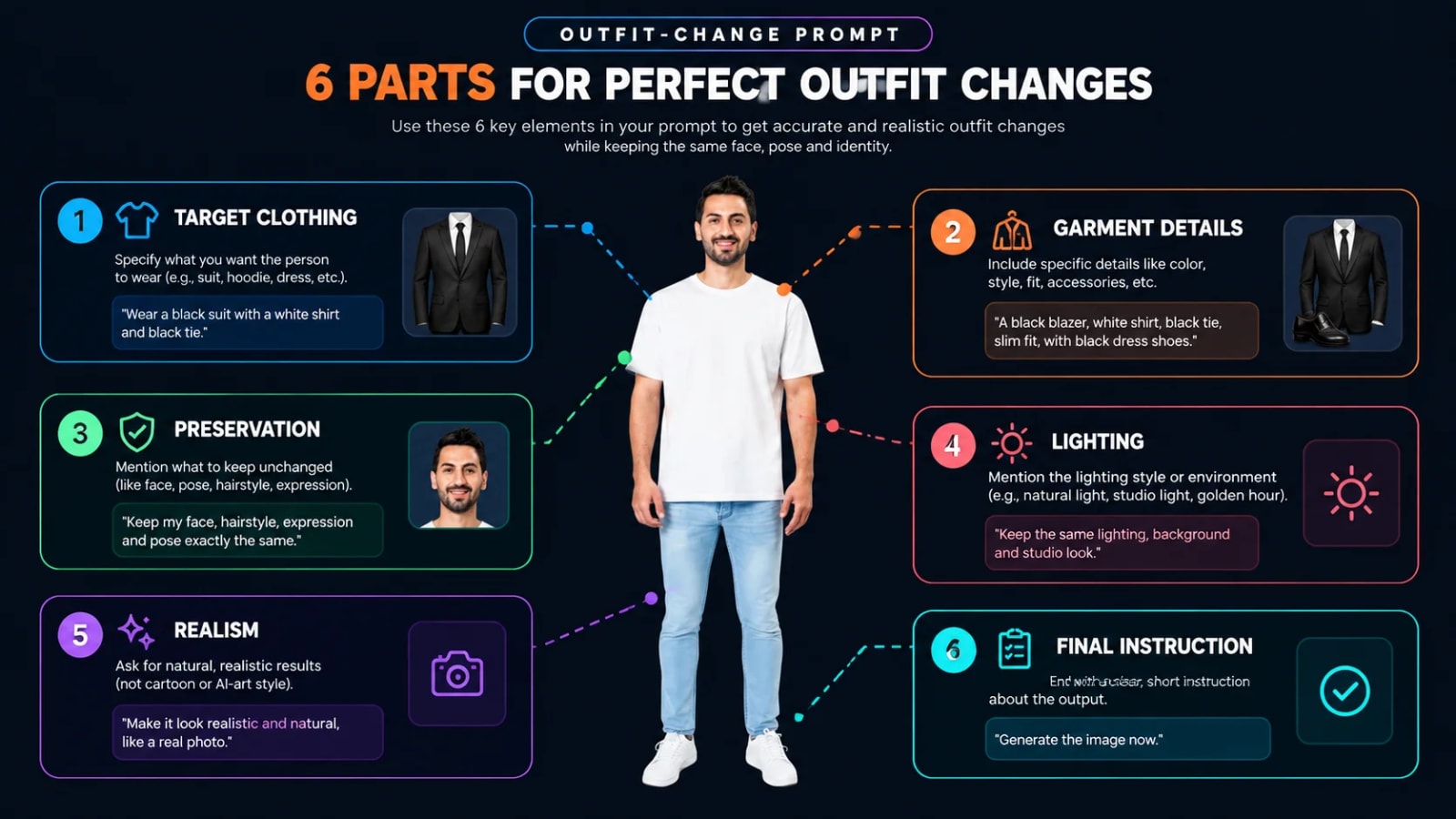
A strong outfit-change prompt combines the requested clothing change with preservation instructions, visual details, and realism requirements. The easiest approach is to build your prompt from several predictable components.
1. Start With the Exact Clothing Change
First, identify what needs to be replaced.
For example:
Replace the current outfit with a tailored charcoal-gray business suit.
This establishes the main transformation without creating unnecessary ambiguity.
2. Describe the New Outfit
Next, describe the garment using details that actually matter.
Include details such as:
Garment type
Color
Material
Cut
Fit
Neckline
Sleeves
Length
Buttons or other visible details
Layering
Fashion style
For example:
Use a fitted charcoal-gray wool blazer, crisp white dress shirt, slim black trousers, and subtle silver buttons.
A clothing description becomes more useful when it specifies how the garment should look, not simply its name.
3. Tell ChatGPT What to Preserve
Then explicitly identify the elements that should not change.
A useful preservation instruction is:
Keep the person's face, facial features, hairstyle, expression, skin tone, body proportions, pose, hands, camera angle, background, and composition unchanged.
This separates the editing target from the rest of the image.
4. Add Realism Instructions
Finally, tell the model how the new clothing should interact with the existing photograph.
For example:
Make the fabric folds, shadows, highlights, texture, and fit physically consistent with the original lighting and body position.
This is especially useful for fitted garments, jackets, dresses, and layered outfits.
A Simple Prompt Formula
You can use this structure for almost any ChatGPT dress change prompt:
Replace [current clothing] with [new garment]. Make the new outfit [color + material + style + fit + specific details]. Preserve [face + hair + expression + pose + body proportions + background + composition]. Match the original [lighting + shadows + perspective + camera angle]. Make the clothing realistic, naturally fitted, and consistent with the person's body and pose.
What Are the Best ChatGPT Photo Dress Change Prompts?
The best ChatGPT photo dress change prompts clearly describe the replacement outfit while preserving the important characteristics of the original photograph. The following examples are designed as reusable templates rather than one-size-fits-all instructions.
1. Casual Outfit Change Prompt
Replace the current outfit with a modern casual outfit consisting of a cream oversized knit sweater, straight-leg blue jeans, and clean white sneakers. Keep the person's face, hairstyle, expression, body proportions, pose, hands, background, camera angle, and lighting unchanged. Make the knit texture, fabric folds, fit, and shadows look completely natural and photorealistic.
2. Formal Dress Change Prompt
Replace the current outfit with an elegant floor-length black evening dress made from premium satin. Use a sophisticated fitted silhouette, subtle draping, and a clean neckline. Preserve the person's face, hairstyle, expression, body proportions, pose, background, composition, and lighting. Make the satin reflections, folds, shadows, and garment fit realistic and consistent with the original photograph.
3. Business Outfit Change Prompt
Change the current clothing into a professional dark navy tailored blazer with a white button-down shirt and matching trousers. Preserve the person's facial features, hairstyle, expression, body proportions, pose, hands, background, and camera angle. Make the suit fabric, seams, folds, shadows, and fit realistic and naturally integrated with the original image.
4. Luxury Fashion Prompt
Replace the existing outfit with a sophisticated high-fashion editorial ensemble featuring a structured black blazer, silk blouse, tailored trousers, and subtle gold accessories. Keep the person's identity, face, hairstyle, expression, pose, body proportions, background, and composition unchanged. Create realistic fabric texture, natural folds, controlled highlights, and lighting consistent with the original photograph.
5. Streetwear Outfit Prompt
Replace the current outfit with contemporary premium streetwear: an oversized black bomber jacket, neutral fitted T-shirt, relaxed cargo trousers, and minimalist sneakers. Preserve the face, hairstyle, expression, body proportions, pose, hands, background, and camera perspective. Ensure realistic garment volume, fabric texture, folds, shadows, and natural interaction with the body.
6. Traditional Outfit Prompt
Replace the current outfit with an elegant traditional outfit featuring a richly textured deep emerald-green fabric, refined embroidery, and a sophisticated traditional silhouette. Preserve the person's facial identity, hairstyle, expression, body proportions, pose, background, lighting, and camera angle. Make the embroidery, fabric texture, folds, and shadows highly realistic.
7. Men's Outfit Change Prompt
Replace the existing clothing with a sophisticated men's outfit consisting of a fitted black blazer, white shirt, tailored trousers, and minimalist leather shoes. Keep the man's face, hairstyle, expression, body proportions, pose, hands, background, and composition unchanged. Make the clothing naturally fitted with realistic wool texture, seams, folds, shadows, and lighting.
8. Women's Outfit Change Prompt
Replace the current outfit with a modern elegant women's fashion look consisting of a tailored beige blazer, satin camisole, high-waisted trousers, and understated accessories. Preserve the woman's face, hairstyle, expression, body proportions, pose, hands, background, and camera angle. Make the fabrics, folds, shadows, and fit photorealistic.
9. Winter Outfit Prompt
Replace the current outfit with a premium winter look featuring a long camel wool coat, cream turtleneck sweater, tailored trousers, and leather boots. Preserve the person's identity, facial features, hairstyle, expression, pose, body proportions, background, and composition. Make the wool texture, layering, folds, shadows, and garment volume realistic.
10. Summer Outfit Prompt
Replace the existing clothing with an elegant lightweight summer outfit consisting of a flowing white linen shirt, neutral tailored trousers, and minimalist sandals. Keep the person's face, hair, expression, body proportions, pose, background, and camera angle unchanged. Make the linen texture, natural wrinkles, lighting, and shadows realistic.
11. Denim Outfit Prompt
Replace the current outfit with a modern denim-on-denim look featuring a fitted medium-blue denim jacket, plain white T-shirt, straight-leg jeans, and clean sneakers. Preserve the person's face, hairstyle, expression, pose, proportions, background, and composition. Make the denim texture, seams, folds, and lighting physically realistic.
12. White Outfit Prompt
Replace the current clothing with a minimalist all-white outfit featuring a structured white blazer, fitted white top, and tailored white trousers. Preserve the person's identity, face, hairstyle, expression, pose, body proportions, background, and original composition. Maintain realistic fabric texture, subtle shadows, natural folds, and accurate lighting so the white garments retain visible detail.
13. Black Outfit Prompt
Replace the current outfit with an elegant monochrome black fashion look featuring a fitted black blazer, black silk top, and tailored black trousers. Keep the face, hairstyle, expression, pose, body proportions, background, camera angle, and lighting unchanged. Preserve realistic fabric separation, texture, folds, highlights, and shadows instead of creating a flat black appearance.
14. Party Outfit Prompt
Replace the current outfit with a sophisticated party look featuring a deep burgundy velvet dress with an elegant fitted silhouette and subtle detailing. Preserve the person's face, hairstyle, expression, body proportions, pose, background, and camera perspective. Match the original lighting and create realistic velvet texture, folds, highlights, and shadows.
15. Instagram Fashion Prompt
Replace the existing outfit with a premium editorial fashion look suitable for an Instagram portrait: a structured cream blazer, elegant black top, tailored trousers, and minimal accessories. Preserve the person's identity, facial features, hairstyle, expression, pose, body proportions, background, and composition. Maintain realistic clothing texture and lighting while keeping the final image polished and photorealistic.
How Can You Change Clothes Without Changing the Face?
You can reduce unwanted facial changes by explicitly instructing ChatGPT to preserve the person's facial features and by limiting the requested edit to the clothing area. ChatGPT's current image editor lets you select part of an image and describe the change, although OpenAI notes that selections are not always perfectly precise and edits can extend beyond the selected area.
For example, select the clothing area and use:
Change only the selected clothing area. Replace the outfit with a tailored navy suit. Do not modify the person's face, facial structure, hairstyle, expression, skin texture, body proportions, pose, hands, background, lighting, or camera angle.
That instruction creates a much narrower editing target.
Moreover, avoid combining an outfit replacement with unrelated requests such as “change my face, make my hair longer, move me to a beach, and change my clothes.” Multiple transformations create more opportunities for unwanted changes.
How Do You Make AI-Generated Clothes Look Realistic?
Realistic AI clothing edits require the replacement garment to match the original photo's lighting, perspective, shadows, folds, texture, and body position. A garment can have the correct color and style but still look artificial if its physical relationship with the person is inconsistent.
For example, a fitted blazer should follow the person's shoulders and torso rather than appearing as a flat texture placed over the body.
Match the Fabric to the Garment
Different materials behave differently.
Material | Useful realism details |
|---|---|
Cotton | Natural wrinkles, soft texture, moderate shadows |
Linen | Visible weave, irregular wrinkles, lightweight folds |
Denim | Structured folds, seams, heavier texture |
Wool | Soft surface, thicker folds, muted highlights |
Silk | Smooth surface, controlled reflections, fluid folds |
Leather | Stronger highlights, structured shape, subtle texture |
Satin | Directional highlights, smooth reflective surface |
Velvet | Deep texture, soft highlights, rich tonal variation |
For example, a silk dress should not have the same rough texture or rigid folds as denim.
Match the Original Lighting
Lighting consistency is essential because clothing inherits the light direction and shadow behavior of the original photograph. If the face is illuminated from the left, the replacement clothing should respond to that same lighting direction.
For example, a portrait with soft window light should not suddenly have hard artificial highlights on the jacket.
OpenAI says ChatGPT Images 2.5 is designed to provide more natural lighting and richer textures while improving preservation of subjects in reference photos.
Match the Pose and Perspective
The replacement garment should follow the person's existing pose, body position, and camera perspective. A jacket designed for a front-facing pose may look distorted if the source photograph shows the person in a three-quarter profile.
For example, specify:
Follow the existing body position and camera perspective exactly; do not alter the person's pose to accommodate the new garment.
What Are the Common Problems With AI Outfit Change Prompts?
Most unsuccessful AI outfit edits come from vague instructions, conflicting requirements, or insufficient control over the editing area. A clear troubleshooting process can help you identify the problem without rewriting the entire prompt.
Problem: The Face Changes
Use:
Preserve the person's exact facial identity, facial structure, hairstyle, expression, and skin texture. Edit only the clothing.
If the interface provides a selection tool, select the clothing region before describing the edit. OpenAI specifically supports selecting part of an image before requesting an edit.
Problem: The Outfit Looks Painted On
Add realistic construction details:
Make the garment physically fitted to the body, with natural seams, folds, fabric tension, shadows, and contact points.
For example, a fitted shirt should follow the torso instead of appearing as a flat color overlay.
Problem: The Background Changes
Use:
Keep the original background, objects, depth of field, composition, and environmental lighting unchanged.
Problem: Hands or Body Proportions Change
Add:
Preserve the original hands, arms, body proportions, posture, and limb positions exactly.
Problem: The Clothing Color Is Wrong
Specify the color more precisely.
Instead of “blue dress,” try:
deep navy blue, approximately #17243A, with a matte finish and subtle tonal variation.
Exact color descriptions can help communicate the intended appearance, although generated images may still vary.
How Do You Edit a Specific Clothing Area in ChatGPT?
You can edit a specific clothing area in ChatGPT by selecting the relevant part of the image and then describing the desired change. OpenAI's current image editor supports selecting an area, describing the edit, changing aspect ratio, and continuing with additional revisions.
For example:
Upload your photo to ChatGPT Images.
Open the image editor.
Select the shirt, jacket, dress, or other clothing area.
Describe the replacement garment.
Tell ChatGPT which visual elements must remain unchanged.
Review the generated result.
Refine one clothing detail at a time.

This workflow is especially useful when the photograph contains multiple people or when you want to modify only one garment.
What Tools Can You Use for ChatGPT Photo Dress Changes?
ChatGPT Images is the primary tool for this workflow because it supports both new image generation and editing of existing uploaded images. OpenAI's current documentation says users can upload an existing image, describe changes, select specific areas, and continue refining the result.
ChatGPT Images
You can use ChatGPT Images to:
Upload an existing portrait.
Change clothing using natural-language instructions.
Select a specific image area.
Make additional revisions.
Change aspect ratios.
Save and share generated images.
OpenAI says ChatGPT Images is available on all ChatGPT tiers, while some advanced image capabilities have plan-specific availability.
Free Image-Editing Alternatives
Other image-editing applications can also be useful when you need manual masking, retouching, or additional control after AI generation. A practical workflow can combine AI generation with conventional editing rather than relying on one tool for every task.
For example, you can use an AI editor for the clothing replacement and then use a conventional graphics editor to make small corrections around edges, accessories, or background elements. If you're exploring different techniques, you can also start with a collection of AI image prompts for creators to find ready-made ideas for your next project.
AQPrompts
AQPrompts can provide reusable AI image prompts for creators who want ready-made starting points rather than writing every prompt from scratch. The library also includes dedicated AI fashion prompts for clothing, portraits, and editorial-style images, while the ChatGPT prompts for photos guide can help with other photo-editing and image-generation ideas.

What Should You Do After Creating a ChatGPT Outfit Change?
The best next step is to refine the clothing edit one element at a time instead of repeatedly replacing the entire outfit. Targeted revisions make it easier to identify what needs improvement.
For example, if the dress is correct but the sleeves look unnatural, ask:
Keep the current outfit unchanged, but make the sleeves anatomically natural and match the existing lighting, fabric folds, and body position.
Then refine another issue only if necessary.
Build Your Own Reusable Prompt Template
Save a base template such as:
Replace the current outfit with [OUTFIT]. Use [COLOR], [MATERIAL], [FIT], and [STYLE DETAILS]. Preserve the person's face, identity, hairstyle, expression, body proportions, pose, hands, background, composition, and camera angle. Match the original lighting, shadows, perspective, and depth of field. Make the new clothing photorealistic, naturally fitted, and physically consistent with the person's body.
You can reuse this structure across different projects and find more copy-paste AI prompts in the AQPrompts prompt library. For portrait-focused projects, realistic AI portrait prompts can also provide useful starting points, while additional AI image prompt ideas can help you experiment with different visual styles.
Experiment With Different Fashion Styles
Try the same base prompt with different clothing categories:
Minimalist fashion
Luxury editorial
Business formal
Casual streetwear
Traditional clothing
Winter fashion
Summer fashion
Evening wear
Denim
Monochrome outfits
If you're creating content specifically for social media, you can also explore AI image prompts for Instagram for more portrait, fashion, and content-creation ideas.
For example, a single portrait can become a business headshot, editorial fashion image, or casual lifestyle portrait without rebuilding the entire visual concept from scratch.
Conclusion
A successful ChatGPT photo dress change prompt tells the image model exactly what clothing to replace and exactly which parts of the original photo should remain unchanged. The strongest prompts combine a precise garment description with instructions for identity preservation, realistic fabric behavior, consistent lighting, natural folds, and accurate perspective.
Moreover, ChatGPT's current image-editing workflow lets you upload an existing image, select a specific area, describe the desired change, and continue refining the result. If you want to explore similar editing techniques, you can also find more ChatGPT photo editing prompts for different types of image transformations.
The key is not simply writing a longer prompt. The key is writing a more specific prompt. Start with one of the templates in this guide, replace the outfit details with your desired style, and refine individual elements until the clothing looks naturally integrated with the original photograph.
Once you're comfortable with outfit editing, you can experiment with ChatGPT image generation prompts for creating new visual concepts from scratch. For social-media portraits and vertical compositions, 4:5 AI image prompts can also help you build images specifically suited to Instagram-style formats.
Written by The AQPrompts Team — AI prompt researchers and content creators focused on practical AI image-generation and prompting workflows.
Reviewed by Abdul Qudoos — reviewed for AI image-generation accuracy, practical prompting guidance, and current ChatGPT image-editing capabilities.
Disclaimer: This article was initially drafted using AI assistance. However, the content has undergone thorough revisions, editing, and fact-checking by human editors and subject matter experts to ensure accuracy.
Learn how we review our guides →
Topics:
Abdul Qudoos creates and reviews AQPrompts guides and prompt-library content for creators using AI image tools.
