
ChatGPT Photo Editing Prompts for Girls

ChatGPT Photo Editing Prompts for Girls: 50+ Creative Ideas for Stunning Photos
Summarize this blog post with: ChatGPT | Perplexity | Claude| Grok
You've probably already tried asking ChatGPT to make your photo look better, but a simple request like “make this photo aesthetic” can produce unpredictable results. The right prompt gives ChatGPT clearer visual direction, and in this guide, you'll find 50+ copy-and-paste ChatGPT photo editing prompts for natural portraits, cinematic looks, backgrounds, outfits, selfies, social-media photos, and more.
Key Takeaways
ChatGPT photo editing prompts are natural-language instructions that tell ChatGPT how to modify, enhance, or restyle an uploaded image.
Effective prompts specify the desired edit, visual style, lighting, environment, and elements that should remain unchanged.
Photo-editing prompts can be adapted for portraits, backgrounds, outfits, lighting, color grading, cinematic effects, vintage styles, and social-media images.
Natural-looking edits require realistic skin texture, consistent lighting, accurate proportions, and preservation of important facial features.
Prompt customization lets you control colors, locations, moods, compositions, photography styles, and other visual attributes.
Iterative editing works well because you can make one targeted change at a time instead of rewriting the entire request.
Responsible photo editing should respect consent, privacy, identity, and age-appropriate boundaries, especially when editing images of minors.
What Are ChatGPT Photo Editing Prompts for Girls?
ChatGPT photo editing prompts are natural-language instructions that tell ChatGPT how to modify, enhance, or restyle an uploaded image while specifying which visual elements should remain unchanged. These prompts can describe changes to lighting, backgrounds, colors, composition, clothing, atmosphere, and photographic style.
For example, instead of writing “edit my picture,” you can write: “Improve the lighting in this portrait, keep my facial features unchanged, create soft golden-hour illumination, preserve natural skin texture, and use a subtle warm color grade.”
Clear prompts give an image editor more useful visual constraints. You can tell it what to change and what to preserve, which makes your request more precise than a vague instruction.
What Can You Edit With ChatGPT?
ChatGPT photo editing prompts can describe many visual adjustments, including portrait enhancement, background changes, lighting effects, color grading, and artistic styles. The exact capabilities and results depend on the image tools and features available in your ChatGPT experience.
For example, you can request a clean studio background, a sunset atmosphere, a vintage film effect, or a more polished social-media composition.
Common editing directions include:
Portrait enhancement: Improve lighting, contrast, and composition.
Background replacement: Move the subject into a studio, beach, café, garden, or city environment.
Color grading: Create warm, cool, muted, pastel, or cinematic colors.
Lighting: Add soft window light, golden-hour illumination, or dramatic shadows.
Style changes: Create editorial, vintage, cinematic, minimalist, or dreamy aesthetics.
Composition: Request a tighter crop, centered framing, or portrait-oriented composition.
For more prompt-writing fundamentals, check out our complete guide on how to write effective AI prompts to master the core principles of structuring AI instructions
Why Are ChatGPT Photo Editing Prompts Important?
ChatGPT photo editing prompts are important because specific instructions make your intended visual changes easier to communicate. A detailed prompt can distinguish between “make me look better” and a controlled request such as “improve the exposure, preserve my facial features, soften harsh shadows, and maintain realistic skin texture.”
For example, a portrait that looks too dark can be improved with a prompt focused specifically on exposure and shadows instead of asking ChatGPT to completely redesign the photograph.
Good prompts also help you preserve the parts of an image that already work well. Instead of requesting a complete transformation, you can explicitly say which facial features, hairstyle, pose, clothing, or background elements should remain unchanged.
Why Specific Prompts Produce Better Creative Directions
Specific prompts give you more control over the intended mood, appearance, and composition of an edit. A prompt containing lighting + environment + style + preservation instructions gives considerably more direction than a single adjective such as “beautiful.”
For example, compare these two requests:
Basic: “Make this photo aesthetic.”
Detailed: “Give this portrait a soft editorial aesthetic with natural window lighting, warm neutral colors, subtle contrast, realistic skin texture, and a clean beige background. Preserve the person's facial features and hairstyle.”
The second prompt establishes a visual target rather than leaving the entire interpretation open.
How Do You Write Effective ChatGPT Photo Editing Prompts?
An effective ChatGPT photo editing prompt describes the subject, desired changes, visual style, environment, lighting, and elements that should remain unchanged. You do not need complicated prompt-engineering terminology to create useful instructions.
For example, a reusable structure is:
“Edit this photo by [desired change]. Keep [features to preserve] unchanged. Use [lighting/style], [color palette], and [environment]. Make the final image look [realistic/aesthetic/cinematic/natural].”
This structure works because each part answers a different visual question.
1. Start With the Main Editing Goal
The main editing goal should appear early in the prompt. Tell ChatGPT whether you want to enhance, replace, recolor, restyle, crop, or transform something.
Examples:
“Enhance the lighting in this portrait.”
“Replace the background with a modern studio.”
“Give this image a soft vintage-film appearance.”
“Improve the composition while preserving the subject.”
“Create a cinematic nighttime atmosphere.”
2. Specify What Must Stay Unchanged
Preservation instructions are useful when you want an edit rather than a complete transformation. Tell the editor which important characteristics should remain consistent.
For example:
“Preserve the person's facial features, hairstyle, pose, and overall identity. Only change the background and lighting.”
This approach is particularly useful when editing personal photographs where authenticity matters.
3. Describe Lighting, Colors, and Mood
Lighting and color descriptions strongly influence the visual direction of a photo edit. Words such as soft daylight, warm golden hour, cool blue tones, muted neutrals, and high-contrast cinematic lighting communicate different aesthetics.
For example:
Desired Look | Useful Prompt Direction |
Soft | Diffused natural light, gentle shadows |
Cinematic | Dramatic directional light, controlled contrast |
Vintage | Muted colors, subtle grain, warm film tones |
Editorial | Clean lighting, refined composition |
Dreamy | Soft highlights, pastel colors, gentle glow |
Minimalist | Neutral palette, uncluttered background |
4. Add Realism Instructions
Realism instructions can help prevent overly artificial-looking results. Ask for natural skin texture, realistic shadows, consistent lighting, and believable proportions when those qualities matter.
For example:
“Keep the skin texture realistic and natural, avoid excessive smoothing, and make the lighting consistent with the environment.”
You can also find more ideas through an internal resource such as our curated collection of photorealistic AI image prompts to achieve lifelike skin textures and camera details.
What Are the Best ChatGPT Photo Editing Prompts for Girls?
The best ChatGPT photo editing prompts are specific enough to control the visual result while remaining flexible enough for personalization. The following prompts are designed as starting points that you can adapt to your own photographs.
Natural Portrait Enhancement Prompts
Natural portrait prompts focus on improving presentation without making the person look artificial. They are ideal when you want a polished photograph while preserving the original character of the image.
Prompt 1 — Natural Enhancement
“Enhance this portrait with balanced natural lighting, realistic skin texture, subtle contrast, and improved clarity. Preserve the person's facial features, hairstyle, expression, and identity. Keep the final result natural and photorealistic.”
Prompt 2 — Soft Portrait
“Turn this into a soft professional portrait using diffused natural light, gentle shadows, warm neutral tones, and a clean background. Preserve the original facial features and realistic skin texture.”
Prompt 3 — Professional Headshot
“Transform this photo into a polished professional headshot. Use soft studio lighting, a simple neutral background, realistic skin texture, natural colors, and balanced contrast. Preserve the person's identity and facial proportions.”
Prompt 4 — Clean Beauty Portrait
“Improve this portrait with clean lighting, subtle color correction, realistic skin texture, and refined composition. Avoid excessive retouching and preserve natural facial details.”
Aesthetic Instagram Photo Prompts
Instagram-style prompts work best when they define an overall visual mood rather than relying on the word “aesthetic” alone. Specify the palette, lighting, environment, and composition to create a recognizable look.
Prompt 5 — Soft Instagram Aesthetic
“Give this photo a soft Instagram aesthetic with warm natural light, muted pastel colors, subtle contrast, clean composition, and realistic skin texture. Keep the image elegant and natural.”
Prompt 6 — Minimalist Aesthetic
“Create a minimalist editorial aesthetic using neutral beige and cream tones, soft window lighting, a clean background, subtle shadows, and refined composition. Preserve the person's natural appearance.”
Prompt 7 — Pink Aesthetic
“Give this portrait a sophisticated pink aesthetic with soft blush tones, gentle lighting, subtle pink accents, and a clean modern background. Keep the person's skin tone realistic and preserve facial features.”
Prompt 8 — Pinterest-Inspired Look
“Create a polished editorial photo with a soft Pinterest-inspired aesthetic, warm neutral colors, natural window light, subtle film grain, and an uncluttered background. Keep the person recognizable and realistic.”
For additional social-media ideas, check out our dedicated guide on Instagram AI photo prompts to create trending, aesthetic, and portrait-focused visuals for your feed.
What Are the Best Cinematic ChatGPT Photo Editing Prompts?
Cinematic photo prompts create a movie-like appearance by combining controlled lighting, color grading, atmosphere, and composition. The strongest prompts describe the scene rather than simply asking for a “cinematic” effect.
Cinematic Portrait Prompt
“Transform this portrait into a cinematic photograph with dramatic but realistic directional lighting, warm highlights, cool shadows, subtle film grain, shallow depth of field, and sophisticated color grading. Preserve the person's facial features, expression, hairstyle, and identity.”
Golden-Hour Cinematic Prompt
“Create a cinematic golden-hour portrait with warm sunlight, soft rim lighting, natural lens flare, gentle shadows, and rich but realistic colors. Preserve the original face, hairstyle, clothing, and overall identity.”
Night Cinematic Prompt
“Turn this image into a cinematic nighttime portrait with realistic city lights, subtle blue ambient lighting, warm highlights from nearby lights, natural shadows, and a shallow depth of field. Keep the person's identity and facial features unchanged.”
Moody Editorial Prompt
“Give this portrait a sophisticated moody editorial appearance with directional studio lighting, deep but detailed shadows, muted colors, subtle texture, and professional composition. Keep the face natural and recognizable.”
Cinematic editing works best when lighting and color are described together. For example, cool shadows + warm highlights + directional light creates a more specific visual direction than simply saying “make it cinematic.”
How Can You Change a Photo Background With ChatGPT?
Background-editing prompts tell ChatGPT which environment to create while explaining how the new background should interact with the existing subject. The most useful prompts also specify matching lighting, perspective, and shadows.
Beach Background
“Replace the background with a realistic tropical beach at golden hour. Match the lighting on the person to the warm sunset environment, add natural shadows, and preserve the person's face, hairstyle, clothing, pose, and proportions.”
Luxury Café Background
“Place the subject inside an elegant modern café with warm ambient lighting, neutral interior colors, realistic depth of field, and subtle background blur. Match the subject's lighting to the café environment and preserve the person's identity.”
Flower Garden Background
“Replace the background with a realistic spring flower garden filled with soft pink, white, and lavender flowers. Use natural daylight and shallow depth of field while keeping the subject's face, clothing, pose, and proportions unchanged.”
Modern Studio Background
“Replace the current background with a clean professional photography studio featuring a warm beige backdrop and softbox lighting. Keep the subject realistic and preserve the original facial features, hairstyle, pose, and clothing.”
Background replacement looks more convincing when the new environment shares matching light direction and shadows. An internal guide such as our full list of AI photo editing tips can offer additional techniques.
What Are the Best ChatGPT Prompts for Selfies?
Selfie-editing prompts should improve lighting, framing, and image quality while preserving the natural characteristics of the face. Avoid vague instructions that encourage excessive retouching.
Soft Selfie Enhancement
“Enhance this selfie with natural soft lighting, improved exposure, subtle contrast, realistic skin texture, and cleaner background details. Preserve my facial features, expression, hairstyle, and natural appearance.”
Outdoor Selfie
“Improve this outdoor selfie using balanced daylight, natural colors, subtle background blur, and realistic skin texture. Keep my facial features and expression unchanged.”
Mirror Selfie
“Give this mirror selfie a polished editorial appearance with improved lighting, balanced colors, a clean environment, and subtle contrast. Preserve the original pose, clothing, face, hairstyle, and realistic proportions.”
Low-Light Selfie
“Improve this low-light selfie by reducing distracting noise, balancing exposure, and adding soft realistic illumination. Preserve natural skin texture, facial details, and the original mood.”
Natural selfie editing prioritizes believable improvements over dramatic facial transformation. This makes the result more suitable for profile pictures, personal albums, and social-media posts.
What Are the Best Outfit and Style Editing Prompts?
Outfit-editing prompts work best when they describe the desired clothing style while preserving the subject's pose, identity, and overall composition. For personal photos, use edits that are appropriate, consensual, and consistent with the original context.
Casual Outfit
“Change the outfit to a stylish casual look featuring a clean white top, relaxed blue jeans, and simple sneakers. Preserve the person's face, hairstyle, pose, body proportions, background, and natural lighting.”
Formal Outfit
“Replace the current outfit with an elegant formal outfit in a sophisticated neutral color palette. Keep the person's facial features, hairstyle, pose, proportions, and background unchanged.”
Streetwear Style
“Give the subject a modern streetwear outfit with an oversized jacket, relaxed trousers, and clean sneakers. Preserve the face, hairstyle, pose, body proportions, and realistic lighting.”
Editorial Fashion
“Transform the clothing into a polished editorial fashion look with sophisticated neutral tones and refined styling. Maintain realistic fabric texture, natural proportions, the original face, and the existing pose.”
Outfit prompts should describe clothing rather than requesting changes to a person's body. This keeps the editing goal focused on styling while producing more useful and respectful results.
Which ChatGPT Photo Editing Prompts Create Vintage and Retro Looks?
Vintage photo prompts use film-inspired colors, grain, contrast, lighting, and composition to recreate the character of older photography. Different combinations create different eras and moods.
Vintage Film
“Give this portrait a classic 35mm film aesthetic with subtle grain, slightly faded colors, warm highlights, gentle contrast, and natural skin tones. Preserve the person's facial features and original composition.”
1990s-Inspired Photo
“Create a tasteful 1990s-inspired photography aesthetic with soft flash, slightly muted colors, subtle film grain, natural imperfections, and realistic lighting. Preserve the subject's identity and proportions.”
Polaroid Style
“Transform this image into a realistic instant-film photograph with soft colors, subtle grain, slightly faded highlights, natural contrast, and an authentic instant-camera feel.”
Black-and-White Portrait
“Convert this portrait into a sophisticated black-and-white photograph with rich tonal range, controlled highlights, detailed shadows, and natural skin texture. Preserve the person's facial features and expression.”
Vintage effects become more convincing when imperfections are subtle. Excessive grain, artificial scratches, or extreme color shifts can make an edit look like a digital filter rather than a photograph.
How Can You Make ChatGPT Photo Edits Look More Natural?
Natural-looking AI photo edits require realistic skin texture, consistent lighting, accurate proportions, believable shadows, and preservation of important facial characteristics. A prompt should explicitly request these qualities when realism is important.
For example:
“Keep the skin texture realistic, preserve natural facial details, maintain accurate proportions, and ensure the lighting and shadows are consistent with the environment.”
Use Preservation Instructions
Preservation instructions tell the editor what not to change. Useful phrases include:
“Preserve the original facial features.”
“Keep the hairstyle unchanged.”
“Maintain the original pose.”
“Keep natural skin texture.”
“Preserve realistic body proportions.”
“Do not over-smooth the skin.”
“Keep the lighting physically consistent.”
Avoid Over-Retouching
Over-retouching removes natural details that make photographs believable. For example, replacing normal skin texture with completely smooth skin can make a portrait appear artificial.
A better instruction is:
“Retouch minor distractions subtly while preserving realistic pores, natural texture, facial details, and the person's original appearance.”
What Are the Best ChatGPT Photo Editing Prompts for Different Moods?
Mood-based prompts create a consistent emotional atmosphere by combining color, lighting, environment, and composition. The following examples give you quick starting points.
Mood | Copy-and-Paste Prompt Direction |
Dreamy | Soft light, pastel colors, gentle glow, shallow depth of field |
Confident | Clean composition, strong directional lighting, refined colors |
Calm | Soft daylight, neutral palette, minimal background |
Romantic | Warm light, subtle pink tones, soft background |
Mysterious | Low-key lighting, deep shadows, cool tones |
Energetic | Bright colors, dynamic composition, crisp lighting |
Elegant | Neutral palette, refined lighting, sophisticated composition |
Cozy | Warm ambient light, soft textures, comfortable environment |
Dreamy Portrait Prompt
“Create a dreamy portrait using soft diffused lighting, pastel colors, subtle highlights, shallow depth of field, and a gentle atmospheric glow. Keep the face realistic and preserve the original identity.”
Elegant Portrait Prompt
“Give this image an elegant editorial style using sophisticated neutral colors, soft studio lighting, refined composition, and subtle contrast. Preserve natural facial features and realistic skin texture.”
Cozy Portrait Prompt
“Create a warm cozy atmosphere with soft indoor lighting, neutral textures, warm beige and cream colors, and a subtle background blur. Keep the subject natural and recognizable.”
What Tools Can You Use to Create and Refine AI Photo Edits?
ChatGPT can serve as the primary workspace for prompt-based image editing when image features are available in your account, while other image editors can complement it for specialized adjustments. The best workflow depends on whether you need conversational editing, detailed manual retouching, graphic design, or final export control.
For example, you can start with a ChatGPT edit, evaluate the result, and then use a dedicated editor for precise cropping, typography, or final color adjustments.
A Simple ChatGPT Editing Workflow
A practical workflow uses an original image, a focused prompt, and iterative refinement. Follow these steps:
Upload the image you want to edit.
Describe one primary editing goal clearly.
List the features that must remain unchanged.
Specify the desired lighting, colors, and style.
Review the result for unwanted changes.
Give one targeted follow-up instruction.
Repeat until the image matches your intended direction.
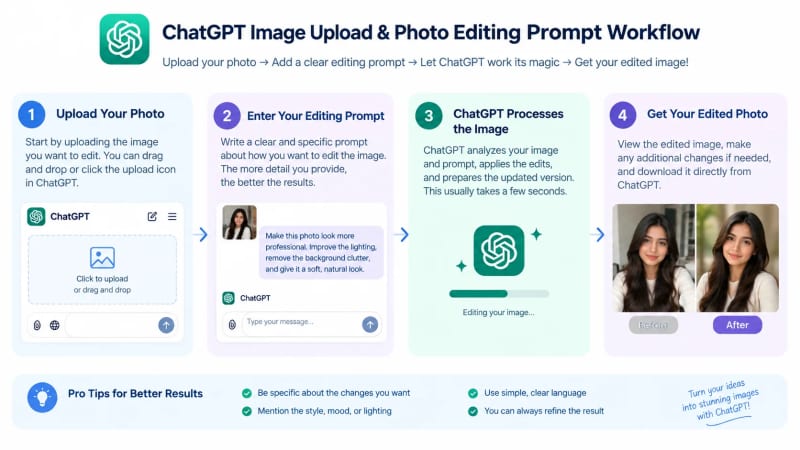
Iterative prompting is often more controllable than placing unrelated edits into one enormous instruction. For example, first fix the lighting, then refine the background, and finally adjust the color grade.
Useful Supporting Tools
Dedicated image editors can complement conversational AI when you need precise manual control. Depending on your workflow, you might use tools such as Adobe Photoshop, Canva, or other image-editing applications alongside ChatGPT.

Free or accessible editing tools can also handle straightforward tasks such as cropping, resizing, brightness adjustments, and basic color correction. Using multiple tools can be useful when the final image needs exact dimensions or additional manual refinement.
Free or accessible editing tools can also handle straightforward tasks like cropping, resizing, brightness adjustments, and basic color correction. If you want to compare different software options, check out our full breakdown of AI image editing tools to find the right editor for your workflow.
A Reusable Master Prompt
A reusable master prompt lets you create customized edits without starting from zero. Replace the bracketed sections with your own requirements:
“Edit this photo to create a [style] image with [lighting] and [color palette]. Change [specific element] while preserving [features to preserve]. Use [background/environment] and [composition]. Keep the result realistic, natural, and visually consistent. Avoid [unwanted effects].”

What's Next? How Can You Improve Your ChatGPT Photo Editing Prompts?
The next step is to test one prompt, identify the biggest problem in the result, and make one targeted refinement. You do not need to rewrite the entire prompt after every generation.
For example, if the background looks good but the lighting is too harsh, your next instruction can simply say:
“Keep the current composition and background, but soften the lighting and reduce the harsh facial shadows while preserving natural skin texture.”
Focused follow-up prompts make it easier to understand which instruction changed the result. This approach also lets you build a personal library of prompts that work well for your preferred photography style.
Build Your Own Prompt Library
A personal prompt library turns successful experiments into reusable editing templates. Save prompts under categories such as:
Portrait enhancement
Selfie editing
Background replacement
Cinematic photography
Vintage photography
Instagram aesthetics
Outfit styling
Lighting correction
Color grading
Professional headshots
For more reusable ideas, explore our complete library of ChatGPT prompt templates to quickly copy, paste, and customize prompts for your photo editing tasks.
Review Every Edit Before Sharing
Human review remains important because AI-generated edits can introduce unintended changes. Check the face, hands, clothing, background, shadows, proportions, and small visual details before publishing or sharing an edited image.
For example, an apparently successful background replacement may contain inconsistent shadows or lighting that becomes obvious when viewed at full resolution.
Responsible editing also means obtaining appropriate permission when you edit or publish someone else's photograph. Avoid deceptive, non-consensual, sexualized, or harmful edits, particularly when images involve minors.
Conclusion
ChatGPT photo editing prompts give you a practical way to communicate specific visual changes using ordinary language. The strongest prompts describe the desired edit, lighting, colors, environment, style, and preservation requirements instead of relying on vague instructions.
Natural-looking edits depend on clear constraints and thoughtful refinement. Whether you want a cinematic portrait, soft Instagram aesthetic, vintage photograph, professional headshot, new background, or polished selfie, start with one focused prompt and improve the result step by step.
The best prompt is not necessarily the longest prompt; it is the prompt that clearly communicates the intended result. Save the prompts that work for you, customize them for different photographs, and build your own collection of reliable AI photo-editing instructions.
Written by The AQPrompts Team — AI prompt researchers and content creators focused on practical AI image-generation and prompting workflows.
Reviewed by Abdul Qudoos — reviewed for AI image-generation accuracy, practical prompting guidance, and current ChatGPT image-editing capabilities.
Disclaimer: This article was initially drafted using AI assistance. However, the content has undergone thorough revisions, editing, and fact-checking by human editors and subject matter experts to ensure accuracy.
Learn how we review our guides →
Topics:
Abdul Qudoos creates and reviews AQPrompts guides and prompt-library content for creators using AI image tools.
