6 Professional Business Portrait AI Prompts
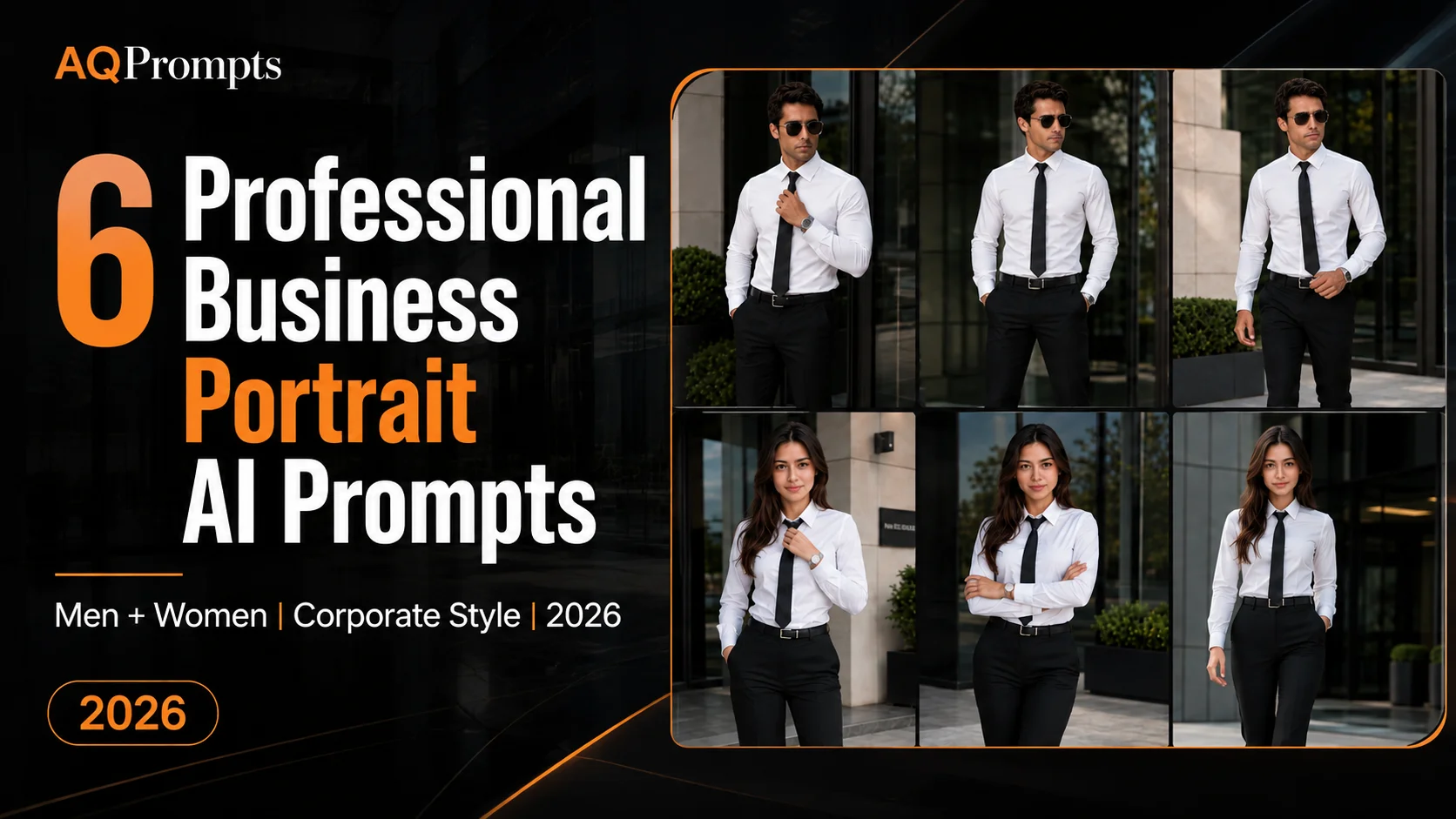
These six professional business portrait AI prompts cover three businessman poses and three businesswoman poses in a coordinated corporate style. The scenes use white shirts, black ties, tailored trousers, modern office architecture, and clear standing or walking actions.
The intent is practical corporate imagery: professional business portraits, personal-brand concepts, and compositions that can be tightened into executive headshots. For more theatrical CEO, hotel, vehicle, and luxury-office scenes, use the luxury businessman prompt guide. For clothing-led menswear concepts, see the AI portrait prompts for men.
The prompts cover adjusting a tie, standing with hands in pockets, folded arms, and walking toward the camera. When the selected tool supports reference images, a permitted photo can provide identity guidance, but it cannot guarantee an exact match across the series.
These prompts can be adapted for AI image generators that support reference images and detailed natural-language instructions. Results vary by tool, model, version, settings, seed, and reference input.
What These Professional Business Portraits Keep Consistent
Instead of changing the outfit, environment, and styling in every image, this series keeps the visual direction consistent.
The male prompts use:
- Crisp fitted white dress shirt
- Slim matte-black necktie
- Tailored black trousers
- Simple black leather belt
- Polished black Oxford shoes
- Silver wristwatch
- Black aviator sunglasses
The female prompts follow a similar corporate aesthetic using:
- Fitted white dress shirt
- Slim black necktie
- High-waisted tailored black trousers
- Slim black leather belt
- Polished black formal shoes
- Silver wristwatch
Keeping these elements consistent can help create a more cohesive business portrait collection.
Prompt 1: Businessman Adjusting His Tie
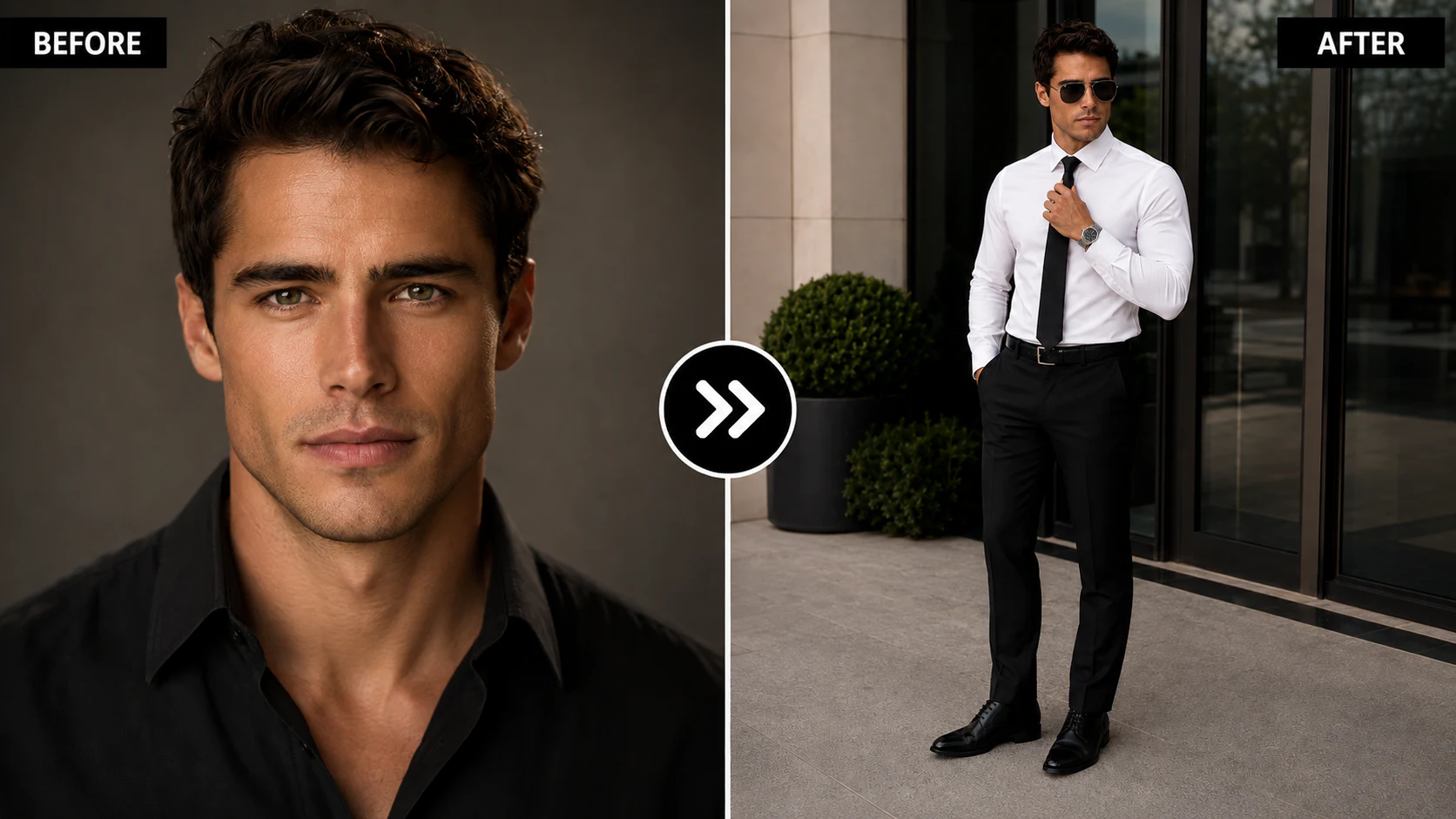
This first prompt creates a confident full-body executive portrait with a subtle tie-adjusting gesture.
The pose works well because one hand stays relaxed inside the trouser pocket while the other interacts with the tie. This gives the subject something natural to do instead of simply standing with both arms hanging beside the body.
Copy-Paste Prompt
Use the uploaded photo only as a permitted facial identity reference. Use the person’s recognizable facial characteristics, natural skin tone, apparent adult age, facial proportions, hairstyle, and facial-hair pattern as guidance. Do not intentionally redesign the person, but expect some variation from the selected tool.

Create a photorealistic full-body professional businessman portrait of the same adult man standing outside a modern corporate building.

Dress him in the same outfit throughout the series: crisp fitted white long-sleeve dress shirt, slim matte-black necktie, tailored black trousers, simple black leather belt with silver buckle, polished black Oxford shoes, and a silver metal wristwatch. No blazer.

Pose him standing straight and confidently with one hand inside his trouser pocket while the other hand gently adjusts the center of his black tie. His head is turned slightly to one side with a calm, serious executive expression.

Add black aviator sunglasses. Use dark reflective glass doors, modern architecture, and subtle greenery in the background. Soft natural daylight, corporate editorial photography, realistic skin and clothing textures, full body visible from head to shoes.

Aspect ratio: 4:5 vertical.
Why This Pose Works
Adjusting the tie adds a small sense of movement without turning the portrait into an action photograph. The gesture can help create a composed executive look suitable for professional profile concepts, entrepreneur branding, corporate social media posts, business campaign concepts, and personal-brand portfolios.
Prompt 2: Businessman with Both Hands in Pockets
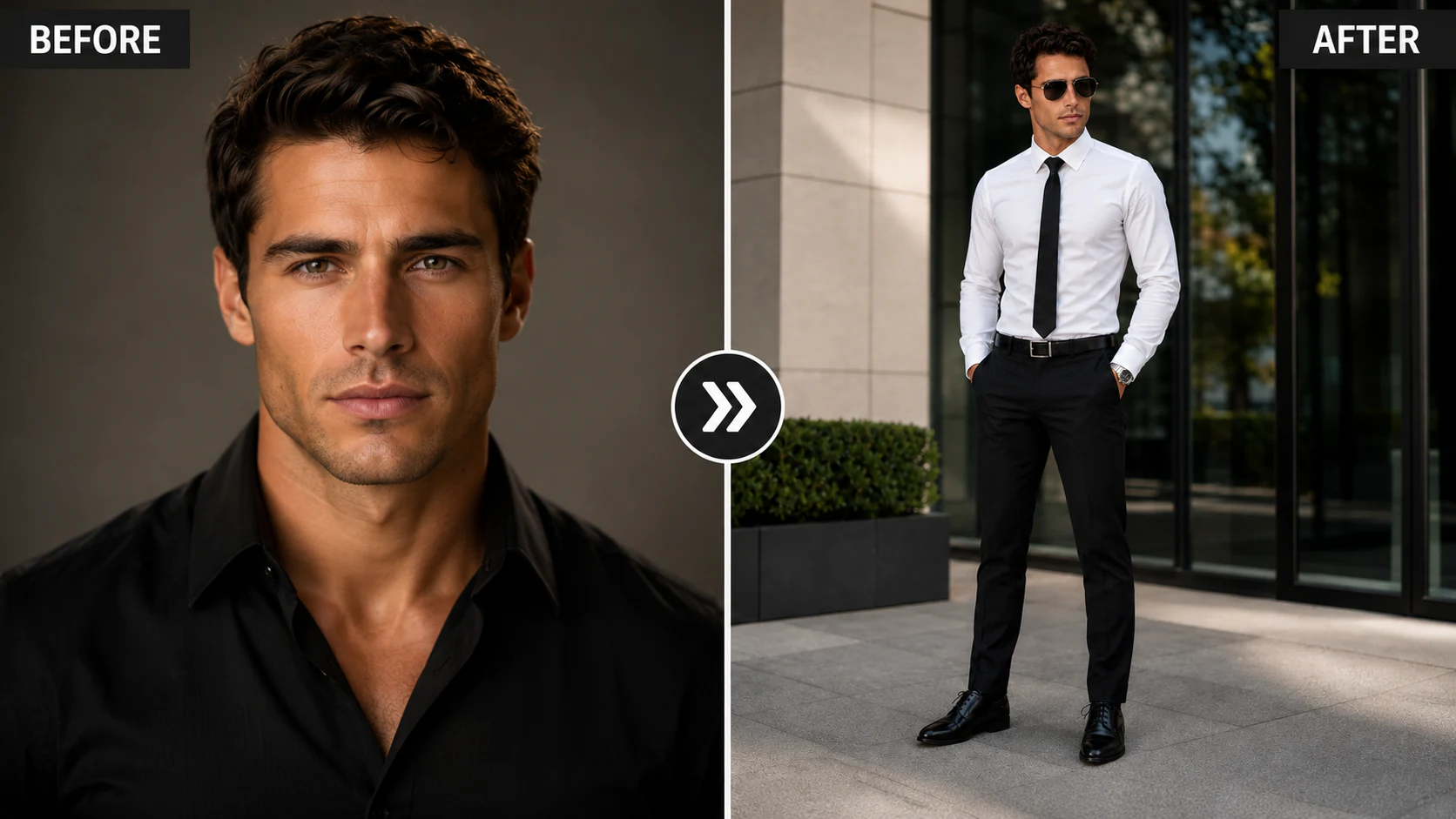
This variation creates a calmer and more relaxed corporate pose. Both hands remain inside the trouser pockets while the shoulders stay relaxed and the legs are positioned slightly apart.
Copy-Paste Prompt
Use the uploaded photo only as a permitted facial identity reference. Use the same recognizable features as guidance without promising an exact match or a fixed result.

Create a photorealistic business portrait of the same adult man wearing the same white dress shirt, black necktie, black tailored trousers, black belt, polished black shoes, and silver wristwatch.

Show his full body outside a modern office building. Pose him with both hands casually inside his trouser pockets, shoulders relaxed, legs slightly apart, and body facing the camera. His head is turned gently toward the left side of the frame with a composed, confident expression.

Keep the shirt sleeves fully down and buttoned. Add sleek black aviator sunglasses.

Use large reflective glass windows and minimalist architecture behind him with soft natural daylight and slight background blur. Keep body proportions, clothing, architecture, and full-body framing realistic.

Aspect ratio: 4:5 vertical.
When to Use This Prompt
This is a useful variation when you want the portrait to feel less formal than the tie-adjusting pose while retaining the same clothing and environment. Try keeping the camera around chest or eye level to avoid exaggerated body proportions.
Prompt 3: Businessman Walking Toward the Camera
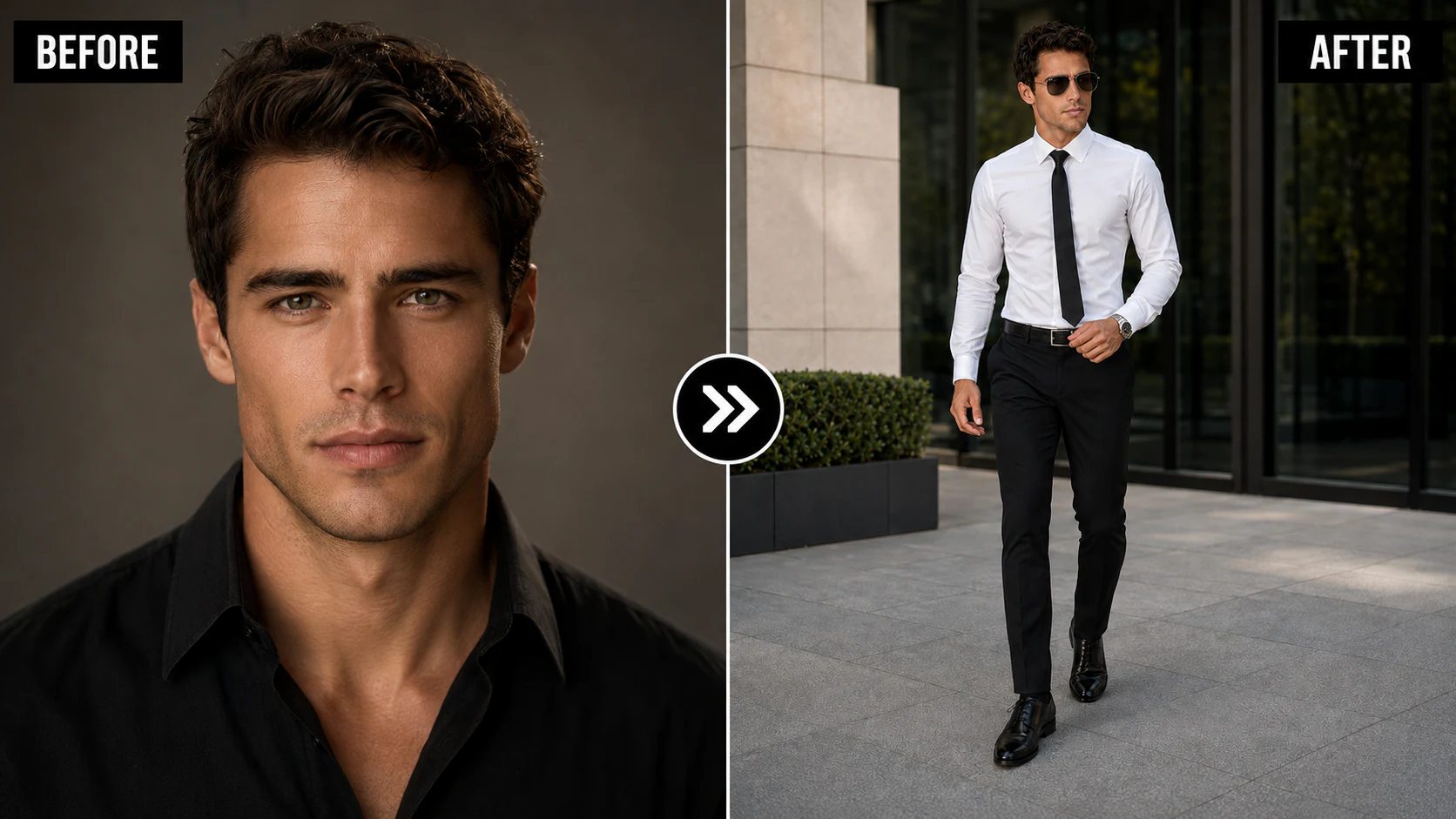
Standing poses are useful, but adding movement can make a corporate image collection feel more editorial. This prompt asks the subject to walk naturally toward the camera while maintaining the same outfit and overall business direction.
Copy-Paste Prompt
Use the uploaded photo only as a permitted facial identity reference. Use the adult subject’s recognizable appearance as guidance and review the output for identity drift.

Create a photorealistic full-body corporate fashion photograph of the same adult man in the same crisp white shirt, slim black tie, tailored black trousers, black leather belt, polished black dress shoes, and silver wristwatch.

Capture him walking confidently toward the camera, with one foot naturally ahead of the other. One arm swings naturally beside his body while the other hand lightly touches the front of his belt or trouser pocket.

His head is turned slightly away from the camera with a confident, sophisticated expression. Add black aviator sunglasses.

Set the scene outside a contemporary corporate building with dark glass walls and modern architecture. Soft diffused daylight, realistic walking anatomy, sharp face, natural body proportions, and editorial photography.

Aspect ratio: 4:5 vertical.
Tip for Better Walking Poses
Walking anatomy can sometimes be difficult for image-generation models. If the result looks unnatural, simplify the movement by specifying:
- One foot only slightly ahead
- Natural shoulder position
- Relaxed arms
- No exaggerated stride
- Full shoes visible
- Realistic leg spacing
This can help reduce stiff or distorted walking poses.
Prompt 4: Businesswoman Adjusting Her Tie
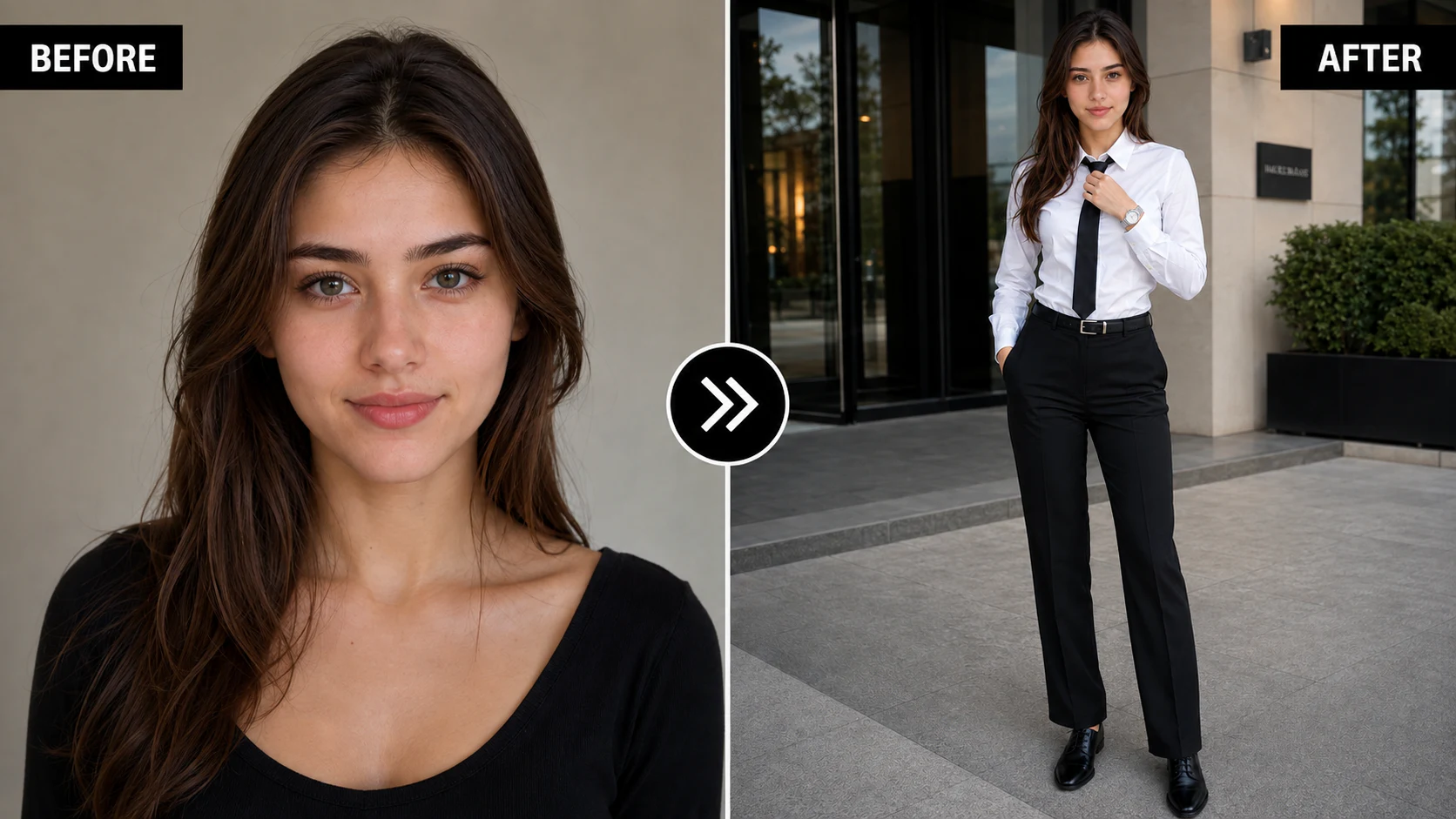
The first female prompt follows the same visual concept as the male tie-adjusting portrait while changing the tailoring and overall body language. The goal is an elegant but professional corporate fashion image.
Copy-Paste Prompt
Use the uploaded photo only as a permitted facial identity reference. Use the adult woman’s recognizable facial characteristics, natural skin tone, apparent age, facial proportions, and hairstyle as guidance. Do not intentionally redesign the person, but expect some variation from the selected tool.

Create a photorealistic full-body professional business-fashion portrait of the same adult woman standing outside a modern office building.

Dress her in the same formal outfit throughout the female series: fitted crisp white long-sleeve dress shirt, slim matte-black necktie, elegant high-waisted black tailored trousers, slim black leather belt with a minimal silver buckle, polished black formal shoes, and a refined silver wristwatch. No blazer.

Style her hair neatly and naturally while retaining her recognizable appearance where supported.

Pose her with one hand casually inside her trouser pocket while the other hand gently adjusts her black tie near the chest. Her body faces slightly toward the camera and her head turns subtly to one side with a calm, confident, elegant expression.

Use modern reflective glass architecture and subtle greenery. Soft natural daylight, editorial photography, realistic skin texture, and full-body framing from head to shoes.

Aspect ratio: 4:5 vertical.
Why the Outfit Consistency Matters
If you are creating several images of the same person, changing too many wardrobe details can make the series feel disconnected. Keeping the shirt, tie, trousers, watch, belt, and shoes consistent gives the AI clearer visual instructions and creates a stronger campaign-style appearance.
Prompt 5: Businesswoman with Folded Arms
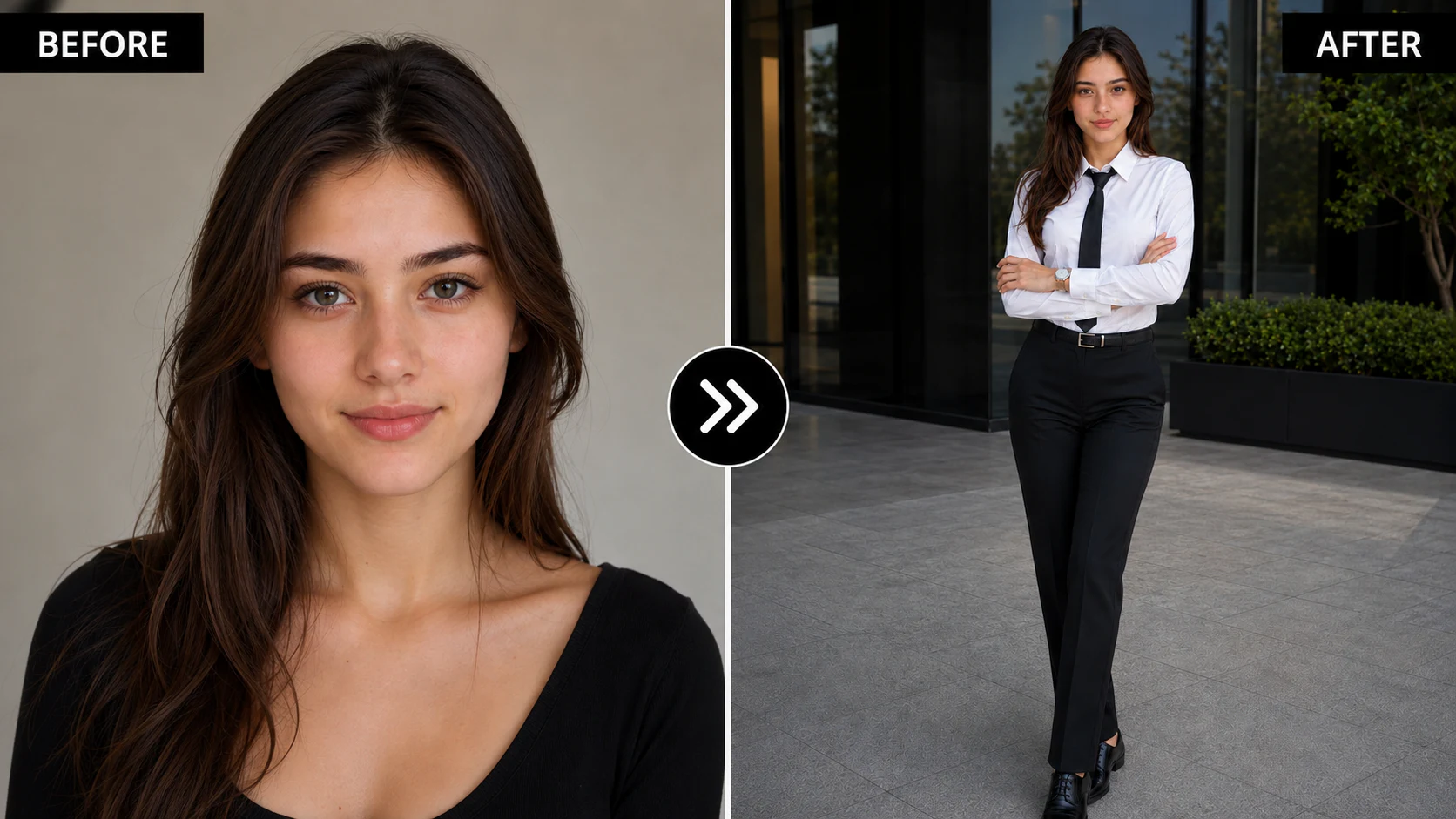
Folded arms create a stronger, more authoritative corporate pose. This version keeps the stance elegant by placing one leg slightly in front of the other and keeping the shoulders relaxed.
Copy-Paste Prompt
Use the uploaded photo only as a permitted facial identity reference. Use her recognizable appearance as guidance and review the output for unwanted changes.

Create a photorealistic corporate portrait of the same adult woman wearing the same fitted white shirt, slim black tie, high-waisted black tailored trousers, black belt, black formal shoes, and silver wristwatch.

Show her full body standing confidently outside a sleek corporate building.

Pose her with both arms folded naturally across her waist or chest, one leg positioned slightly in front of the other. Keep her shoulders relaxed and her posture elegant. Her face looks directly toward the camera with a composed, intelligent, and confident expression.

Keep the shirt and tie neat and professional. Use soft natural daylight, dark reflective glass panels, modern architecture, and shallow depth of field. Keep anatomy, fabric, and natural skin texture realistic.

Aspect ratio: 4:5 vertical.
Avoiding Unnatural Folded Arms
AI models may occasionally produce overlapping fingers or unnatural arm positions. If that happens, try instructions such as:
- Hands partially visible
- Natural finger placement
- Anatomically coherent arms
- No overlapping hands
- Relaxed elbows
- Realistic shoulder alignment
Avoid overloading the prompt with too many hand instructions at once.
Prompt 6: Businesswoman Walking Toward the Camera
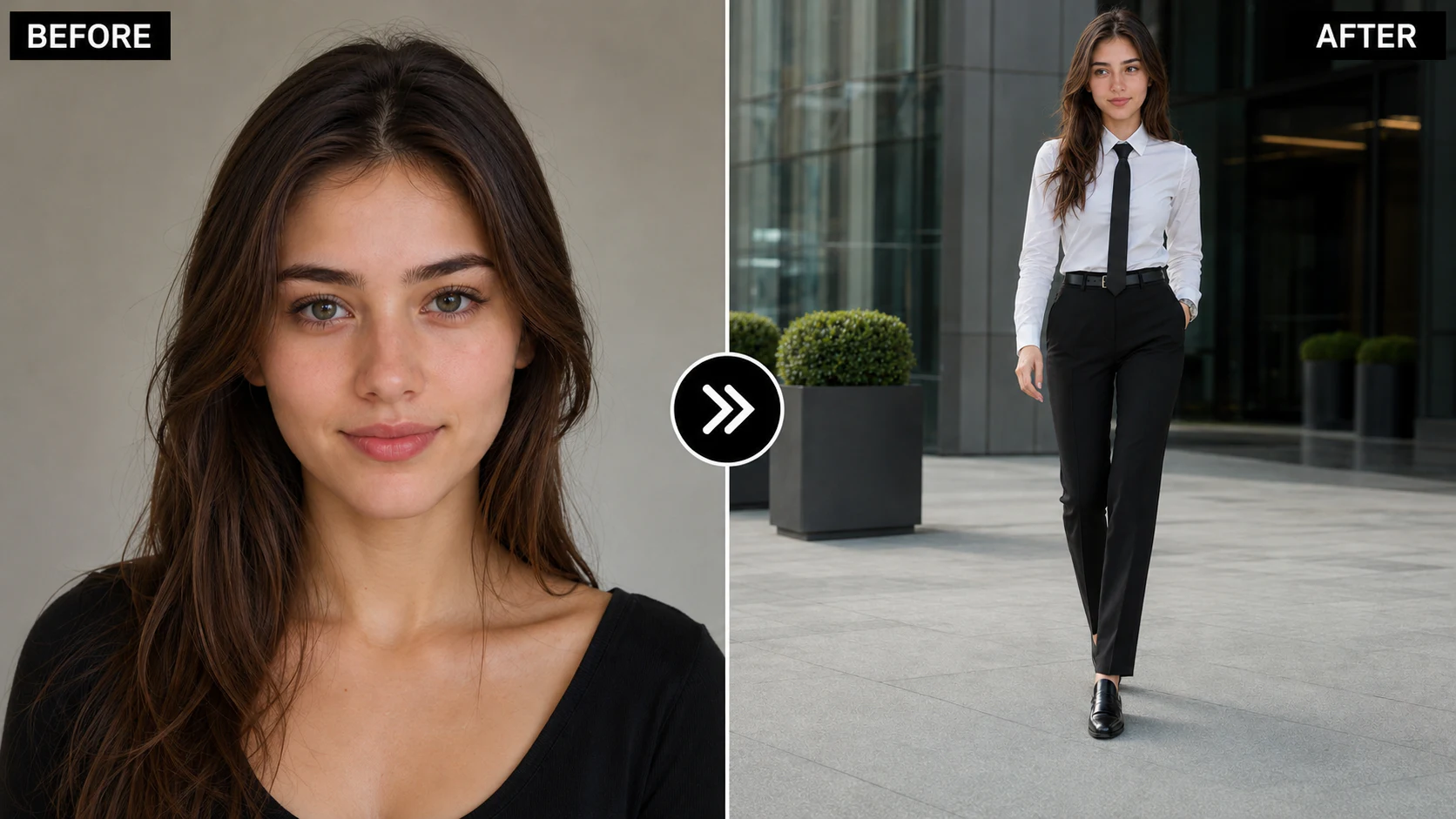
The final prompt introduces movement while maintaining the same corporate wardrobe. The subject walks toward the camera with one hand in her pocket and the opposite arm moving naturally.
Copy-Paste Prompt
Use the uploaded photo only as a permitted facial identity reference. Use the adult woman’s recognizable facial characteristics as guidance without promising an exact match.

Create a photorealistic full-body business-fashion photograph of the same adult woman wearing the same white fitted dress shirt, slim black necktie, black high-waisted tailored trousers, slim black belt, polished black formal shoes, and silver wristwatch.

Capture her walking confidently toward the camera outside a modern office building. Place one hand casually inside her trouser pocket while the other arm moves naturally beside her body.

Her hair moves very slightly with her walking motion. She looks slightly to one side with a calm, serious, and sophisticated expression.

Use clean modern glass architecture, subtle reflections, soft daylight, and an elegant shallow background blur. Keep body proportions and the walking pose realistic.

Professional corporate fashion photography, realistic detail, and restrained editorial color grading.

Aspect ratio: 4:5 vertical.
How to Keep the Same Face Across All 6 Images
When using a reference image, facial consistency can still vary between generations.
Use One Clear Reference Photo
Choose a permitted photo where:
- The face is clearly visible
- Lighting is even
- Eyes are unobstructed
- The image is sharp
- Facial proportions are easy to identify
A front-facing or slightly angled portrait usually provides a clearer identity reference than a heavily stylized image.
Keep Identity Instructions Consistent
Avoid changing the facial description drastically between prompts. If one prompt asks the model to use a face as guidance and another requests a significantly different age, hairstyle, or facial structure, the model may produce inconsistent results.
Change the Pose, Not the Person
For a consistent series, keep the face, general hairstyle, clothing, accessories, environment, and lighting style relatively stable. Then change primarily the pose, hand placement, head direction, or walking and standing position.
This creates visual variety without intentionally changing the identity of the series, although the tool may still introduce differences.
How to Customize These Corporate Portrait Prompts
You do not have to use the prompts exactly as written. A few simple changes can create different business campaign concepts.
Change the Architecture
Replace “modern corporate building” with:
- Financial-district architecture
- Glass skyscraper entrance
- Executive hotel lobby
- Minimalist office courtyard
- Modern business tower
- Contemporary conference center
Do not present a fictional generated location as a real workplace, event, client property, or business achievement.
Change the Lighting
Try:
- Soft overcast daylight
- Early morning light
- Golden-hour sunlight
- Bright diffused corporate lighting
- Soft window reflections
For a restrained corporate look, request one soft daylight direction instead of combining several dramatic light sources.
Change the Expression
Instead of a serious expression, try:
- Subtle professional smile
- Calm neutral expression
- Approachable executive expression
- Confident direct eye contact
- Thoughtful side glance
Common Problems and How to Fix Them
The AI Changes the Face
Keep identity guidance concise and avoid unnecessary face-related styling. Do not ask the model to use a reference identity while also changing facial proportions, apparent age, or other major identifying characteristics. No wording guarantees exact identity preservation.
The Tie Looks Distorted
Use a simpler instruction such as: “straight slim black necktie centered naturally beneath the shirt collar.” Avoid asking for complicated tie movement.
Shoes Are Cropped
Make sure the prompt explicitly says “full body visible from head to shoes” and use a vertical aspect ratio such as 4:5.
Hands Look Unnatural
Simplify the pose. Instead of specifying every finger position, describe the overall hand placement and request natural anatomy.
The Office Background Becomes Too Busy
Use wording such as: “minimalist corporate architecture, clean reflective glass panels, subtle background detail, shallow depth of field.” This keeps attention on the subject.
Executive Headshots vs. Full-Body Business Portraits
The six prompts request a 4:5 vertical composition and show the complete outfit. For an executive headshot, change the framing to head-and-shoulders or chest-up, remove walking instructions, and use a simple expression with a neutral office or studio background.
Choose the crop based on the intended placement. A professional profile may need a tighter face-led composition, while a website banner or personal-brand post may benefit from environmental context. Check the current requirements of the destination platform before exporting.
Related Business, Men’s Fashion, and Portrait Guides
- Browse businessman AI image prompts with luxury CEO settings for hotel, vehicle, city-window, and desk concepts.
- Explore AI portrait prompts for men when clothing and menswear styling are the primary focus.
- View the business AI image prompt library for additional professional portrait concepts.
Conclusion
A professional business portrait prompt needs more than formal clothing. Body language, facial direction, hand placement, lighting, environment, framing, and wardrobe consistency all shape the requested composition.
These six prompts provide a complete mini corporate portrait series:
- Male adjusting tie
- Male hands in pockets
- Male walking
- Female adjusting tie
- Female folded arms
- Female walking
Start with one pose and review the output before carrying the same clothing and visual direction into the remaining prompts. If you use a reference image, it must be an adult photo you own or have permission to upload.
AI-generated results will still vary depending on the model, model version, reference image, settings, seed, and interpretation of the instructions. Treat these prompts as structured starting points and customize them according to the tool you are using.
Update note: On August 14, 2026, the title, metadata, introduction, headings, image descriptions, executive-headshot guidance, FAQs, conclusion, and internal links were refined around professional corporate portrait intent. The six prompts and image URLs were retained.
Learn how we review our guides →
Common Questions
Frequently Asked Questions
What are business portrait AI prompts?
They are text instructions that describe a corporate portrait's adult subject, outfit, pose, lighting, background, framing, and visual tone. The output still needs review for anatomy, clothing, identity, text, and setting accuracy.
Can I use these prompts with my own photo?
Yes. If your AI image tool supports reference images, you can upload a clear face photo and use these prompts to guide the pose, clothing, and corporate setting while trying to preserve the person’s recognizable appearance.
How can I keep the same face in every AI business portrait?
Use the same clear reference image, keep your identity instructions consistent, and avoid changing age, facial structure, or other major identifying features between prompts. Results can still vary depending on the AI model and settings.
Which aspect ratio is best for full-body corporate portraits?
These examples request a 4:5 vertical composition because it leaves room for a head-to-shoes portrait. Use a tighter crop for an executive headshot, and check the destination platform's current image requirements.
Why does the AI sometimes change the outfit between images?
AI models may reinterpret clothing details across generations. To improve consistency, repeat the important wardrobe instructions in every prompt, including shirt color, tie, trousers, belt, shoes, and accessories.
How do I make an AI business portrait look more realistic?
Use one coherent outfit, a simple pose, one main light source, and a restrained office environment. Avoid conflicting style directions, then inspect skin, hands, tailoring, body proportions, reflections, and architecture.
What should I do if the hands or walking pose look unnatural?
Simplify the pose. Use instructions such as natural hand placement, realistic walking anatomy, and one foot slightly ahead of the other. Regenerating the image with fewer complicated hand instructions can also help.
Can these prompts be used for both men and women?
Yes. This article includes business portrait prompts for both men and women, with consistent corporate outfits, professional poses, and modern office backgrounds.
Which AI tools can I use with these business portrait prompts?
These prompts can be adapted for AI image generators that support detailed natural-language prompts and, ideally, reference images. The exact result will depend on the model, version, and available image-reference features.
Will these prompts generate the exact same result every time?
No. AI-generated images can vary based on the model, seed, settings, reference image, prompt interpretation, and tool updates. These prompts are designed as structured starting points rather than guaranteed formulas.
Can I adapt these prompts for executive headshots?
Yes. Replace the full-body instruction with a head-and-shoulders or chest-up crop, simplify the hand action, and use a neutral office or studio background. Do not use a generated headshot as identity evidence or to invent a professional credential.
Topics:
Abdul Qudoos creates and reviews AQPrompts guides and prompt-library content for creators using AI image tools.