11 Free ChatGPT Prompts for Photos (Copy & Paste)
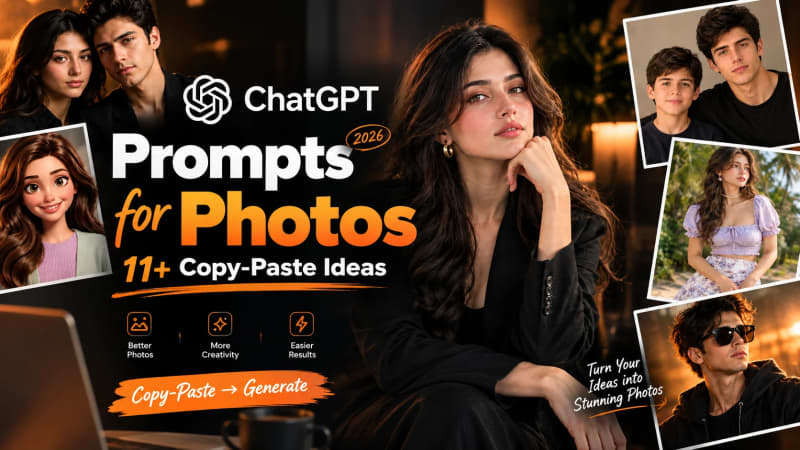
11 ChatGPT Prompts for Photos That Actually Work (Copy-Paste, 2026)
If you've gone looking for prompts to turn your photos into something better, you've probably hit the same wall: long lists that look great in a screenshot but fall apart the moment you try them on your own picture. This pack is different — 11 tested prompts, organized by the result you're actually after: a professional headshot, a moody aesthetic portrait, a fun cartoon avatar, a couple's photo, or a nostalgic throwback with your younger self.
Every prompt here works inside ChatGPT's image tools (GPT-4o / GPT Image). Most need a clear reference photo first — a well-lit, front-facing shot works best. From there it's simple: upload your photo, copy-paste the prompt below, and swap out details like hair color, outfit, or setting to match what you actually want. No prompt-engineering background needed. If you're brand new to this, our complete guide to getting started with ChatGPT image generation covers the basics in more depth.
One thing to note before you dive in: ChatGPT's image features and free-tier limits change fairly often, so if a prompt behaves differently than expected, it's worth double-checking your current plan and model access before assuming the prompt is broken.
Quick tip before you start: every prompt below can take an aspect ratio and a style modifier tacked onto the end. Aspect ratio — 1:1 for a grid post, 4:5 for a portrait feed post, 9:16 for Stories/Reels, 16:9 for a banner or cover. Style modifiers — shot on 35mm film, matte finish, cinematic color grade, soft focus, film grain. Add either (or both) to any prompt to shift the mood without touching the rest of the wording.
Professional & Headshot Prompts
If you need a prompt for professional photo use — a LinkedIn photo, a website bio, a resume — these two are built for that. Both are camera-and-lighting-specific, which is what keeps ChatGPT from generating something that looks obviously AI-made. For a broader comparison, see our roundup of AI headshot generators worth trying alongside these prompts.
Prompt 1 — Clean LinkedIn Headshot
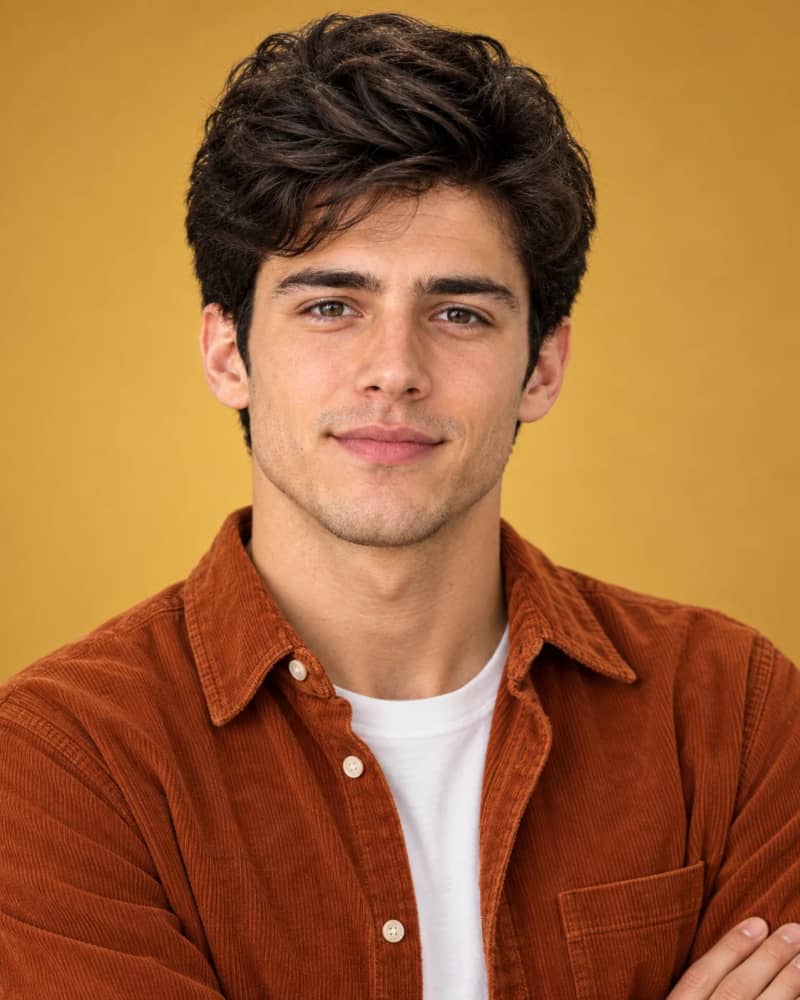
A professional studio portrait of a young man in his early twenties, with tousled dark wavy hair and light stubble, giving a warm, confident half-smile directly at the camera. He has a friendly, approachable expression with slightly squinted eyes. He is wearing a burnt orange corduroy button-up shirt, unbuttoned at the top, layered over a plain white crew-neck t-shirt, with his arms crossed. The background is a smooth, warm mustard-yellow gradient, softly lit studio backdrop. Soft, even studio lighting highlights his face with gentle shadows, giving a natural skin texture with visible pores and fine detail. Sharp focus on the face, shallow depth of field, shot on a professional camera with an 85mm portrait lens. Clean, minimal, commercial headshot style.
When to use it: Warm, approachable, and casual-professional — a strong fit for a LinkedIn profile picture or a personal website "about" photo, especially if your current headshot feels stiff or outdated.
Prompt 2 — Executive Portrait

A professional corporate studio headshot of a man in his thirties with short styled brown hair swept back, wearing black rectangular glasses, and a well-groomed full beard with mustache. He is smiling broadly showing teeth, giving a warm, confident, approachable expression directly at the camera. He is wearing a dark navy business suit with a crisp white dress shirt and a black textured tie, arms confidently crossed, with a silver wristwatch visible on his left wrist. The background is a smooth dark charcoal-gray gradient, professionally lit studio backdrop. Soft, even studio lighting with subtle rim light separating him from the background, sharp focus on the face with natural skin texture and fine detail. Shallow depth of field, shot on a professional camera with an 85mm portrait lens. Clean, high-end corporate executive headshot style.
When to use it: More formal than Prompt 1 — better suited to a company bio page, press kit, or any setting where "corporate" is the goal rather than "approachable."
Aesthetic & Cinematic Prompts
This section spans a spectrum — from soft, dreamy, Instagram-style portraits to moody, dramatic, film-like shots. The three prompts below sit at different points along that range. If you want more options in this style, our full list of aesthetic ChatGPT photo prompts goes deeper on this category alone.
Prompt 3 — Moody Cinematic Portrait

A dramatic black and white studio portrait of a young man with dark tousled side-swept hair, looking off to the side with a serious, contemplative expression. He is wearing a plain dark button-up shirt with a dark tie and a dark blazer. The lighting is a hard, directional single-source light (Rembrandt/split lighting style) creating a strong diagonal shadow across the wall and dramatic contrast on his face — one side lit, the other in deep shadow. The background is a dark plain wall with a sharp diagonal light streak cutting across it. High-contrast, moody, cinematic black and white photography with deep blacks and fine grain. Sharp focus on the eyes, shallow depth of field, shot on a professional camera with an 85mm portrait lens. Vertical portrait orientation, aspect ratio 4:5.
When to use it: The most dramatic option in this pack — good for a cover photo or a portfolio shot where you want something that feels closer to a film still than a selfie.
Prompt 4 — Soft Pastel Aesthetic

A soft, natural outdoor portrait of a young woman with long wavy light brown hair, looking off to the side with a gentle, dreamy expression. She has fair skin, soft natural makeup with a rosy tint on cheeks and lips. She is wearing delicate purple floral drop earrings and a white pearl choker necklace. She is dressed in a light lavender puff-sleeve smocked crop top with a square neckline and a tie detail at the chest, paired with a white and lavender floral print satin midi skirt. She is holding a small pearl-embellished handbag. The background is a tropical beach setting with lush green palm trees and sandy ground, softly out of focus. Natural soft daylight, warm and airy tone, shallow depth of field with creamy bokeh background. Shot on a professional camera with an 85mm portrait lens, fashion editorial style photography. Vertical portrait orientation, aspect ratio 4:5.
When to use it: Light, warm, and dreamy — this is the one to reach for if "aesthetic" to you means soft colors and golden daylight rather than drama.
Prompt 5 — Editorial/Magazine Style

A high-fashion editorial portrait of a young woman with sleek, straight dark hair with soft movement, wearing bold matte red lipstick and a sharp, confident expression, gazing directly into the camera. She is dressed in a structured black blazer with strong shoulders, paired with statement gold hoop earrings. The background is a stark, high-contrast black studio backdrop. Lighting is bold and dramatic — a single hard beauty light from above, creating strong contrast, deep shadows beneath the cheekbones, and a glossy, polished skin finish. Sharp focus on the eyes, shallow depth of field, shot on a professional camera with an 85mm portrait lens. High-fashion magazine cover style. Vertical portrait orientation, aspect ratio 4:5.
When to use it: Bold, graphic, and a little intimidating in a good way — best for a striking profile picture or a portfolio piece rather than an everyday photo.
Creative & Fun Prompts
These are the least "serious" prompts in the pack — good for when you just want to play around without a specific occasion in mind. If the cartoon style below is your favorite, we've got a whole guide to turning photos into cartoons with AI with more variations.
Prompt 6 — Retro '90s Throwback

A low-angle outdoor portrait of a young man with messy dark tousled hair, wearing black oversized sunglasses with a neutral, cool expression. He is dressed in a white t-shirt layered under a dark jacket. He is holding open a newspaper in front of him, slightly out of focus in the foreground, with only his head and shoulders visible above it. The background is a bright blue sky with soft white clouds, shot from a low angle looking upward. Warm golden sunlight hits the side of his face and hair, creating a warm highlight with a slight lens flare. Sharp focus on the face, shallow depth of field with the newspaper blurred in the foreground. Shot on a professional camera with an 85mm lens, candid editorial fashion photography style. Vertical portrait orientation, aspect ratio 4:5.
When to use it: Playful and a little nostalgic — works well as a standalone social post rather than a profile picture, since the styling leans more "editorial moment" than portrait.
Prompt 7 — Animated/Cartoon Version

Turn this photo into a 3D animated character in the style of a modern Pixar/Disney movie. Give me large, expressive eyes, soft rounded facial features, and a warm, exaggerated smile. Keep my hair color and general style but make it voluminous and glossy. Dress me in a casual, trendy outfit with a soft pastel color palette. Use bright, even studio lighting on a clean white background, with a polished, high-quality 3D render finish.
When to use it: Highly shareable and easy to get right on the first try — a great profile picture, sticker, or group-chat avatar. Works best with a clear, front-facing photo and a genuine smile, since the style tends to exaggerate expression.
Prompt 8 — Fantasy/Sci-Fi Character

Turn this photo into a cinematic cyberpunk character portrait. Keep my facial features and likeness recognizable, but add a glowing futuristic tech implant or interface on the side of my head, with fine circuit-like lines and a soft blue light glow. Dress me in a sleek black leather jacket. Set the scene in a moody, rain-lit futuristic city at night with blurred neon signs and bokeh lights in the background. Use dramatic, cinematic lighting with cool blue and warm neon tones, shallow depth of field, photorealistic detail.
When to use it: High-impact and eye-catching — good for a dramatic profile picture or a gaming avatar. Works best with a clear side-angle or three-quarter shot so the added tech detail has somewhere to sit.
Prompts for Photos of Couples
These two take a shared photo of two people and reimagine it in a completely different style. See also our full list of AI couple photo ideas if you want more than two starting points.
Prompt 9 — Editorial Couple Portrait

Turn this photo into a polished editorial-style couple portrait. Keep both faces recognizable and natural. Dress the couple in coordinated all-black outfits — a button-down shirt for him, a blazer or shirt for her. Use a warm, softly blurred neutral background (taupe or dark brown tones). Pose them close together, cheek-to-cheek or leaning in, with one hand gently resting on the other's arm. Lighting should be moody and directional, like a professional studio shoot, with rich skin tones, sharp focus on the faces, and a soft falloff into the background.
When to use it: Polished and romantic — a good pick for an anniversary gift or an engagement announcement.
Prompt 10 — Couple in a Different Era
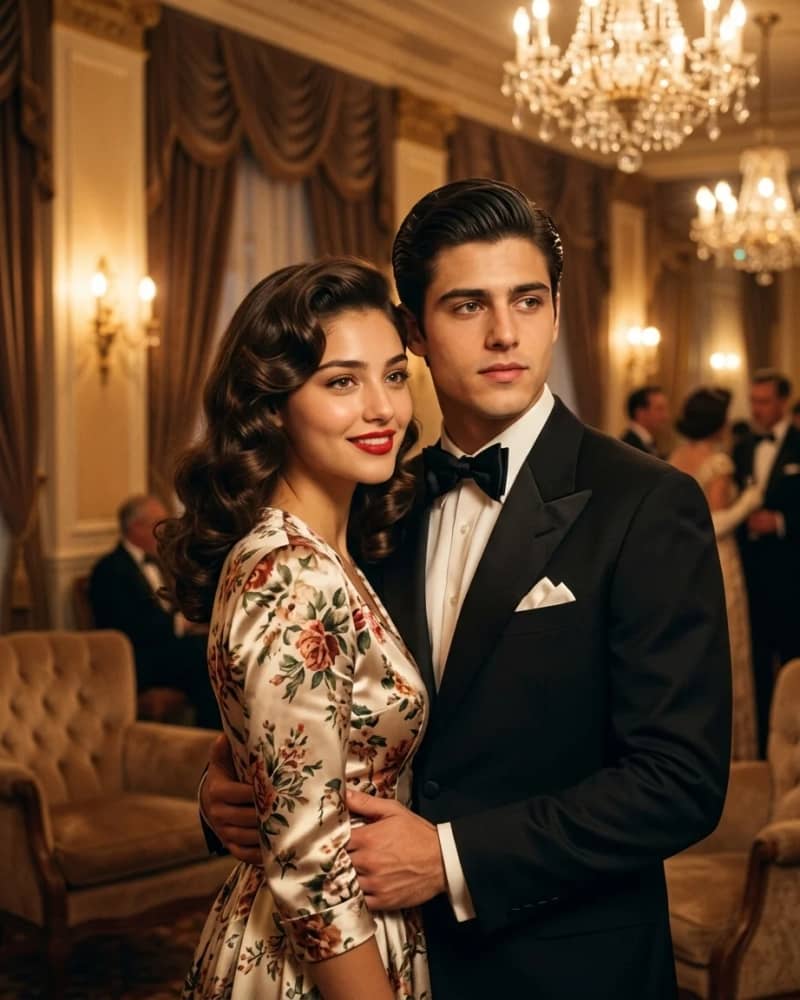
Turn this photo into a vintage 1940s-style glamour portrait of the couple. Keep both faces recognizable. Style the woman's hair in soft vintage curls with red lipstick and a floral or satin dress, and dress the man in a classic black tuxedo with a bow tie and slicked-back hair. Set the scene in a warmly lit, elegant vintage room with soft golden ambient lighting, like an old Hollywood ballroom. Use a warm, slightly soft-focus film look with rich golden and amber tones, evoking a classic glamour photograph.
When to use it: A fun novelty shot rather than a subtle edit — great for a save-the-date or an anniversary post. Works best with two clear, well-lit, front-facing photos of both people.
A quick note before using either couple prompt: since these upload and reimagine a photo of someone else, it's worth getting the other person's okay first — not every partner wants their likeness fed into an AI tool, even for something lighthearted.
Nostalgic Prompt: You and Your Younger Self
This one's narrower — a single-purpose prompt rather than a category with several options — for turning a childhood photo and a current one into a single "then and now" portrait. Pairs well with our guide to restoring and enhancing old photos with AI if your childhood photo needs cleaning up first.
Prompt 11 — Side-by-Side With Your Younger Self

Using these two photos (one recent, one childhood), create a single side-by-side portrait showing both versions of me together in the same frame, as if past and present me are standing next to each other. Keep both faces true to the original photos — don't blend or morph the features. Match the lighting and color tone across both so they look like they belong in the same photograph. Use a warm, soft, nostalgic lighting style with a simple neutral background. Compose it so both versions are looking toward each other or toward the camera, like a "then and now" portrait.
When to use it: A sentimental keepsake — nice for a birthday post or a family memory piece. Works best with one clear, well-lit childhood photo and one clear, well-lit current photo, both front-facing.
How to Adapt These Prompts for Better Results
Copy-pasting is fine as a starting point, but the best results come from tweaking once you see the first output. For a deeper walkthrough of this, our guide to writing better ChatGPT prompts covers the structure behind all of these — but here are a few quick ways to adapt what's above:
Swap the variables, not the whole prompt. Every prompt above is built from the same basic pieces: subject description, outfit, background, lighting, and camera/lens details. Change one piece at a time — outfit color, background setting, or lighting mood — rather than rewriting the whole thing, so you can tell what actually changed the output. OpenAI's own guidance on writing image prompts backs this up — clarity on a few key details beats a longer, more elaborate prompt.
Add aspect ratio and style modifiers as tags. Drop these at the end of any prompt above: aspect ratio — 1:1 (Instagram grid), 4:5 (portrait feed post), 9:16 (Stories/Reels), 16:9 (banner/cover). Style modifiers — shot on 35mm film, matte finish, cinematic color grade, soft focus, film grain. Mixing these in changes the mood without touching the rest of the prompt.
Fix distortion or likeness issues with a follow-up message, not a new prompt. If the face looks off, reply with something like "keep the exact same facial features and proportions, don't alter the face" and regenerate. If the crop or framing is wrong, ask ChatGPT directly to adjust the composition rather than starting over.
Build a reusable physical description. If you're planning to try several prompts on yourself, ask ChatGPT to describe your face and features from a clear photo first, then save that description and drop it into future prompts. It keeps your results consistent across styles.
Double-check your ChatGPT setup before assuming a prompt failed. Image generation, upload limits, and free-tier access change from time to time, so if a prompt behaves unexpectedly, it's worth confirming your current plan and model version before troubleshooting the wording.
Get consent before uploading someone else's photo. This applies to the couple's prompts above and to any group or family photo — a quick check-in with the other person before running their photo through an AI tool is a small step that avoids an awkward conversation later.
FAQ
Is ChatGPT free for photo editing? ChatGPT offers some image generation on its free tier, but usage limits and available models vary and change over time — see OpenAI's current pricing page or our own breakdown of whether ChatGPT is really free for the full picture.
Can I upload someone else's photo? Technically yes, but it's best practice to get their okay first, especially for anything shared publicly afterward.
Do these prompts work with other AI image tools? They're written for ChatGPT's image generation, but the underlying structure — subject, outfit, background, lighting, camera details — carries over reasonably well to other AI image tools too.
Learn how we review our guides →
Topics:
Abdul Qudoos creates and reviews AQPrompts guides and prompt-library content for creators using AI image tools.

