Businessman Prompt: 10+ Luxury AI Portrait Prompts (2026)
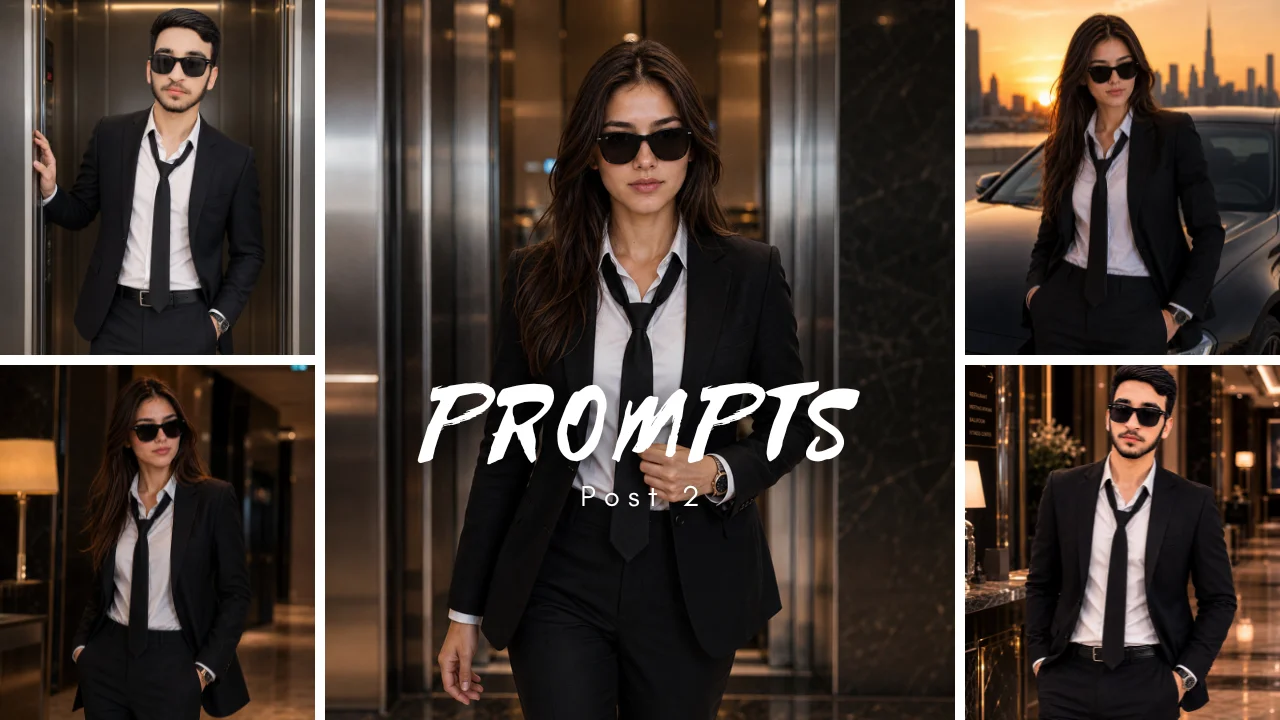
Ultimate Luxury Businessman AI Portrait Prompts for Realistic CEO & Executive Images
Summarize this blog post with: ChatGPT | Perplexity | Claude | Grok
If you want a polished businessman or CEO-style AI portrait, you already know that a suit and luxury background can create the basic look. The harder part is making the clothing, pose, lighting, architecture, and props work together without looking artificial. This guide gives you six ready-to-use luxury businessman AI portrait prompts plus a simple system for customizing them.
11 Luxury Businessman AI Portrait Prompts
The following prompts are built around different scenes so you can choose the visual concept that matches your purpose.
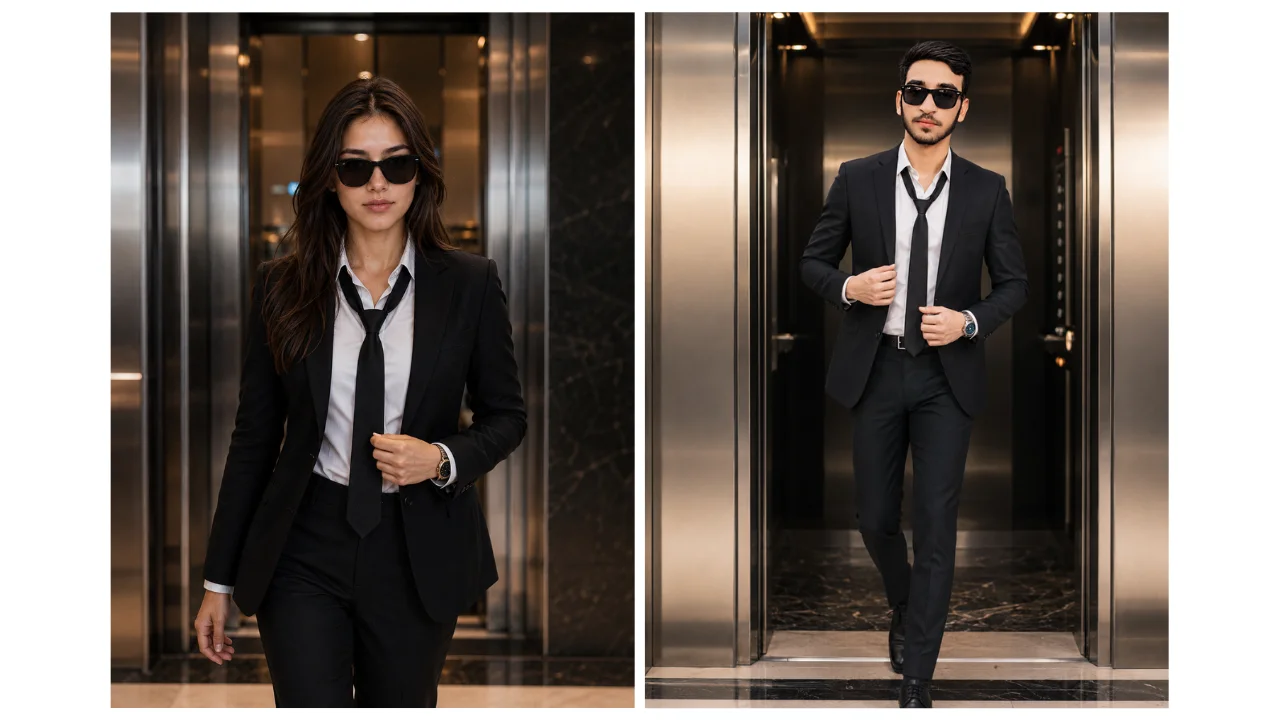
Prompt 1: Formal Building Arrival
Best for: Executive editorial concepts, website imagery, and leadership-themed content.
AI-generated example image for demonstration purposes.
Prompt
Prompt
Create a vertical environmental portrait of an adult man stepping from a modern office-building elevator. He wears a well-fitted charcoal suit, plain white shirt, and dark tie with no visible logo. Use a natural walking posture, both hands clearly positioned, and a composed expression. Frame from mid-thigh upward at eye level. Use clean architectural lines, soft overhead light balanced with neutral daylight, and a lightly blurred corridor. Keep elevator doors, suit buttons, tie, hands, and floor perspective coherent. 4:5 aspect ratio. If a permitted reference photo is supplied, use it as identity guidance without claiming an exact match.
Why it works: The elevator creates a natural transition point without requiring a dramatic action.
Customization tip: If the walking pose produces distorted legs or hands, change the action to standing just outside the elevator.
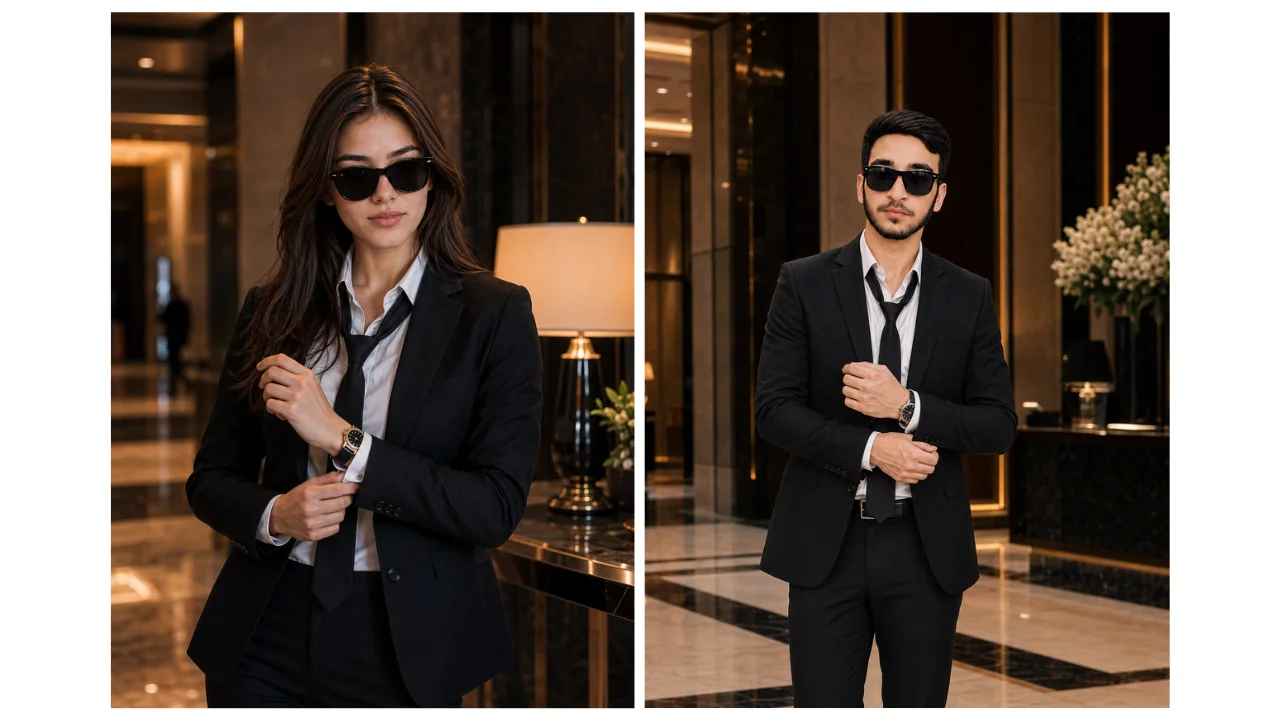
Prompt 2: Cuff Adjustment in a Hotel-Style Lobby
Best for: Luxury fashion concepts, personal-brand visuals, and event-preparation imagery.
Prompt
Prompt
Create a vertical business-fashion portrait of an adult man standing in a contemporary lobby while adjusting one shirt cuff. He wears a navy suit with an open-collar light shirt and one understated watch. Show both hands, correct sleeve lengths, and a relaxed three-quarter stance. Use warm interior light with a single daylight source from the side, muted stone and wood surfaces, and no readable hotel or company branding. Keep reflections restrained and background guests indistinct. 4:5 aspect ratio.
Why it works: The cuff adjustment gives the subject a clear purpose without turning the image into an action shot.
Customization tip: If the hands or sleeves look wrong, remove the watch and change the pose to one hand resting near the jacket button.
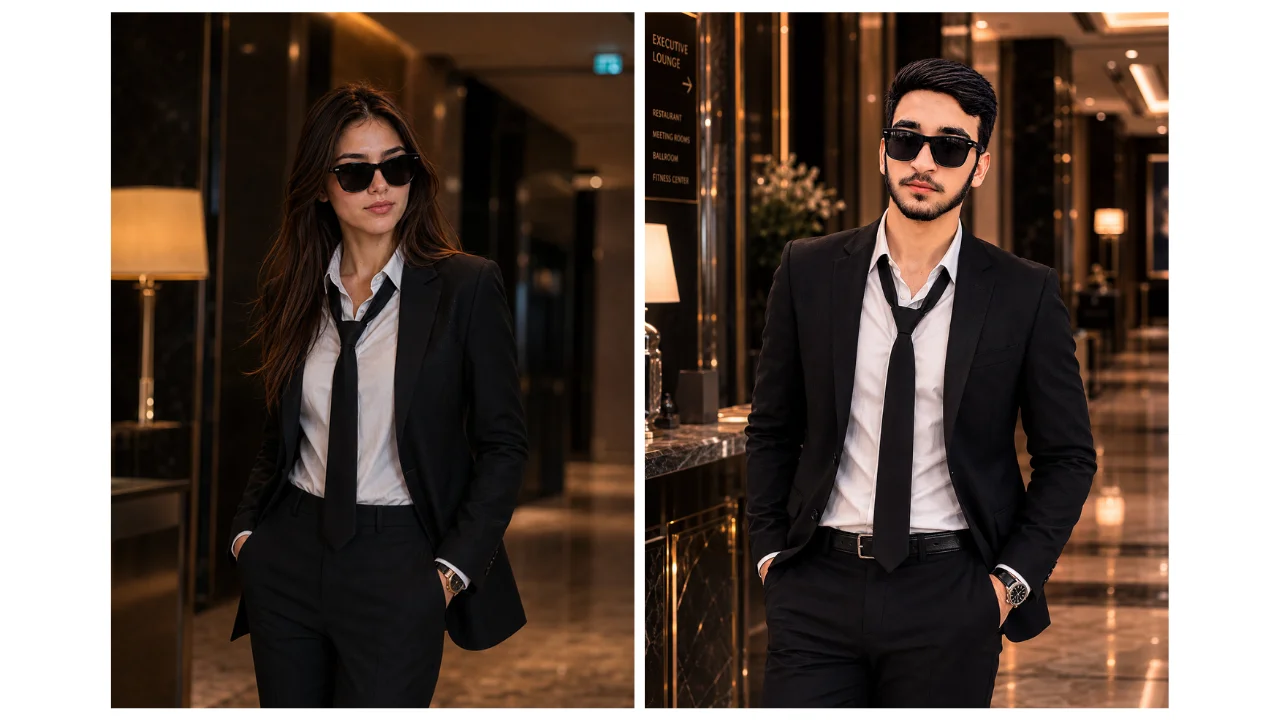
Prompt 3: Quiet Luxury Corridor Portrait
Best for: Website headers, editorial layouts, and sophisticated personal-brand imagery.
Prompt
Prompt
Create a vertical portrait of an adult man standing in a quiet, modern corridor. Use a dark textured blazer, plain knit shirt, tailored trousers, and simple shoes. Position the subject slightly off-center with shoulders relaxed and hands visible. Use repeating wall lines to guide attention toward the face, soft side lighting, natural skin texture, and a calm expression. Avoid status labels, ornate decoration, logos, and readable signs. Keep doors and ceiling lines geometrically consistent. 4:5 aspect ratio.
Why it works: The corridor creates depth and negative space without pretending to represent a particular company or headquarters.
Customization tip: If architectural lines become distorted, simplify the background to one wall and one doorway.
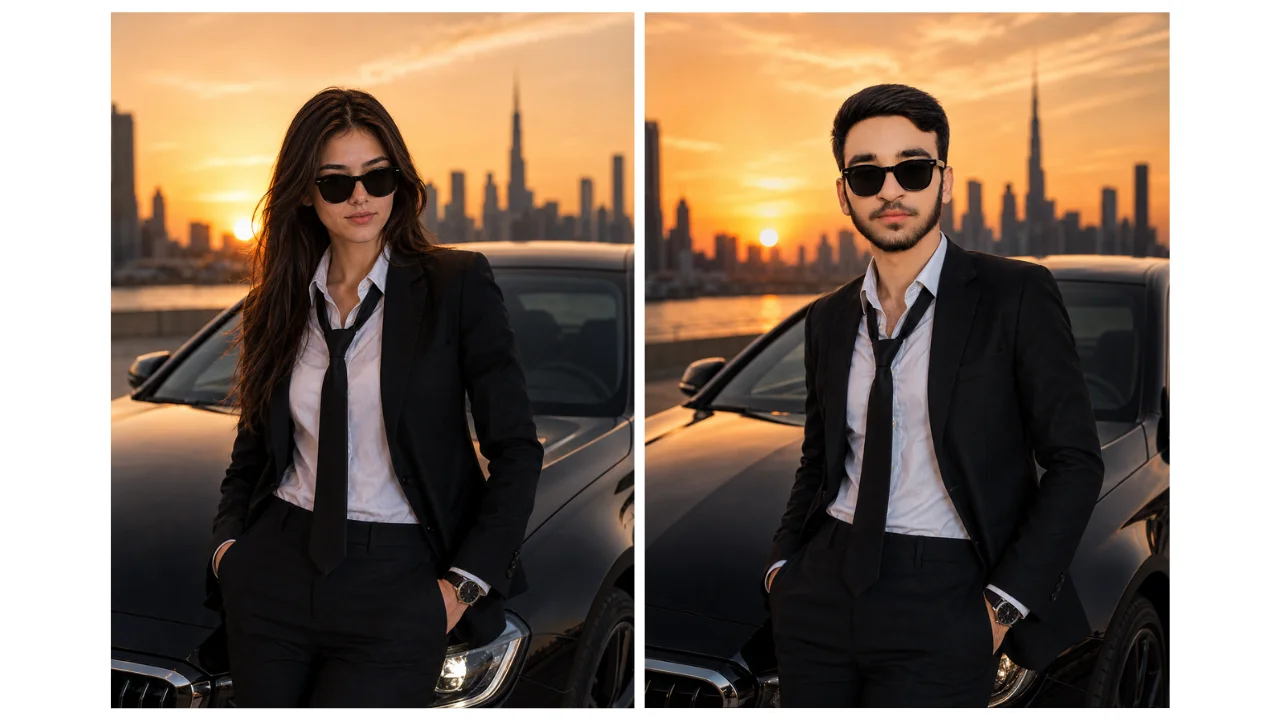
Prompt 4: Vehicle-Side Luxury Personal Brand Concept
Best for: Lifestyle posts, automotive-inspired branding, and cinematic social imagery.
Prompt
Prompt
Create a vertical personal-brand portrait of an adult man standing beside an unbranded dark sedan in a public outdoor setting near sunset. He wears a dark casual blazer, plain shirt, and tailored trousers. Use a relaxed stance without leaning heavily on the vehicle, natural expression, and a three-quarter crop. Keep the car secondary, with realistic doors, wheels, windows, reflections, and ground contact. Do not include a badge, dealership sign, license number, or ownership claim. Use one warm light direction and a softly blurred background. 4:5 aspect ratio.
Why it works: The car provides a premium visual cue without making vehicle ownership the subject of the image.
Customization tip: Keep the vehicle partially visible if the model begins inventing badges, unusual wheels, or unrealistic bodywork.
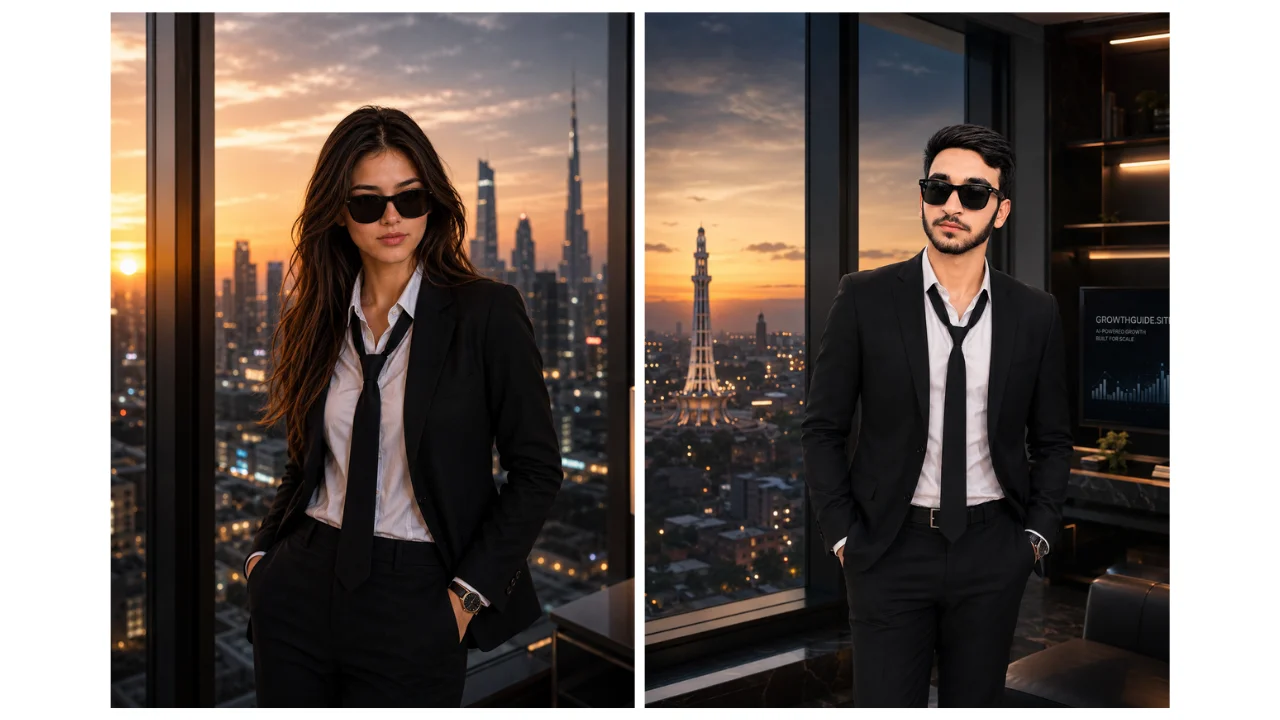
Prompt 5: City-Window Leadership Portrait
Best for: Website hero images, articles, social graphics, and leadership-themed layouts.
Prompt
Prompt
Create a vertical environmental portrait of an adult man standing near a large window with a distant city view. He wears a medium-grey suit with a plain shirt and no tie. Use a side-facing stance with the face turned toward the camera, hands relaxed, and enough space around the shoulders. Balance soft window light with a subdued interior, keep the skyline out of focus, and avoid recognizable private property or company branding. Preserve believable window frames, reflections, hands, and jacket structure. 4:5 aspect ratio.
Why it works: The open space around the subject leaves room for a headline, quote, or website copy.
Customization tip: If the subject becomes too dark, request brighter facial exposure or reduce the intensity of the window light.
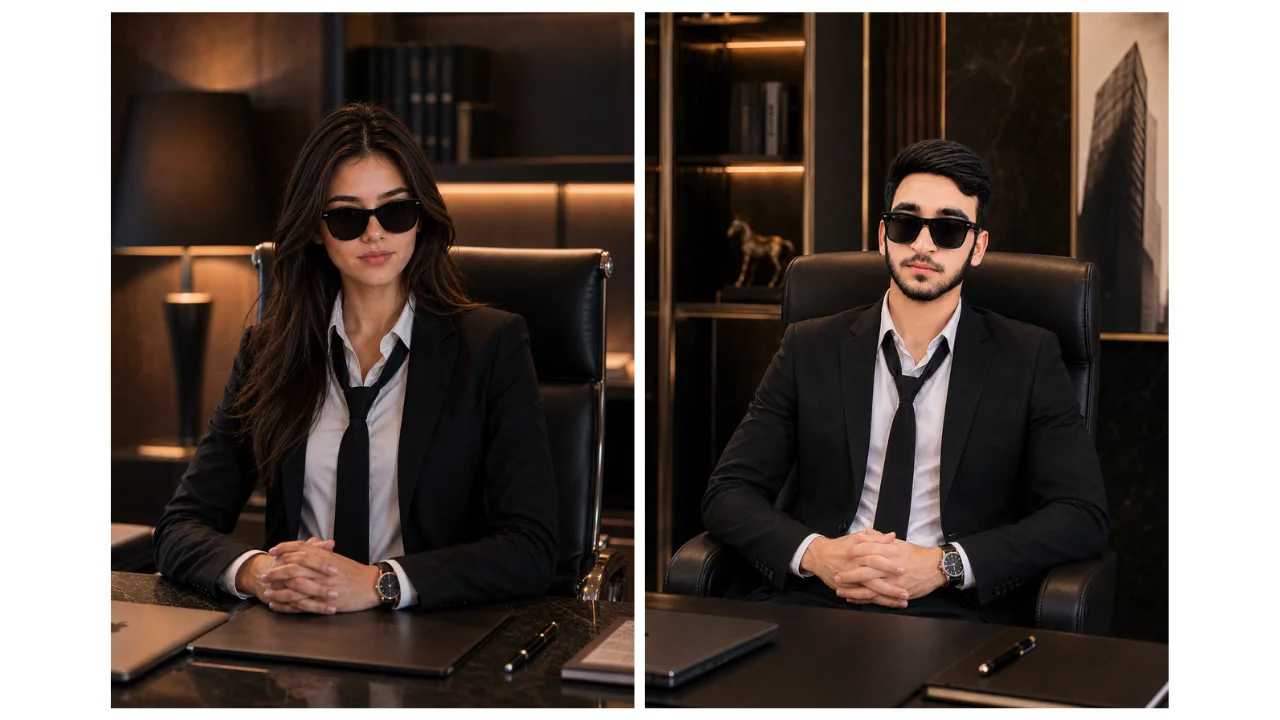
Prompt 6: Working Desk Executive Portrait
Best for: Business articles, service pages, websites, and professional content concepts.
Prompt
Prompt
Create a vertical business portrait of an adult man seated at a simple modern desk. He wears a dark blazer over a pale shirt and sits with a natural upright posture. Place one closed notebook and one unbranded laptop on the desk, with both hands visible and separate from the objects. Use soft window light, an uncluttered office background, neutral colors, and an eye-level waist-up composition. Do not include awards, company logos, financial charts, confidential documents, or readable credentials. 4:5 aspect ratio.
Why it works: The desk immediately communicates a professional environment without requiring fake certificates, company logos, or financial claims.
Customization tip: Remove text-bearing objects if the generator starts inventing business names, awards, documents, or credentials.
Prompt 7: Luxury Lounge Business Portrait
Best for: Personal branding, business websites, luxury lifestyle content, and executive social media posts.

Prompt
Create a photorealistic luxury business portrait of an adult businessman seated confidently in an elegant private lounge. He is wearing a perfectly tailored black suit, crisp white shirt, and a minimal luxury watch. His posture is relaxed yet confident, with one arm resting naturally on the chair. Surround him with premium leather furniture, dark wood, subtle marble details, and warm ambient lighting. Use cinematic lighting, realistic skin texture, natural facial details, shallow depth of field, and a sophisticated editorial photography style. Keep the environment clean and unbranded with no visible logos or readable text. 4:5 aspect ratio.Why it works: The sophisticated lounge setting adds a premium feel while keeping the businessman as the clear visual focus.
Customization tip: Replace the lounge with a private office, luxury hotel lobby, or premium club-style interior for a different atmosphere.
Prompt 8: Luxury Hotel Executive Portrait
Best for: Corporate websites, personal branding, leadership profiles, and premium business content.

Prompt
Create a photorealistic executive portrait of an adult businessman standing confidently inside a sophisticated luxury hotel-style interior. He wears a perfectly fitted dark navy suit, crisp white shirt, polished dress shoes, and a subtle wristwatch. Position him naturally beside an elegant staircase with refined stone surfaces, modern architectural details, warm indirect lighting, and soft reflections. Maintain realistic body proportions, natural hands, detailed skin texture, and authentic facial features. Use a cinematic editorial photography style with a softly blurred background. Avoid visible logos, readable signs, or recognizable brands. 4:5 aspect ratio.Why it works: The elegant architectural background creates a high-end executive aesthetic without distracting from the subject.
Customization tip: Request warmer lighting or a darker color palette if you want a more cinematic and dramatic result.
Prompt 9: Executive Car Interior Portrait
Best for: Luxury branding, entrepreneur content, social media campaigns, and premium lifestyle concepts.

Prompt
Create a photorealistic luxury businessman portrait of an adult man seated inside the rear passenger area of a premium unbranded sedan. He wears a perfectly tailored charcoal suit, plain white shirt, and understated luxury watch. Position him naturally with relaxed shoulders and one hand resting comfortably near his lap. Show realistic premium leather seats, subtle interior lighting, clean reflections, and a softly blurred city environment visible through the window. Use cinematic lighting, realistic skin texture, natural facial details, accurate hands, and shallow depth of field. Do not show vehicle logos, license plates, or readable text. 4:5 aspect ratio.Why it works: The premium car interior immediately communicates success and creates a strong luxury-business atmosphere.
Customization tip: Ask for a city skyline through the window or golden-hour lighting for a more cinematic appearance.
Prompt 10: Rooftop Executive Portrait
Best for: Entrepreneur profiles, motivational content, personal branding, and luxury social media posts.

Prompt
Create a photorealistic luxury executive portrait of an adult businessman standing confidently on a sophisticated modern rooftop terrace during blue hour. He wears a perfectly tailored black suit with a dark shirt and minimal accessories. Use a relaxed but powerful posture with both hands naturally positioned. Behind him, show a beautiful distant city skyline with subtle architectural lights, a modern glass railing, and an elegant contemporary environment. Use soft evening light on his face, realistic skin texture, natural facial details, cinematic depth of field, and premium editorial photography. Keep the skyline generic with no recognizable buildings, logos, or readable signs. 4:5 aspect ratio.Why it works: The rooftop setting combined with the city skyline gives the portrait a powerful, aspirational executive feel.
Customization tip: Use sunset lighting for a warmer result or blue-hour lighting for a darker, more luxurious mood.
Prompt 11: Luxury Office Window Portrait
Best for: Business websites, executive profiles, LinkedIn content, personal branding, and professional articles.

Prompt
Create a photorealistic luxury executive portrait of an adult businessman standing beside a large floor-to-ceiling window in a modern high-end office. He wears a perfectly tailored dark brown suit, cream shirt, and an understated wristwatch. Use a natural three-quarter pose with one hand adjusting his jacket and the other relaxed at his side. Include sophisticated wood, glass, and stone elements with a distant city view outside the window. Use soft directional natural light, realistic reflections, detailed skin texture, natural facial features, and controlled background blur. Keep the office unbranded with no company logos, readable documents, awards, or recognizable headquarters. Premium editorial photography style, realistic proportions, accurate hands, 4:5 aspect ratio.Why it works: The floor-to-ceiling window and modern office create a polished corporate look while leaving useful visual space around the subject.
Customization tip: Request a wider composition with more empty space on one side if you need room for website text, headlines, or promotional copy.
How Do You Customize Luxury Businessman AI Prompts?
Luxury businessman AI prompts are easiest to customize when you change one visual block at a time instead of rewriting the entire prompt.
Start with the subject. Keep the adult subject consistent if you are creating a series.
Next, change the wardrobe. You can replace a charcoal suit with a navy suit, open-collar shirt, dark blazer, or luxury casual outfit.
Then change the action. Standing, walking, adjusting a cuff, looking through a window, and sitting at a desk create different visual stories.
After that, change the environment. A modern office, hotel-style lobby, quiet corridor, city window, or neutral outdoor setting can completely change the mood.
Finally, adjust the lighting and crop.
This block-based method makes troubleshooting easier because you know which change caused the result to become inconsistent.
For clothing-led concepts, you can also explore luxury men's fashion AI portrait prompts. For conventional corporate imagery, see professional business portrait AI prompts.
How Do You Make a Luxury AI Portrait Look Realistic?
A realistic luxury AI portrait usually depends more on coherent visual relationships than on adding more descriptive adjectives.
First, keep the wardrobe physically consistent. Jacket structure, shirt cuffs, buttons, ties, and watches should not contradict one another.
Second, use one believable light direction. A window-lit subject should not simultaneously appear strongly lit from three unrelated directions.
Third, simplify the environment. Two or three clear background elements are easier to render coherently than a room packed with luxury objects.
Fourth, inspect hands and reflections. These areas can reveal generation errors that are easy to miss in a small social-media preview.
Finally, remove unnecessary status signals. A believable suit, calm posture, clean architecture, and controlled lighting can communicate sophistication without fake awards or invented company names.
Realism often improves when you remove details instead of adding them.
How Do You Preserve Identity in an AI Business Portrait?
Identity preservation means using a permitted reference image to provide visual guidance while accepting that the generated result can still vary.
Choose a reference photo where the face is clearly visible, reasonably sharp, and not heavily obscured by sunglasses, extreme shadows, or unusual angles.
Keep identity-related instructions consistent between generations. If one prompt describes short hair and another asks for a completely different hairstyle, the model has conflicting visual information.
Do not treat phrases such as “preserve identity” or “exact face” as guarantees.
Midjourney's current documentation explains that image prompts and references guide the generation rather than simply copying the reference image, while AQPrompts similarly treats reference images as identity guidance rather than an exact-match guarantee.
For a broader set of professional poses, see 6 Professional Business Portrait AI Prompts.
What Should You Avoid in Luxury Businessman AI Prompts?
Avoid prompt instructions that create visual clutter, contradictory stories, or misleading claims.
The most common problems include:
Too many accessories: watches, rings, cufflinks, sunglasses, bracelets, phones, pens, and multiple props can create anatomy and object errors.
Too many luxury symbols: cars, yachts, private jets, penthouses, awards, and expensive watches can turn a portrait into a collection of unrelated objects.
Fake credentials: certificates, company awards, executive plaques, and financial charts can imply facts that are not true.
Named businesses: invented logos and company names can create misleading or inaccurate imagery.
Unclear actions: asking a person to walk, hold a phone, adjust a cuff, open a door, and shake hands at the same time makes the composition unnecessarily difficult.
Contradictory environments: a formal tuxedo, beach setting, corporate conference, sports car, and casual coworking space may describe several different concepts rather than one coherent portrait.
One clear story is usually stronger than five competing luxury cues.
What Tools Can You Use for Luxury Businessman AI Portraits?
Luxury businessman AI portrait prompts can be adapted to image generators that accept natural-language instructions, although exact controls and output behavior differ between platforms.
ChatGPT Images
ChatGPT Images currently supports creating and editing images, uploading an existing image for edits, and choosing different aspect ratios. OpenAI also notes that image generation can take time depending on request complexity.
Midjourney
Midjourney Image Prompts documentation
Midjourney supports image prompts and several reference-image approaches. Its documentation explains that image prompts influence content, composition, and visual direction rather than guaranteeing an exact copy of the source.
Leonardo AI
Leonardo provides image-generation workflows with model and generation controls. Its current documentation distinguishes API access from its web-app plans, so users should check the current product interface and pricing before relying on specific features.
The important point is that the same prompt can behave differently across models and versions. Do not describe one prompt as guaranteed to produce identical results everywhere.
How Can You Troubleshoot Luxury Businessman AI Portraits?
Why does the suit look distorted?
Remove unnecessary accessories first. Pocket squares, cufflinks, tie bars, watches, and layered fabrics can be reintroduced one at a time after the basic jacket and shirt look correct.
Why are the hands incorrect?
Give each hand one simple position. If hands continue to fail, crop the image above the hands or remove nearby props.
Why does the image look too fake?
Reduce exaggerated luxury signals and simplify the environment. Replace “billionaire penthouse” with concrete visual instructions such as modern neutral interior, tailored charcoal suit, soft window light, composed posture.
Why does the face change?
Use a clear, permitted reference image and keep the identity instructions consistent. Avoid changing age, hairstyle, facial hair, expression, and camera angle simultaneously.
Why does the AI invent logos or text?
Request blank walls, unbranded objects, no readable signage, and no company logos. Always inspect screens, documents, badges, signs, and vehicle emblems before publishing.
Why does the architecture look strange?
Reduce the number of repeating architectural elements. One wall and one doorway are easier to control than a long corridor containing many doors, lights, mirrors, and decorative panels.
How Should You Use AI-Generated Business Portraits Responsibly?
AI-generated business portraits should be presented as creative imagery when they could otherwise be mistaken for documentary evidence.
Do not use a generated portrait to falsely claim:
A job title you do not hold
Employment at a company
Ownership of a luxury vehicle or property
A client relationship
An award or qualification
Attendance at an event
A speaking engagement
Access to a private location
Do not upload another person's portrait without permission, and do not use generated imagery as identity verification or deceptive evidence.
If the image represents a genuine professional identity, a real photograph is often the safer choice for contexts where authenticity matters.
AQPrompts' editorial review process specifically rejects instructions that encourage impersonation, fraud, deceptive evidence, or unauthorized identity manipulation.
What's Next After Creating Your Luxury Businessman Portrait?
The next step is to create a small, consistent image set rather than generating random luxury portraits.
Start with one wardrobe and create three poses:
Standing portrait for a profile or About page.
Environmental portrait for an article or website section.
Action portrait for social media or editorial content.
Then create a second version by changing only the environment.
For example, keep the same charcoal suit and subject while moving from a quiet office corridor to a city-window setting. This creates visual variety without changing every element at once.
If you need more luxury lifestyle concepts, explore Luxury Lifestyle AI Portrait Prompts for Men. For a broader collection, browse business AI image prompts.
You can also use AQPrompts' AI Instagram Prompt Tool to adapt visual ideas into prompts for reels thumbnails, carousel covers, branding visuals, and other Instagram content.
Conclusion: Build the Story, Not Just the Status
Luxury businessman AI portrait prompts work best when they describe a specific visual story instead of relying on words such as “CEO,” “millionaire,” or “billionaire.”
Choose one adult subject, one coherent outfit, one clear action, a restrained environment, and believable lighting. Then inspect the result for hands, clothing, reflections, text, logos, and unintended claims.
The goal is not to add every possible symbol of wealth. The goal is to create an image that looks intentional, polished, and visually coherent.
Start with one of the six prompts above, change one block at a time, and build the exact luxury businessman portrait concept you need.
Written by
Abdul Qudoos — Founder & Editor, AQPrompts
Abdul Qudoos creates and reviews AQPrompts content focused on AI image prompting, portrait composition, lighting, visual direction, prompt customization, and practical AI education for creators. His author profile describes AQPrompts as a practical prompting platform focused on clearer and more usable AI image prompts.
Reviewed by: Abdul Qudoos, Founder & Editor, AQPrompts
AI transparency: AI-generated images can vary by tool, model, version, settings, reference image, and generation conditions. The prompts in this guide are editorially reviewed starting points, not guarantees of identical results or documented comparative performance across image generators. AQPrompts' review methodology explains that a prompt is only described as generation-tested when retained evidence identifies the relevant prompt version, tool, model, settings, outputs, and review record.
Update note: On September 30, 2026, the title, metadata, introduction, headings, FAQs, image descriptions, conclusion, and internal links were refined around luxury CEO and lifestyle concepts. The six prompts and image URLs were retained
How Do You Adapt These Prompts for Each Platform?
October 2026 refresh. A portrait that works as a website hero will not always work as a LinkedIn profile photo. Before you generate, decide where the image will live, because the platform decides the crop, the composition and how much empty space you need.
For a LinkedIn profile photo, ask for a tight head-and-shoulders crop with the face centered and a plain dark background, and generate at 1:1 so nothing important gets cropped.
For a website hero or banner, add 'wide composition with empty negative space on the left third for headline text' and generate at 16:9.
For an Instagram post or carousel cover, generate at 4:5 vertical and keep the subject in the center third so the grid preview never cuts off the face.
For a press kit or About page, generate the same prompt twice, once vertical for the page and once with wider environmental framing for social sharing, so the two images read as one set.
Learn how we review our guides →
Common Questions
Frequently Asked Questions
Can an AI business portrait be used on a professional profile?
It may be used where the platform and context permit, but it should not misrepresent your identity, workplace, qualifications, products, or events. Review the image carefully and disclose AI use when needed.
Why does a generated suit look inconsistent?
Buttons, lapels, ties, pocket squares, cuffs, and watches can compete. Keep the wardrobe description short, choose one accessory focus, and remove details that are not essential.
How do I make an office portrait feel credible?
Use a restrained office setting, one believable action, and ordinary objects. Avoid invented awards, company logos, financial claims, or status symbols that imply facts that are not true.
How should I write a billionaire portrait prompt?
Replace the abstract status label with visible art direction such as tailored clothing, quiet architecture, a restrained interior, one premium material, and composed body language. Do not imply real wealth, property, or credentials.
What makes a CEO portrait concept different from a standard headshot?
An environmental CEO concept may include a desk, city window, hotel-style lobby, or arrival scene. Keep the setting secondary to the adult subject and avoid invented company names, awards, financial charts, or headquarters claims.
Can I customize the luxury setting or outfit?
Yes. Replace the wardrobe or setting as one complete block, then remove details that conflict with it. Change one block at a time so problems with tailoring, hands, reflections, or architecture are easier to diagnose.
Topics:
Abdul Qudoos creates and reviews AQPrompts guides and prompt-library content for creators using AI image tools.