Aesthetic AI Prompts for Instagram: 9 Cinematic Male Portraits
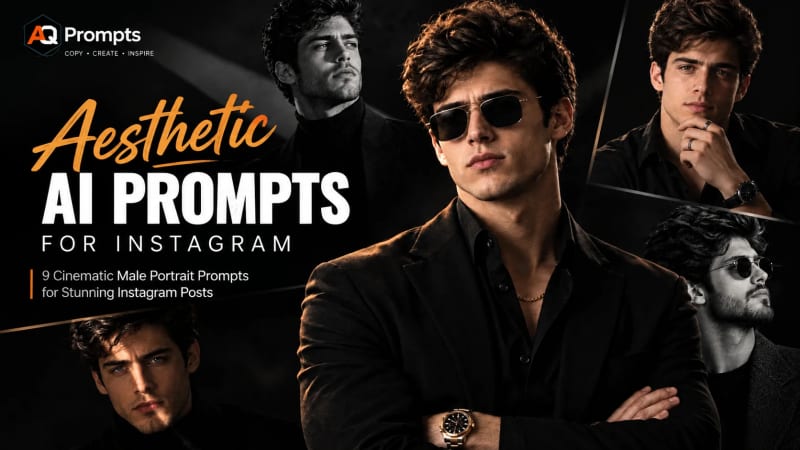
Aesthetic AI Prompts for Instagram
Looking for aesthetic AI prompts for Instagram that produce something more distinctive than the usual generic AI portrait? This collection focuses on dramatic male studio portraits with controlled lighting, intentional composition, realistic skin texture, and Instagram-friendly framing.
Each prompt is designed to give an image generator more than a subject and a style. You’ll also get guidance for lighting direction, framing, lens choice, background, aspect ratio, and common visual problems to avoid.
You can copy these AI prompts for Instagram as they are, or customize the wardrobe, hairstyle, setting, expression, and lighting to build your own visual style.
What Makes an Aesthetic AI Portrait Look Better?
A strong aesthetic AI photo prompt does not need to be packed with random technical terms. What matters is whether each detail has a visual purpose.
Aspect Ratio
For Instagram Feed posts, 4:5 is a useful portrait format because it gives the subject more vertical space. For Stories and Reels, 9:16 is the natural choice.
Choose the format according to where the image will be published rather than generating everything in one ratio and cropping later.
Lens and Framing
Lens language can help communicate the type of composition you want.
An 85–105mm portrait setup works well for tighter, intimate portraits with limited background distraction. A 35–50mm perspective can show more of the subject’s body, pose, clothing, or environment.
The important part is not simply naming a lens. The framing should support the visual story.
Light Direction
“Cinematic lighting” by itself is too vague.
Specify where the light comes from: from the side, above, behind the subject, through blinds, or through a narrow beam. Directional light creates shadows, separation, depth, and mood.
Negative Space
A dark or minimal background can be useful because it prevents the environment from competing with the face.
Negative space is not wasted space. In a portrait, it can make the subject feel more isolated, dramatic, and editorial.
Skin Texture
Realistic texture is one of the easiest ways to avoid an overly synthetic portrait.
Subtle pores, natural facial sheen, individual beard or stubble hairs, small variations in skin tone, and restrained film grain can help prevent the familiar smooth, waxy appearance associated with generic AI portraits.
How These Settings Translate Across AI Image Generators
The exact controls differ between generators, so treat photography terminology as visual guidance, not as a guarantee that an AI model will interpret every camera setting literally.
What you want Midjourney ChatGPT Images Stable Diffusion / Flux4:5 composition Use --ar 4:5Choose the aspect ratio or describe the desired framing Set the output dimensions/ratio 9:16 composition Use --ar 9:16Choose 9:16 or request a vertical composition Set a vertical output ratio Shallow depth of field Describe shallow focus and background blur Describe the desired focus and blur Describe it directly; model-specific controls may help Unwanted details Use supported negative prompting such as --no Describe what should be avoided Use a negative prompt when supported Portrait lighting Describe the light position and quality Describe the light position and quality Describe the light position and quality
Midjourney currently supports aspect-ratio parameters such as --ar, while ChatGPT Images provides aspect-ratio controls and can also follow aspect-ratio instructions in the prompt.
The practical rule is simple: describe the visual result you want first, then add tool-specific controls where your generator supports them.
9 Aesthetic AI Prompts for Instagram
Editorial note: Abdul Qudoos — Founder and content reviewer of AQPrompts.com. Tested with Chatgpt. Last reviewed: 7 September 2026.
1. Rembrandt Chin-Rest Portrait

Prompt:
A man leans his chin into his palm mid-thought, a chronograph watch half-visible where his sleeve slides back, silver rings catching a narrow sliver of light. A single Rembrandt-style key light creates a small triangle of illumination on his far cheek while the rest of his face falls gradually into a near-black background.
His skin retains subtle natural texture: visible pores around the cheeks and forehead, a faint sheen at the temple, and soft individual stubble around the jaw. Tight head-and-shoulders composition, eyes in crisp focus, shallow depth of field, restrained cinematic color grading with a slightly cool tone, premium editorial portrait photography.
Settings: Head-and-shoulders · 4:5 · 85mm look · shallow depth of field · Rembrandt lighting · near-black background
Avoid: plastic-looking skin, excessive skin smoothing, duplicated jewelry, warped watch face, unnatural eye symmetry
Swap it: Replace the watch with a coffee cup, book, or pair of glasses to create a different story without changing the lighting setup.
2. High-Contrast Formal Portrait
Prompt:
Black-and-white portrait of a man wearing a black suit and white collared shirt, one hand raised near his chest, knuckles slightly pressed against the fabric as though he is holding back a thought rather than deliberately posing.
Thick, slightly unruly hair contrasts with the sharp lines of his glasses. He maintains direct eye contact with the camera. Low-key Rembrandt lighting leaves most of the frame in deep shadow, with the face and hand providing the main visual anchors.
High contrast, limited midtones, subtle film grain, natural pores, realistic stubble, refined large-format editorial character, controlled monochrome tonal range.
Settings: Waist-up · 4:5 · 105mm look · shallow depth of field · Rembrandt lighting · monochrome
Avoid: glossy skin, artificial face smoothing, distorted glasses, duplicate buttons, malformed fingers
Swap it: Remove the glasses and loosen the tie for a more relaxed “end of a long day” variation.
3. Spotlight Profile Portrait

Prompt:
A man stands beneath a single hard spotlight with his head slightly bowed and shoulders subtly relaxed, as if he has just exhaled. Everything outside the light’s reach disappears into deep black.
Side-profile composition, facing left. The spotlight travels across the bridge of his nose and cheek while the far side of the face remains in near-total shadow. The texture of the t-shirt and a faint sheen on the forearm remain visible where the light strikes. Individual stubble hairs appear naturally along the jaw.
Minimal studio environment, dramatic tonal separation, restrained monochrome treatment, realistic facial texture.
Settings: Head-and-shoulders side profile · 4:5 · 50mm look · f/2-style shallow focus · single hard spotlight · black background
Avoid: doubled spotlight edges, distorted forearm proportions, over-sharpened skin, excessive HDR
Swap it: Move the spotlight directly overhead for a harsher, more severe mood.
4. All-Black Luxury Portrait

Prompt:
A man in a tailored all-black suit stands with his arms crossed against a background that almost completely absorbs his silhouette. His shirt is open at the top, while a thin gold chain and gold-framed sunglasses catch the only noticeable warm highlights in the frame.
His beard is closely groomed. A subtle natural sheen appears along the collarbone where the light reaches the skin. One small scar across a knuckle provides an imperfect detail within an otherwise polished portrait.
Low-key directional side light separates the subject from the black background without flattening the texture of the suit. Luxury editorial photography, quiet confidence, controlled contrast, premium fashion campaign aesthetic.
Settings: Waist-up · 4:5 · 35mm look · low-key side lighting · black backdrop
Avoid: warped chain links, mirrored sunglasses artifacts, over-smoothed skin, melted suit fabric, distorted hands
Swap it: Remove the sunglasses and chain for a cleaner, quieter portrait where facial identity becomes the primary focal point.
5. Diagonal Light-Beam Portrait
Prompt:
Close-up portrait of a man wearing a black turtleneck, tousled dark hair, and a light beard. His natural brown eyes become visually striking because a narrow diagonal beam of light passes directly across them.
A thin gobo-shaped light beam travels diagonally from the forehead toward the chin, dividing the face between illumination and deep shadow. Fine beard and stubble texture remains visible wherever the beam crosses the skin.
The surrounding environment appears almost completely absent rather than visibly dark. Focus is locked on the illuminated eye, with a subtle natural catchlight and restrained background detail.
Graphic, cinematic, minimal editorial portrait.
Settings: Close-up · 4:5 · 85mm look · shallow depth of field · narrow gobo light beam · black backdrop
Avoid: duplicated light beams, symmetrical beam artifacts, waxy skin, flat eyes, artificial catchlights
Swap it: Rotate the beam horizontally for a more architectural and graphic composition.
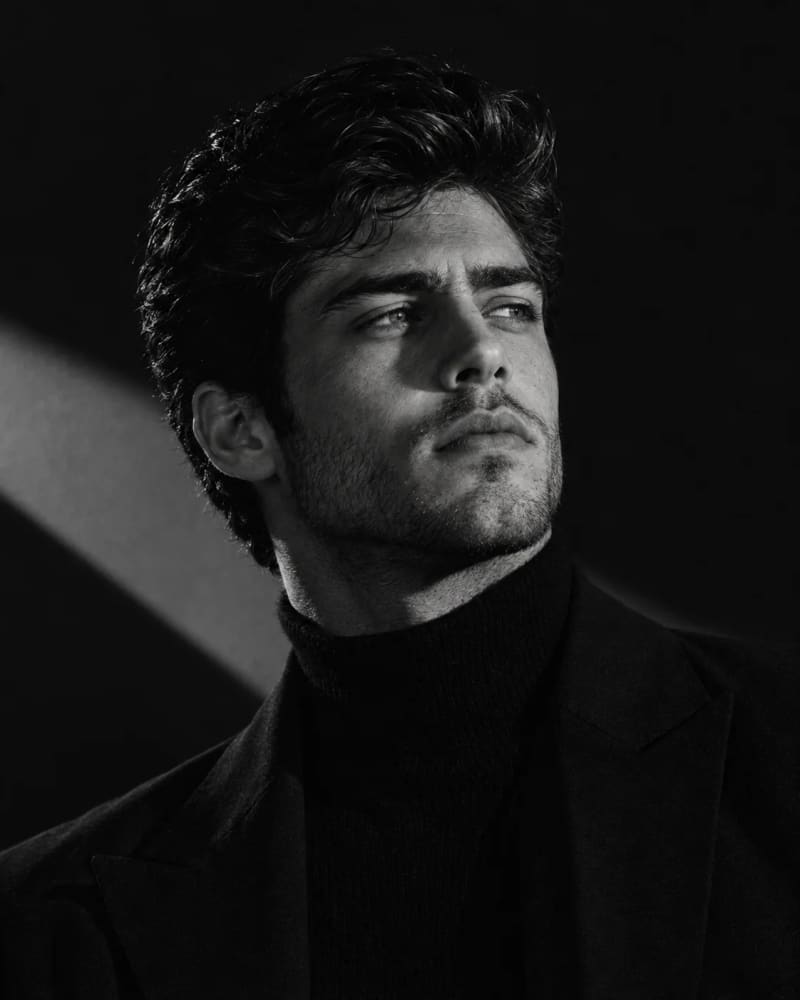
6. Sculptural Chiaroscuro Portrait
Prompt:
A bearded man wearing a ribbed turtleneck and dark blazer tilts his chin slightly upward, the tendon in his neck visible, his eyes looking off-frame as though caught in thought rather than posing for the camera.
Hard directional side lighting produces a sharp geometric patch of brightness across the jaw and background. The opposite side of the face falls almost completely into shadow.
Minimal dark studio backdrop, monochrome editorial treatment, natural skin and beard texture, strong tonal separation, no soft fill light, sculptural chiaroscuro aesthetic.
Settings: Head-and-shoulders · 4:5 · 50mm look · shallow focus · hard side light · monochrome
Avoid: shadowless lighting, flattened facial structure, artificial skin smoothing, distorted jawline, melted blazer texture
Swap it: Add a subtle 5–10° camera tilt for a more dynamic editorial composition.
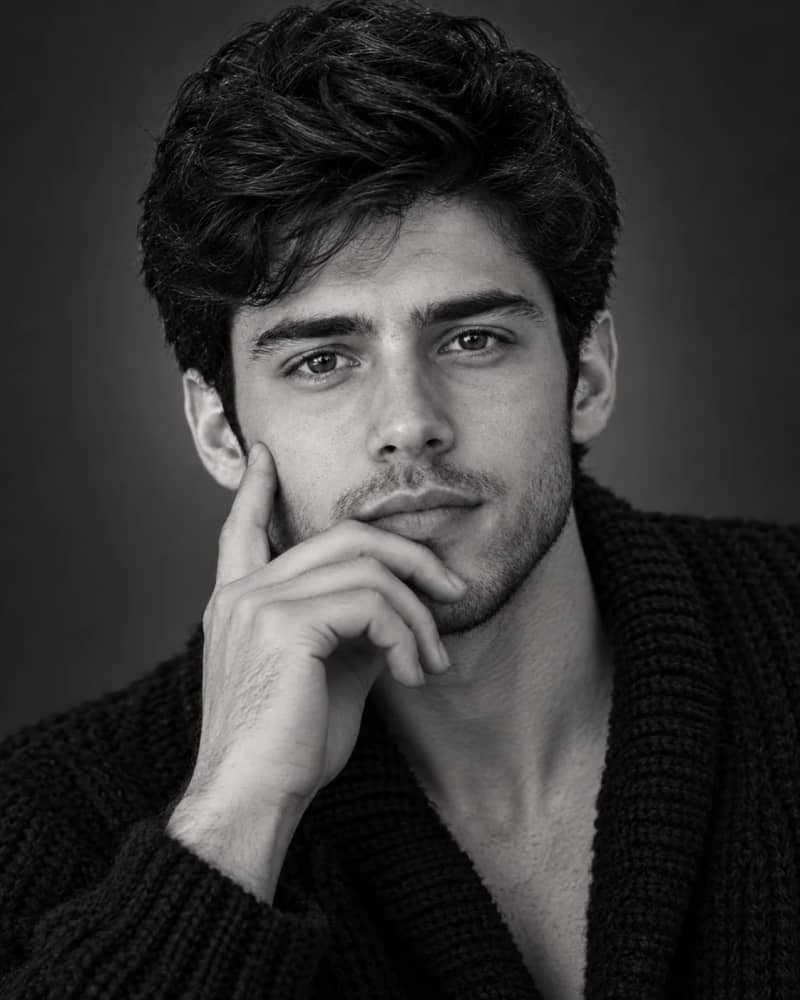
7. Intimate Close-Hand Portrait
Prompt:
A bearded man rests one hand against his cheek, with the pad of his index finger pressing gently into the skin and creating a believable line of pressure. He wears a chunky knitted cardigan with the collar slightly open.
Soft studio light creates a gradual transition from light to shadow against a dark grey background. The eyes remain the sharpest point of the image while the knit texture and surrounding facial details fall slightly softer.
The mood is quiet and intimate rather than posed, with natural skin variation, restrained contrast, subtle texture, and a documentary-inspired editorial quality.
Settings: Close-up head-and-shoulders · 4:5 · 85mm look · shallow focus · soft gradient lighting · dark grey background
Avoid: extra fingers, fused fingers, glossy skin, unfocused eyes, excessive blur
Swap it: Have the subject look just past the camera to create a more candid feeling.
8. Venetian-Blind Shadow Portrait

Prompt:
A man in a black suit and tie turns slightly away from the camera while his thumb lightly grips the edge of his jacket cuff, creating a small natural gesture instead of a rigid pose.
Diagonal bands of shadow inspired by window blinds cross the dark grey background. Soft directional light illuminates one side of his face while the other side gradually disappears into shadow.
A restrained layer of film grain reduces excessive digital sharpness without obscuring facial detail. The composition feels controlled, cinematic, and editorial rather than heavily staged.
Settings: Waist-up · 4:5 · 35mm look · soft directional light · window-blind shadow pattern · monochrome
Avoid: warped shadow bands, duplicated shadows, glossy suit fabric, malformed tie, unnatural hands
Swap it: Widen the gaps between the blinds for a stronger graphic shadow pattern that remains visible at smaller Instagram sizes.
9. Vintage Sunglasses Profile

Prompt:
Side-profile portrait of a man with his chin slightly lifted, wearing round vintage sunglasses that catch a hard sidelight. The corner of his mouth suggests a restrained half-smile.
A textured tweed blazer over a simple crew-neck shirt adds tactile detail without overwhelming the face. Voluminous swept-back hair creates a clean silhouette along the profile.
The background remains almost entirely in shadow. Hard side lighting, subtle film grain, natural skin texture, restrained monochrome grading, vintage editorial fashion photography.
Settings: Head-and-shoulders side profile · 4:5 · 105mm look · hard side lighting · black backdrop
Avoid: warped sunglasses geometry, duplicated frames, artificial hair strands, mismatched facial symmetry, plastic skin
Swap it: For a stronger profile-identification image, remove the sunglasses and use the same lighting setup with unobstructed eyes.
Which Prompts Work Best for Instagram Stories and Reels?
A 4:5 portrait does not always convert cleanly into a 9:16 composition.
Good candidates for simple cropping or canvas extension
#1, #5, #6, and #7 are already relatively tight and vertically focused. Extending the canvas can often add useful negative space without destroying the composition.
Better regenerated directly in 9:16
#2, #3, #4, #8, and #9 depend more heavily on horizontal elements such as crossed arms, forearms, profile space, or shadow patterns.
For those compositions, generating a dedicated 9:16 AI image prompt is usually better than forcing a 4:5 image into a taller frame.
How to Customize Aesthetic AI Prompts
You usually do not need to rewrite an entire prompt to create a different aesthetic.
Change one visual element at a time and keep the rest of the composition stable.
Element Try this Or this Hair Wavy brown hair Slicked-back black hair Outfit Black button-up Black leather jacket Background Near-black studio Dark grey studio Lighting Rembrandt light Soft window light Style Monochrome editorial Warm cinematic Ratio 4:5 Feed 9:16 Stories/Reels
This approach helps you understand which change actually affected the final image, instead of changing everything at once.
How to Keep the Same Person Across Multiple Instagram Photos
For a consistent Instagram feed, the challenge is not only the aesthetic. It is also maintaining a recognizable subject across multiple generations.
When your image generator supports reference images, start with a clear reference photo and explicitly distinguish identity from everything you want to change.
A useful instruction is:
Preserve the subject’s recognizable facial identity and proportions while changing the wardrobe, lighting, environment, pose, and overall aesthetic.
Do not assume that writing “same person” alone will guarantee consistency. Different generators and workflows handle image references differently, and results can vary.
The goal is to keep the person consistent while allowing the visual concept to change.
Build a Consistent Instagram Aesthetic
One of the easiest mistakes is creating a different visual identity for every post.
A feed that alternates randomly between black-and-white chiaroscuro, bright lifestyle photography, colorful street fashion, and warm cinematic portraits can feel more like a collection of unrelated experiments than a deliberately art-directed profile.
Choose one visual lane for several posts:
Dark cinematic
Luxury editorial
Minimalist black-and-white
Vintage film
Then vary the subject, wardrobe, pose, or location while keeping the underlying visual language consistent.
For many creators, consistency across roughly 6–9 posts is more effective than trying to make every image completely different.
More Aesthetic AI Prompts for Instagram
This collection focuses on dramatic male studio portraits, but different Instagram searches require different prompt styles.
Explore related collections for:
These related collections can also help you build a consistent prompt workflow instead of relying on one aesthetic for every image.
Frequently Asked Questions
What are aesthetic AI prompts for Instagram?
Aesthetic AI prompts are detailed instructions designed to generate images with a specific visual mood, composition, lighting style, color treatment, or editorial direction. For Instagram, they are commonly used for posts, profile pictures, portraits, fashion images, and Stories or Reels.
What is the best aspect ratio for Instagram AI photos?
For portrait-oriented Feed content, 4:5 is a practical choice. For Stories and Reels, 9:16 is designed for vertical full-screen content.
How can I make AI portraits look less artificial?
Use specific lighting direction, realistic facial texture, natural imperfections, controlled backgrounds, purposeful composition, and restrained detail. Avoid relying only on generic phrases such as “ultra-realistic” or “8K.”
Can I use these AI image prompts with different generators?
Yes. The descriptive parts of the prompt can usually be adapted across image generators, but syntax, parameters, reference-image features, and negative-prompt support vary between tools.
How do I create a consistent AI Instagram feed?
Choose a repeatable visual language—such as dark cinematic, luxury editorial, or monochrome—and keep major elements such as lighting, color treatment, composition, and mood consistent while changing the subject or scene.
Final Tip
The best AI prompts for Instagram are not necessarily the longest ones.
They are the ones where every major instruction has a job: the light creates the mood, the composition controls attention, the background supports the subject, the texture adds realism, and the aspect ratio fits the destination.
Start with one strong aesthetic, test a small set of variations, and refine the details that consistently improve your results.
Related: Explore more aesthetic AI image prompts, Instagram AI photo prompts, and ready-to-copy AI image prompts for Instagram across different styles and subjects.
Learn how we review our guides →
Topics:
Abdul Qudoos creates and reviews AQPrompts guides and prompt-library content for creators using AI image tools.