
ChatGPT Photo Editing Prompts for Boys: 25+ Copy-and-Paste Ideas

The Ultimate ChatGPT Photo Editing Prompts for Boys: 25+ Copy-and-Paste Ideas
Summarize this blog post with: ChatGPT | Perplexity | Claude | Grok
You've probably already seen boys turn ordinary selfies into cinematic portraits, stylish Instagram photos, and realistic AI edits with ChatGPT. However, the quality of the result depends heavily on how clearly you describe the edit, not simply on asking AI to “make my photo better.” In this guide, you'll find 25+ ChatGPT photo editing prompts for boys, plus practical ways to customize them for realistic portraits, fashion, bikes, gym photos, backgrounds, and social media.
Key Takeaways
ChatGPT photo editing prompts for boys provide instructions for transforming existing male photos into realistic, cinematic, aesthetic, and social-media-ready images.
Effective prompts specify the subject, clothing, environment, pose, lighting, camera look, mood, and realism requirements instead of relying on vague style descriptions.
Copy-and-paste prompts help beginners create consistent AI photo edits without needing advanced Photoshop or traditional photo-editing skills.
Face-preservation instructions can help maintain the person's recognizable identity while changing backgrounds, outfits, lighting, and other visual elements.
Prompt categories such as Instagram portraits, cinematic edits, fashion, gym, bikes, cars, travel, and vintage styles make it easier to find an edit for a specific purpose.
Prompt customization works best when you change one or two visual elements at a time and clearly describe what should remain unchanged.
Realistic AI edits benefit from natural skin texture, accurate proportions, coherent lighting, realistic shadows, and photography-specific details.
What Are ChatGPT Photo Editing Prompts for Boys?
ChatGPT photo editing prompts for boys are written instructions that tell an AI image-editing tool how to modify an existing male photo while controlling elements such as clothing, background, lighting, pose, and style. Instead of manually explaining every adjustment after an image is uploaded, you can provide a structured description of the final appearance you want.
For example, a basic request such as “make this photo cinematic” gives the AI very little direction. A stronger prompt can specify a dark urban background, soft directional lighting, realistic skin texture, a black jacket, shallow depth of field, and a professional portrait composition.
AI photo editing prompts work best when they describe both what should change and what should stay unchanged. For example, you can request a new outfit and background while explicitly asking the AI to preserve the person's face, hairstyle, body proportions, and recognizable identity.

For more general ideas, explore ChatGPT photo prompts. You can also connect these edits with ChatGPT photo editing prompts.
Why Are ChatGPT Photo Editing Prompts for Boys Important?
ChatGPT photo editing prompts for boys are important because they make complex-looking photo transformations easier to describe and repeat. A well-written prompt gives the AI clear instructions instead of leaving important creative decisions entirely to the model.
First, ready-made prompts save time because you do not need to build every instruction from scratch. For example, someone creating an Instagram portrait can start with a complete cinematic portrait prompt and only change the clothing or background.
Second, specific prompts improve creative control. You can separately describe the outfit, location, lighting, camera perspective, mood, and image quality instead of asking for a generic “cool photo.”
Third, structured prompts make experimentation easier. You can create one portrait, then modify only its background, outfit, or lighting while keeping the rest of the concept consistent.
How Do You Use ChatGPT Photo Editing Prompts for Boys?
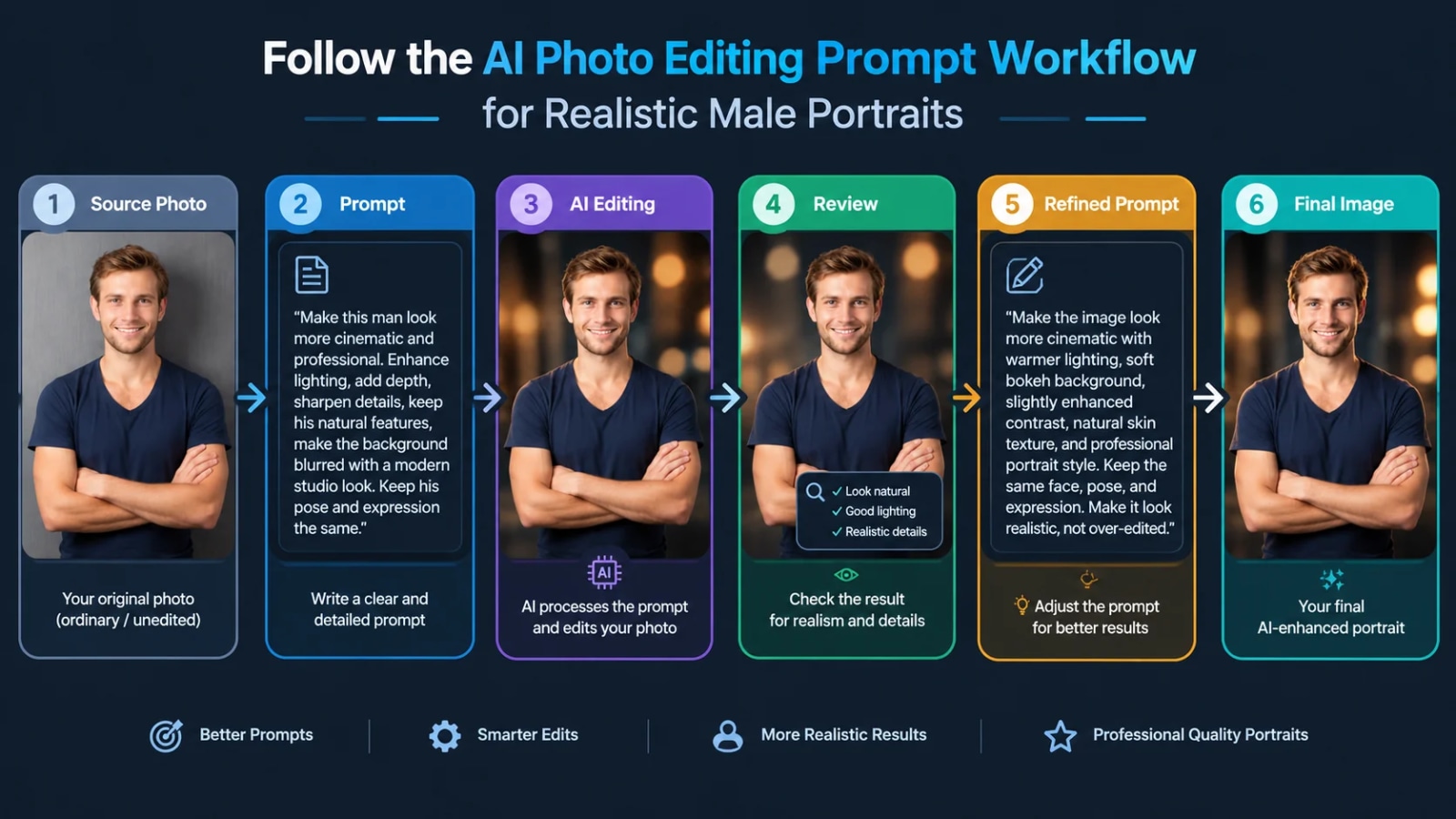
Using a ChatGPT photo editing prompt involves uploading a suitable photo, describing the desired changes, reviewing the result, and refining individual instructions when necessary. The process is simple, but the quality of your input photo and instructions can significantly affect the result.
1. Upload a Clear Photo
A clear source image gives the AI more visual information to work with. Choose a photo where the face is visible, the subject is reasonably well lit, and important parts of the body are not heavily obscured.
For example, a front-facing or three-quarter portrait with reasonable lighting usually gives you more useful information than a heavily blurred or extremely dark selfie.
2. Choose the Editing Goal
Your prompt should identify the main transformation before describing smaller details. Decide whether you want a cinematic portrait, outfit change, background replacement, luxury fashion look, gym image, travel portrait, or Instagram DP.
For example, your main instruction could be: “Transform this existing portrait into a realistic luxury fashion editorial while keeping the person recognizable.”
3. Describe the Visual Details
Specific visual details give the AI stronger direction than generic adjectives. Include the clothing, location, lighting, pose, camera perspective, atmosphere, and overall visual treatment.
For example, instead of “make me stylish,” write “dress the subject in a fitted black blazer over a dark shirt, place him in a modern luxury hotel lobby, and use soft warm editorial lighting.”
4. Protect Important Features
Identity-preservation instructions tell the AI which parts of the original image should remain consistent. Mention the face, facial structure, hairstyle, skin tone, body proportions, and other characteristics that you do not want unnecessarily changed.
5. Review and Refine
AI image editing often works best through controlled refinement rather than one vague instruction. If the first result has the right background but the wrong outfit, modify the outfit instruction instead of rewriting everything.
What Are the Best ChatGPT Photo Editing Prompts for Boys?

The best ChatGPT photo editing prompts for boys are specific, realistic, and built around a clear visual outcome. The following prompts cover popular styles that can be adapted to different photos and personal preferences.
1. Cinematic Male Portrait Prompt
Transform the uploaded photo into a cinematic male portrait while keeping the person's recognizable facial identity, facial structure, hairstyle, skin tone, and natural proportions unchanged. Place him in a moody urban environment at dusk with subtle practical lights in the background. Use soft directional lighting on the face, realistic skin texture, natural shadows, shallow depth of field, and a professional cinematic color grade. Keep the result photorealistic and avoid excessive skin smoothing or artificial facial changes.
Best for: Instagram portraits, profile pictures, and cinematic edits.
2. Aesthetic Boy Portrait Prompt
Edit the uploaded photo into a clean modern aesthetic portrait. Preserve the person's recognizable face, hairstyle, body proportions, and natural skin texture. Place him in a minimal contemporary setting with soft neutral tones, natural window light, subtle background blur, and relaxed confident body language. Keep the photography realistic, understated, and editorial rather than overly processed.
Best for: Aesthetic social-media content and profile photos.
3. Luxury Fashion Portrait Prompt
Transform the uploaded portrait into a high-end men's fashion editorial. Keep the person's identity, facial structure, hairstyle, and natural proportions consistent. Dress him in a tailored black suit with subtle luxury styling and place him inside an elegant modern architectural environment. Use controlled studio-style lighting, realistic fabric texture, natural skin detail, shallow depth of field, and sophisticated editorial photography.
Best for: Fashion profiles and premium-looking portraits.
4. Instagram DP Prompt
Create a polished Instagram profile picture from the uploaded photo. Keep the person's face, identity, hairstyle, skin tone, and recognizable features unchanged. Use a clean modern background, flattering natural lighting, sharp facial detail, subtle background separation, and a confident but natural expression. Frame the subject as a professional portrait suitable for a square social-media profile image.
Best for: Instagram, Facebook, and other profile pictures.
Explore here Instagram AI photo prompts.
5. Streetwear Portrait Prompt
Edit this photo into a realistic streetwear fashion portrait. Preserve the subject's identity and natural facial characteristics. Change the outfit to a modern oversized streetwear look with layered clothing and clean sneakers. Place him on a contemporary city street with realistic architectural details, soft evening light, subtle background blur, and natural shadows. Keep the image photorealistic and fashion-editorial.
Best for: Fashion and urban-style content.
6. Black Outfit Portrait Prompt
Change the subject's clothing to a sophisticated all-black outfit while preserving his face, hairstyle, body proportions, and identity. Use a dark neutral environment with controlled soft lighting that separates the subject from the background. Maintain realistic clothing folds, natural skin texture, accurate shadows, and professional portrait photography.
Best for: Minimalist and masculine portraits.
7. Bike Rider Photo Prompt
Transform the uploaded portrait into a realistic motorcycle lifestyle photograph. Preserve the person's recognizable face, hairstyle, body proportions, and natural appearance. Place him beside a modern motorcycle on an urban road during golden hour. Use realistic environmental lighting, subtle motion atmosphere, detailed motorcycle textures, natural shadows, and professional lifestyle photography. Keep the composition believable and photorealistic.
Best for: Bike riders and Instagram posts.
8. Car Photoshoot Prompt
Turn the uploaded image into a realistic luxury car photoshoot. Keep the person's facial identity, hairstyle, skin tone, and body proportions unchanged. Place him beside a premium modern car in a sophisticated urban environment during blue hour. Use realistic reflections, soft cinematic lighting, natural shadows, detailed clothing texture, and professional automotive lifestyle photography.
Best for: Car enthusiasts and lifestyle portraits.
9. Gym Portrait Prompt
Transform this photo into a realistic modern gym portrait while preserving the person's identity and natural body proportions. Place him inside a premium contemporary gym with realistic equipment in the background. Use directional overhead lighting, natural skin texture, subtle contrast, realistic shadows, and a confident but believable pose. Avoid exaggerated muscles or artificial body distortion.
Best for: Fitness and gym content.
10. Travel Portrait Prompt
Edit the uploaded photo into a realistic travel portrait. Preserve the person's recognizable face, hairstyle, skin tone, and natural proportions. Place him in a scenic mountain destination with realistic atmospheric depth, natural daylight, subtle environmental details, and professional travel photography. Keep the subject naturally integrated into the environment with matching light and shadows.
Best for: Travel posts and outdoor portraits.
11. Rainy Night Portrait Prompt
Transform this portrait into a realistic rainy-night street photograph. Keep the person's face, identity, hairstyle, and body proportions unchanged. Add a dark urban street with realistic rain, wet pavement reflections, soft neon lights, subtle atmospheric haze, and cinematic directional lighting. Preserve natural skin texture and realistic facial detail.
Best for: Moody and cinematic social-media images.
12. Vintage Portrait Prompt
Transform the uploaded photo into a realistic vintage-inspired portrait while preserving the person's recognizable identity and facial structure. Use a subtle 1990s photographic aesthetic, natural film grain, slightly muted tones, realistic lighting, and authentic clothing and environmental details. Avoid excessive filters or artificial aging.
Best for: Retro and nostalgic content.
13. Black-and-White Portrait Prompt
Convert the uploaded photo into a professional black-and-white male portrait while preserving the person's identity, facial structure, hairstyle, and natural skin texture. Use dramatic but realistic directional lighting, controlled contrast, detailed facial shadows, and a clean background. Make the result resemble professional editorial photography rather than a heavy digital filter.
Best for: Professional profiles and artistic portraits.
14. Formal Suit Prompt
Replace the subject's existing clothing with a perfectly fitted dark formal suit while keeping his face, hairstyle, body proportions, and identity unchanged. Place him in a sophisticated professional environment with soft studio lighting, realistic fabric texture, natural shadows, and subtle background blur. Maintain realistic anatomy and photographic detail.
Best for: LinkedIn, professional profiles, and formal portraits.
Explore here ChatGPT outfit change prompts.
15. Casual Outdoor Portrait Prompt
Turn this image into a realistic casual outdoor portrait. Preserve the person's facial identity, hairstyle, skin tone, and body proportions. Place him in a clean urban park during soft late-afternoon sunlight. Use natural colors, realistic shadows, shallow depth of field, subtle background blur, and authentic lifestyle photography.
Best for: Casual profile pictures.
16. Studio Portrait Prompt
Transform the uploaded photo into a professional studio portrait. Keep the person's identity, facial structure, hairstyle, and natural skin texture unchanged. Use a clean neutral studio background, soft key lighting, subtle fill light, realistic facial shadows, sharp eyes, and natural skin detail. Create a polished professional portrait without excessive retouching.
Best for: Professional photography.
Browse male portrait prompts.
7. Dark Moody Portrait Prompt
Edit the uploaded photo into a realistic dark editorial portrait. Preserve the subject's identity and natural facial characteristics. Use a deep neutral background, controlled side lighting, subtle highlights, realistic shadows, natural skin texture, and a sophisticated dark color grade. Keep the result cinematic but believable.
Best for: Moody Instagram portraits.
18. Beach Portrait Prompt
Transform the uploaded image into a realistic beach lifestyle portrait. Keep the person's face, identity, hairstyle, skin tone, and body proportions unchanged. Place him on a natural beach during golden hour with warm sunlight, realistic ocean reflections, gentle atmospheric depth, and natural shadows. Make the image look like professional travel photography.
Best for: Summer and vacation photos.
19. Luxury Hotel Portrait Prompt
Create a realistic luxury lifestyle portrait using the uploaded photo. Preserve the person's identity and natural facial features. Place him inside a sophisticated five-star hotel with elegant architecture, warm ambient lighting, realistic reflections, subtle background blur, and premium editorial photography. Keep clothing and anatomy natural and believable.
Best for: Luxury lifestyle content.
20. Mirror Selfie Enhancement Prompt
Improve the uploaded mirror selfie while preserving the person's exact recognizable identity, facial structure, hairstyle, and natural body proportions. Clean up distracting background elements, improve realistic lighting, refine the overall composition, and maintain natural skin texture. Keep the result looking like a genuine high-quality photograph rather than an AI-generated image.
Best for: Existing selfies that need cleanup.
21. Background Change Prompt
Replace only the background of the uploaded photo with a realistic modern city environment while keeping the person completely consistent. Preserve the face, hairstyle, clothing, body proportions, pose, and identity. Match the new environment's lighting, shadows, perspective, and color temperature to the subject so the final image looks naturally photographed in that location.
Best for: Background replacement.
22. Outfit Change Prompt
Change the subject's outfit to a modern smart-casual men's fashion look while preserving his face, hairstyle, body proportions, pose, and identity. Make the new clothing physically realistic with accurate folds, texture, fit, and lighting. Ensure the outfit naturally matches the environment and existing shadows.
Best for: Fashion experimentation.
23. Professional Headshot Prompt
Create a realistic professional headshot from the uploaded photo. Preserve the person's recognizable face, facial structure, hairstyle, and natural skin texture. Use clean studio lighting, a neutral professional background, subtle depth of field, realistic skin detail, and balanced exposure. Avoid excessive retouching or changing the person's identity.
Best for: LinkedIn and professional profiles.
24. Luxury Black-and-Gold Portrait Prompt
Transform the uploaded portrait into a sophisticated black-and-gold editorial photograph. Preserve the person's identity, facial structure, hairstyle, and natural proportions. Use a dark elegant environment with subtle warm highlights, controlled studio lighting, realistic skin texture, detailed clothing, and cinematic depth. Keep the gold elements refined rather than excessive.
Best for: Premium social-media visuals.
25. Viral Cinematic Instagram Portrait Prompt
Create a modern cinematic Instagram portrait from the uploaded photo while keeping the person's recognizable identity, facial structure, hairstyle, and natural body proportions unchanged. Place him in a visually striking urban environment with dramatic but realistic lighting, subtle atmospheric depth, natural skin texture, realistic clothing detail, and professional shallow depth of field. Make the final image look like a high-end editorial photograph rather than an artificial AI image.
Best for: Trend-focused Instagram content.
How Can You Customize ChatGPT Photo Editing Prompts for Boys?

Customizing a ChatGPT photo editing prompt means changing individual visual instructions while keeping the core subject and desired realism consistent. You do not need to rewrite an entire prompt every time you want a different result.
Change the Outfit
Outfit instructions control the subject's visual style and can quickly create different versions of the same portrait. Replace black suit with oversized streetwear, linen shirt, leather jacket, smart-casual outfit, or traditional clothing.
For example, you can change “fitted black suit” to “cream linen shirt with tailored beige trousers” while leaving the location and lighting unchanged.
Change the Background
Background instructions control the environment surrounding the subject without necessarily changing the subject itself. You can specify a city street, luxury hotel, beach, mountain, studio, café, rooftop, or dark architectural setting.
For example, a city portrait can become a travel photograph by changing only the environment and matching the lighting to the new location.
Change the Lighting
Lighting instructions strongly influence the mood and photographic appearance of an AI portrait. Common choices include golden-hour sunlight, soft window light, studio lighting, blue-hour illumination, dramatic side lighting, and overcast daylight.
Change the Camera Look
Camera descriptions can help communicate the intended photographic composition and depth. You can mention a portrait lens look, shallow depth of field, close-up framing, three-quarter composition, or environmental portrait.
Avoid stuffing prompts with technical camera specifications that do not contribute to the visual result.
Get free cinematic AI portrait prompts.
How Do You Keep the Same Face When Editing a Boy's Photo?
Keeping the same face in an AI edit requires explicitly telling the image model which identity-defining features should remain unchanged. Your prompt should clearly distinguish between the elements you want modified and the elements you want preserved.
For example, include instructions such as:
Preserve the person's recognizable facial identity.
Keep the facial structure consistent.
Maintain the original hairstyle unless otherwise requested.
Preserve natural skin tone and texture.
Keep body proportions realistic.
Do not alter the person's age unnecessarily.
Keep the original pose unless a new pose is requested.
Identity preservation is especially important when changing clothing or backgrounds. If you request a new outfit, explain that only the clothing should change while the person's face, body proportions, and identity remain consistent.
A useful instruction is:
Change the clothing and environment only. Preserve the person's recognizable face, facial structure, hairstyle, skin tone, body proportions, and identity.
This does not guarantee identical results in every generation, but it gives the model a much clearer editing boundary.
What Are the Best ChatGPT Prompts for Boys' Instagram Photos?
The best Instagram photo prompts for boys focus on recognizable identity, strong composition, realistic lighting, and a clear visual style. Instagram images benefit from a subject that remains visually clear even when displayed at a smaller size.
For example, an Instagram portrait can use a clean background, sharp facial detail, controlled contrast, and subtle depth of field rather than an overly complicated environment.
Best Instagram Styles
Style | Best Use | Key Prompt Elements |
|---|---|---|
Cinematic | Moody posts | Directional light, urban setting, depth |
Aesthetic | Clean feeds | Neutral colors, soft light, minimal background |
Luxury | Fashion content | Tailored outfit, premium environment |
Streetwear | Urban content | Modern clothing, city setting |
Gym | Fitness posts | Realistic lighting, gym environment |
Bike | Rider content | Motorcycle, outdoor lighting |
Travel | Vacation posts | Scenic environment, natural light |
Studio | Profile images | Clean background, controlled lighting |
Vintage | Retro feeds | Film grain, muted tones |
Black & white | Editorial posts | Contrast, dramatic light |
A strong Instagram prompt should describe the final composition instead of simply asking for a “viral” image. For example, specify the environment, clothing, lighting, framing, and mood so the AI has concrete visual instructions.
What Should You Do If ChatGPT Changes the Face or Looks Unrealistic?
If an AI edit changes the face or looks unrealistic, refine the prompt by explicitly separating the requested edits from the features that must remain unchanged. Broad instructions often give the model too much freedom.
First, identify the specific problem. If the face changed, strengthen the identity-preservation instruction. If the hands look unnatural, request realistic anatomy and natural positioning. If the lighting does not match, describe the direction and quality of light more clearly.
For example, instead of regenerating the entire concept, add:
Preserve the original facial identity and proportions. Do not redesign the face. Keep natural skin texture and realistic facial detail.
Controlled refinement is usually more useful than adding dozens of unrelated instructions. Change one problem at a time and compare the result.
What Tools Can You Use for AI Photo Editing Prompts?
AI photo editing prompts can be used with image-capable AI tools that support editing or transforming uploaded images. The exact interface, supported features, and output behavior can change over time, so users should follow the current capabilities of the tool they choose.
ChatGPT
ChatGPT is useful when you want to combine natural-language instructions with an image-editing workflow. You can provide the source image and explain which visual elements you want changed or preserved.

Other AI Image Tools
Other image-generation and editing platforms can also be useful for experimenting with the same prompt concepts. The exact wording may need adjustment because different models interpret instructions differently.
For example, a prompt designed for a conversational image editor may need to be shortened or restructured for a platform that expects a more compact prompt.
Free and paid tools should be compared based on the editing features you actually need rather than assuming one platform is universally better. For simple background or style experiments, a free option may be enough; more advanced workflows may require additional controls.
What's Next After Using ChatGPT Photo Editing Prompts for Boys?
The next step is to turn successful prompts into reusable templates that you can customize for different photos and styles. A reusable structure lets you create new concepts without starting from zero.
Use this basic formula:
Subject + outfit + environment + pose + lighting + camera look + mood + realism + identity preservation
For example:
Create a realistic male portrait of the uploaded person wearing [OUTFIT] in [LOCATION]. Preserve his recognizable face, hairstyle, skin tone, and body proportions. Use [LIGHTING] with [CAMERA/COMPOSITION] and a [MOOD] visual style. Keep realistic skin texture, natural anatomy, accurate shadows, and believable environmental integration.
Prompt templates become more useful when you replace only the variables that matter. You can keep the identity and realism instructions fixed while changing the outfit, environment, lighting, and mood.
Build Your Own Prompt Library
A personal prompt library helps you quickly reuse successful instructions. Save prompts by purpose rather than keeping everything in one large document.
Useful categories include:
Instagram portraits
Luxury fashion
Streetwear
Gym photos
Bike photos
Car photos
Travel portraits
Background changes
Outfit changes
Professional headshots
Cinematic portraits
Conclusion
ChatGPT photo editing prompts for boys give you a practical way to control AI-powered photo transformations without manually editing every visual element. The strongest prompts clearly explain the desired subject, outfit, environment, lighting, composition, and mood while also identifying which parts of the original person should remain unchanged.
Start with one of the copy-and-paste prompts above and change only the details you need. A simple, specific prompt usually gives you more useful control than a long list of vague adjectives.
If you want better results, focus on three things: describe the edit clearly, protect the person's identity, and refine one problem at a time. Once you find a prompt that works, turn it into a reusable template and build your own collection of AI photo-editing ideas.
You may also find these guides useful:
ChatGPT photo editing guide — Learn how to use ChatGPT for different types of photo edits.
ChatGPT couple photo editing prompts — Explore ready-to-use prompts for editing couple photos.
Male portrait prompts — Find more AI prompts specifically designed for realistic male portraits.
Written by The AQPrompts Team — AI prompt researchers and content creators focused on practical AI image-generation and prompting workflows.
Reviewed by Abdul Qudoos — reviewed for AI image-generation accuracy, practical prompting guidance, and current ChatGPT image-editing capabilities.
Disclaimer: This article was initially drafted using AI assistance. However, the content has undergone thorough revisions, editing, and fact-checking by human editors and subject matter experts to ensure accuracy.
Learn how we review our guides →
Topics:
Abdul Qudoos creates and reviews AQPrompts guides and prompt-library content for creators using AI image tools.
