Staircase Life Journey Age Progression Timeline Prompt
Birthday Portraits
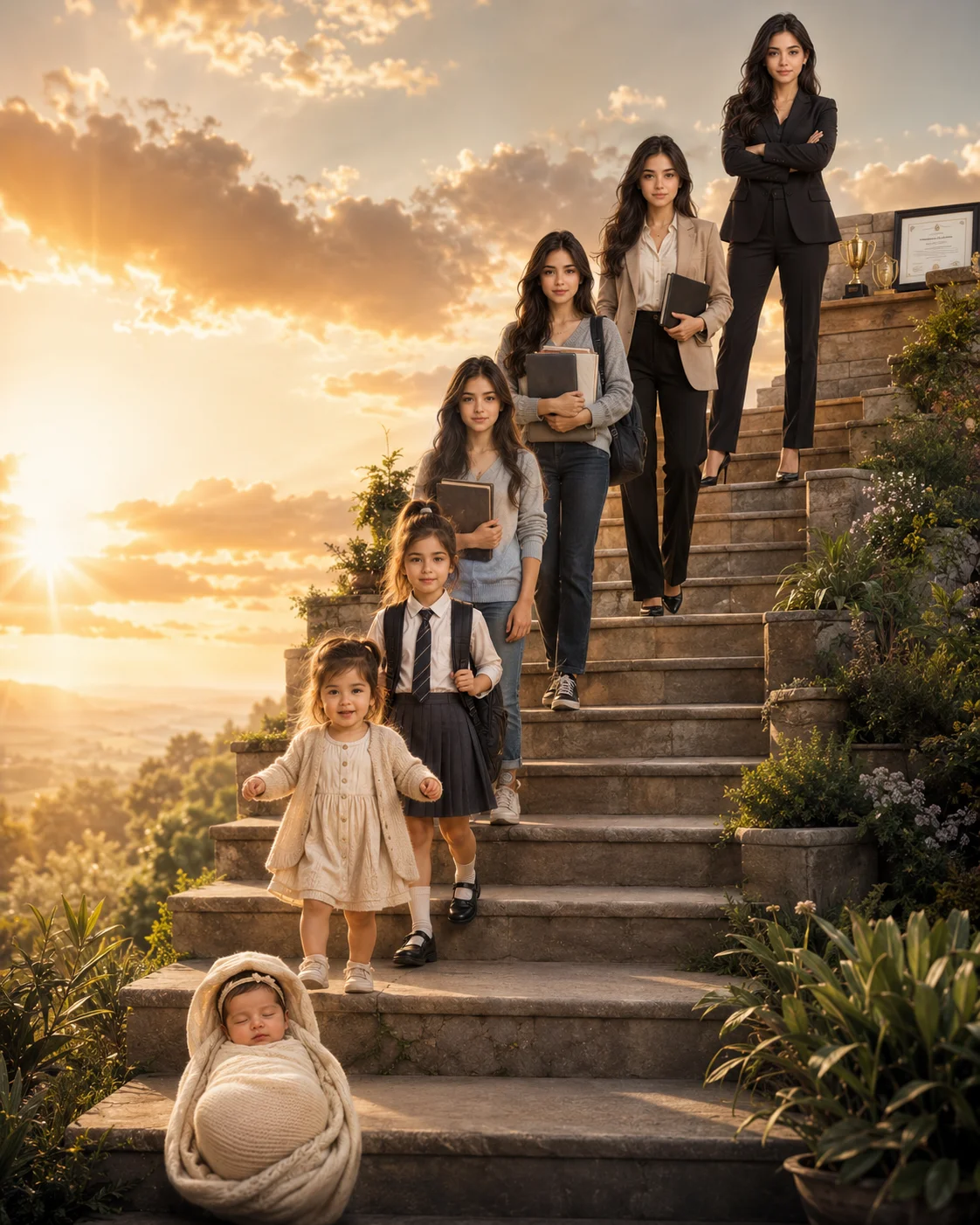
Inaugurate your website's celebratory category with this emotionally resonant, master-tier age progression timeline prompt. Replicating premium editorial storytelling design, this composition masterfully sequences seven chronological life stages—from a swaddled infant up to a successful 35-year-old executive—climbing an elegant stone staircase. Bathed in a warm, hopeful golden hour sunrise, this template leaves dedicated blank spaces beside each figure, providing an exceptional framework for personalized birthday milestone posters, family legacy prints, or biographical brand graphics.
Identity preservationPhotorealistic outputEditorial lightingSocial-ready format
Aspect Ratio
Select before copying
Recommended: 4:5 — 4:5 vertical frame accommodates the text overlay and the subject without either element feeling cramped or cropped.
Rate this prompt
Be the first to rate
Free prompt — one-click copy, no login required
Visual Character
Lighting
Warm golden hour volumetric lighting with realistic tracking shadows, shot with an 85mm portrait lens effect, high-resolution, 4:5 aspect ra
Color
Background features a warm golden sunrise, soft clouds, and lush greenery, with clean empty spaces next to each figure for typography labels
Composition
Ultra-realistic cinematic storytelling portrait poster tracking a young man's age progression from infancy to adulthood across a single comp
Full Prompt
Best For
Custom milestone birthday posters (such as 30th or 40th celebrations)emotional corporate personal history timelinesfamily heritage book coversand high-engagement tribute graphics.
How To Use This Prompt
Step 01
Copy the prompt
Use the copy button above to grab the complete prompt with your selected aspect ratio.
Step 02
Open your AI tool
Use a generator that supports the input and reference-image features you need.
Step 03
Generate your image
Create variations, pick the best result, then download and use it in your content.
Common Output Problems
Issues you may encounter and how to fix them
The color palette shifts between generations, producing inconsistent results+
Why it happens
AI generators may interpret the color description with slight variations each time, especially combined with lighting.
Fix
Specify exact color values and verify consistency across 3-5 generations.
The Staircase visual element renders with inconsistent detail or quality across the composition+
Why it happens
AI generators may interpret the Staircase concept with varying fidelity, producing inconsistent visual quality.
Fix
Specify the exact Staircase visual style and regenerate 3-5 times to select the most consistent result.
Customize This Prompt
Adapt these elements to fit your vision
Replace the golden hour lighting with cool blue-hour tones for a more moody, twilight atmosphere.
Remove the laptop for a cleaner, less accessorized look, or swap it for a different style to match your branding.
Which AI Tools Can I Use?
This prompt works with popular AI image generators.
Links to official tool websites. Not a claim that this prompt was tested in every tool or model version.
Frequently Asked Questions
Quick answers before you copy this prompt
Do I need to upload a reference photo to use this prompt?+
Yes, this prompt is designed for reference-image workflows. Upload a clear, well-lit photo of the subject. If you remove the identity-preservation instructions, the model will generate a new face instead.
Why does the text in the generated image look wrong or misspelled?+
AI image generators struggle with text rendering. Keep text to 1-3 words maximum, use simple fonts, and add "clean sharp text, no placeholder characters" to improve accuracy. For perfect text, consider adding it in post-processing.
What aspect ratio works best for this composition?+
4:5 is recommended for Instagram feeds and portrait-style layouts. Use 1:1 for profile pictures or square-format social posts. 9:16 works for Stories and Reels covers, but may crop important composition elements.
The skin looks too smooth or artificial. How do I make it more realistic?+
Add "natural skin texture with visible pores, subtle imperfections, realistic skin tone variation" to the prompt. Avoid words like "flawless" or "perfect skin" which push models toward artificial smoothness.