By Abdul QudoosPublished May 11, 2026Updated Oct 23, 2026
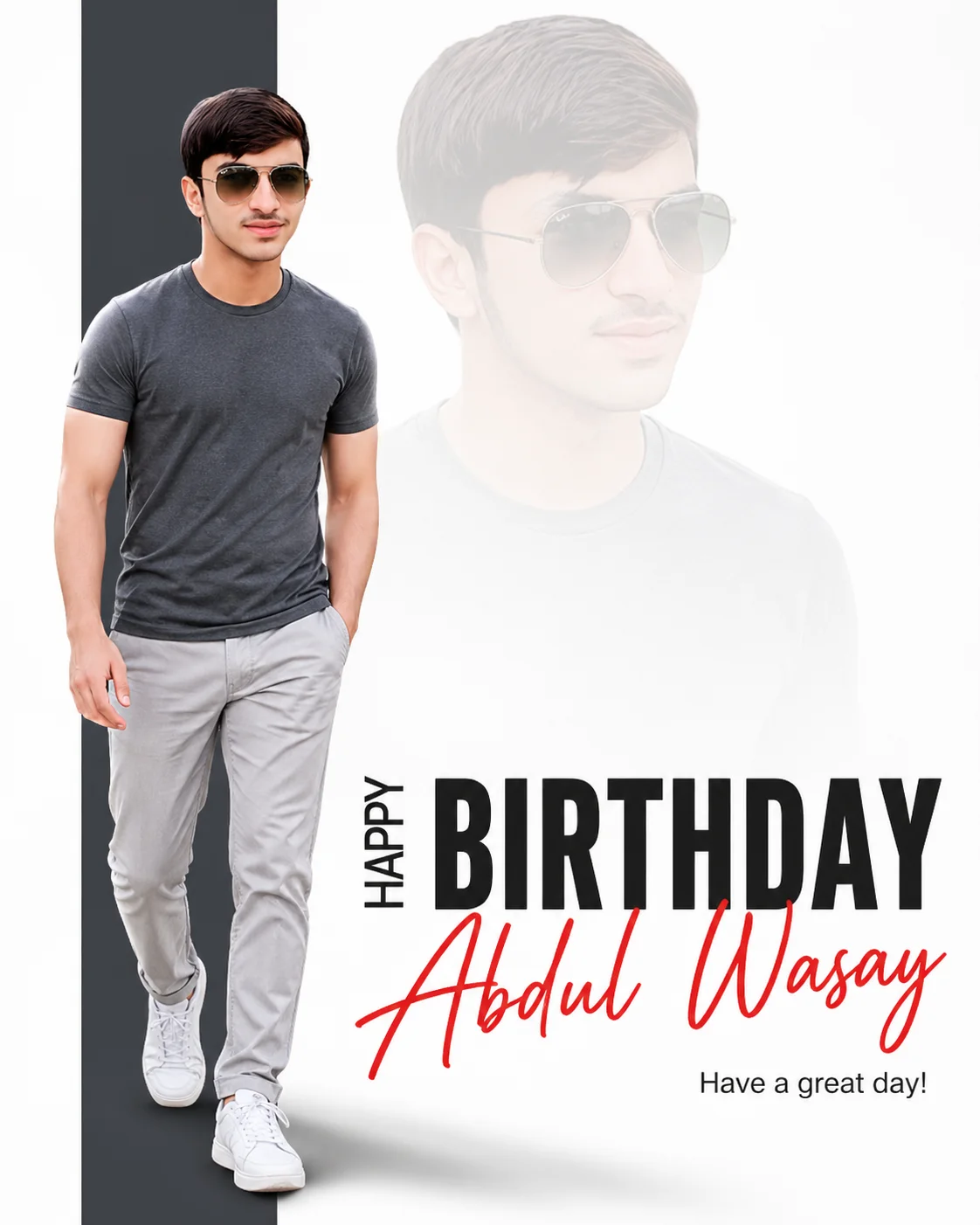
Minimalist birthday poster design of a man in a charcoal t-shirt and light chinos walking on a pure white background with bold black Happy Birthday text and a red cursive name

AI-edited example image for demonstration purposes.

Minimalist High-Key Birthday Prompt with Red Signature Text AI Prompt

Aspect Ratio

Select before copying
Recommended: 4:5 · 4:5 vertical frame provides space for both the main subject and the semi-transparent overlay without crowding either compositional element.

Copy this ready-to-use AI prompt and generate polished creator visuals in your favorite AI tool.

Identity preservationPhotorealistic outputEditorial lightingDepth of field
View Prompt
[SUBJECT: well-groomed clean-shaven man with aviator sunglasses at 18% left of frame] + [POSE: walking forward, right hand in trouser pocket, left leg forward in stride] + [OUTFIT: charcoal grey crew-neck t-shirt, light grey chinos, white athletic sneakers] + [IDENTITY LOCK: Use the provided reference image as the primary identity source. Preserve exact facial structure, bone structure, jawline, eye shape, nose shape, lips, hairline, and proportions. Do not alter identity. ] + [FACE CONSISTENCY MODE: Strict. Maintain 95–100% facial similarity to the reference image. No stylization or reinterpretation of facial features. ] + [REFERENCE PRIORITY: Face > everything else. If any conflict occurs, preserve the face from the reference image. ] + [HAIR & FACIAL HAIR LOCK: Match the reference image exactly. No beard, no stubble, no added facial hair. ] + [EXPRESSION LOCK: Neutral/confident expression matching reference. Do not change emotion drastically. ] + [AGE & ETHNICITY LOCK: Keep same age range, skin tone, and ethnicity as reference image. ] + [DETAIL PRESERVATION: Preserve skin texture and facial asymmetry from the reference image. Avoid smoothing or beautification changes. ] + [SHADOW COMMANDS: Render a realistic soft-edged drop shadow cast onto the white background toward the 4 o'clock position; include a sharp, dark ambient occlusion contact shadow directly beneath the sneakers for a grounded effect] + [LAYER 1: Sharp foreground subject on left overlapping a dark vertical bar; Bottom-right features a bold graphic text layer] + [TEXT COMMANDS: Render ONLY the following exact text — "HAPPY" vertically, "BIRTHDAY" in large bold black sans-serif caps; "Abdul Wasay" in bright crimson red cursive across the lower half; bottom-right sub-text: "Have a great day!". Do not generate any placeholder or lorem ipsum text. ] + [LAYER 2: Larger transparent ghosted subject at 52% center, 30% opacity, facing 45 degrees right, fading softly into the white background] + [LAYER 3: Minimalist pure white background with a dark grey vertical column at top-left] + [BLENDING: Heavy gradient feathering on ghost layer; clean vector-style edges on all elements] + [LIGHTING: Soft diffused 5500K studio light from 11 o'clock direction, creating subtle rim lighting on the left arm] + [COLOR GRADE: High-key, high contrast, neutral skin tones, desaturated clothing with high-saturation red text accent] + [CAMERA SPECS: 85mm lens, f/8, ultra-sharp focus, photorealistic texture]. Photorealistic, quality, cinema grade, no watermark, no logos. Shot on Nikon Z9, 50mm f/1.4 lens, f/2.0 aperture, warm studio lighting with bokeh background, vibrant color grade, celebratory mood, photorealistic, high-resolution, aspect ratio 4:5

About this Minimalist High-Key Birthday Prompt with Red Signature Text AI prompt

Most birthday graphics shout. This minimalist high key birthday prompt whispers, and that is why it looks expensive. A well groomed man in a charcoal tee and light chinos walks forward across a pure white frame while the design does the celebrating: HAPPY written vertically, BIRTHDAY in huge black capitals, and the birthday person's name swept across the lower half in bright crimson cursive, with a ghosted second portrait fading into the white behind him. It is part photograph, part poster, and entirely intentional.

This prompt is written like a design brief, in locked blocks for identity, hair, expression, shadows, and text, and that structure is its strength. The identity locks hold the face at near total similarity to your reference photo, while the text commands tell the generator exactly which words to render and forbid placeholder text. Named text is where AI images usually fall apart, so use a tool with elite text rendering such as Ideogram (https://ideogram.ai), and remember to replace the sample name inside the text commands with the real birthday name before you generate.

It is built for birthday posts, story graphics, and printed wishes that look professionally designed. You will find more occasions in our celebrations collection (https://www.aqprompts.com/tools/ai-image-prompts/celebrations), and if you want the same person in a scene instead of a poster, start from the main image prompts library (https://www.aqprompts.com/tools/ai-image-prompts).

Recommended tool: Ideogram

This design stands or falls on its words, and Ideogram renders exact text, including long names and mixed vertical and horizontal layouts, more reliably than any other generator in this class. Gemini is the backup choice, with strong text and the best identity locking if the face matters more than the lettering.

How to use this prompt

  1. Copy the full prompt from this page.
  2. Edit only the text commands block: replace the sample name with the birthday person's name, spelled exactly as it should appear.
  3. Open Ideogram, attach a clear reference photo of the person, paste the edited prompt, and set the aspect ratio to 4:5 before generating.
  4. Read every word in the result before saving. If one letter of the name is wrong, regenerate rather than accepting it, because text errors are what viewers notice first.

Practical tips

  • Change the name, keep the locks. The only edit most people need is the name inside the text commands, written exactly as it should appear. Every lock block around it exists to protect your face and the layout, so leave them all in place.
  • Give text the best tool you have. If your usual generator garbles the cursive name, switch this one job to Ideogram or Gemini, whose in image text is far more reliable, rather than regenerating ten times and hoping.
  • Mind the ghost layer. The faded second portrait at low opacity adds depth, but if it starts competing with the main figure, lower its presence by repeating large, very faint, softly feathered edges in the layer description.

Prompt variations

Anniversary edition

replace HAPPY BIRTHDAY with HAPPY ANNIVERSARY, put two names in the crimson cursive, and add a second ghosted portrait of the partner.
Graduation poster

swap the headline to CLASS OF 2026 style wording with the graduate's name in cursive, and add a subtle laurel detail in the vertical bar.

Brand birthday

replace the personal name with a business name in the same crimson script and the walking portrait with the founder or product for a company anniversary post.

Frequently asked questions

How do I put a different name on the design?

Find the text commands block in the prompt and replace the sample name inside the quotation marks with the name you want, keeping the bright crimson red cursive description around it. Change nothing else in that block.

Does the face really stay the same as my photo?

The identity and face consistency locks are written to hold similarity extremely high, and with a clear reference photo the result is recognizably the same person. Blurry or angled reference photos are the main cause of drift.

The name came out misspelled. What went wrong?

Long cursive text is the hardest render in AI imaging. Shorten nothing, spell the name in the prompt with extra care, and switch to Ideogram or Gemini for the attempt. Generating a few versions and keeping the correct one is normal for text designs.

Can I use this for occasions other than birthdays?

Yes. The layout is a general celebration poster. Change the headline words and the sub text line to suit anniversaries, graduations, Eid, or new year wishes, and keep the identity locks and layer structure untouched.
Tags

#birthday poster prompt#high key portrait#name text design#minimalist background#birthday wishes graphic#custom text prompt#clean aesthetic#celebration design#photo to poster#crimson signature

Explore More AI Image Prompts

Related Prompts