
Photo Prompt Generator: Create Better AI Photos With Copy-Paste Prompts

Photo Prompt Generator: Create Better AI Photos With Copy-Paste Prompts
Summarize this blog post with: ChatGPT | Perplexity | Claude | Grok
You've probably already asked ChatGPT to create a photo or transform an existing image, but getting the exact result you imagined can be harder than expected. A clear photo prompt gives ChatGPT specific visual direction, and this guide shows you how to build, customize, and improve prompts for realistic portraits, social-media photos, cinematic scenes, professional images, and photo edits.
Key Takeaways
A ChatGPT photo prompt generator turns an image idea or editing goal into clear instructions that ChatGPT can use to create or modify an image.
Effective photo prompts describe the purpose, subject, setting, action, and visual style while adding lighting, framing, and constraints when they matter.
Prompt templates make it easier to create consistent AI photos without writing every prompt from scratch.
Reference photos can help guide image generation and editing when you clearly explain which elements should change and which should remain unchanged.
Targeted revisions are usually more useful than rewriting an entire prompt when an AI-generated image misses one detail.
Photo prompt categories can cover realistic portraits, couples, fashion, headshots, Instagram photos, cinematic scenes, product photography, and photo editing.
Reusable prompts help creators develop a repeatable workflow for generating and refining AI images.
What Is a ChatGPT Photo Prompt Generator?
A ChatGPT photo prompt generator is a method or tool that turns an image idea into clear instructions for creating or editing a photo with ChatGPT.
Instead of starting with a vague request such as “Make me a professional photo,” you can describe the subject, pose, environment, lighting, composition, clothing, mood, and desired visual style.
For example, a basic request might become:
“Create a realistic professional portrait of a young man wearing a dark navy suit in a modern office, photographed with soft window light and a shallow depth of field. Use a natural expression, realistic skin texture, and a clean editorial composition.”
The second prompt gives ChatGPT much more useful visual information.
OpenAI's current image-generation guidance says effective prompts do not need to be excessively long. In many cases, one to three clear sentences can provide enough direction, especially when the prompt identifies the purpose, subject, action, setting, and visual style.
How Does a ChatGPT Photo Prompt Generator Work?
A photo prompt generator works by converting a broad creative idea into a structured visual brief.
For example, if your idea is “I want a cinematic beach portrait,” the generator can expand it into details such as:
Subject and appearance
Pose and expression
Beach environment
Time of day
Lighting direction
Camera framing
Clothing
Color palette
Cinematic mood
Aspect ratio
This approach gives ChatGPT explicit information instead of forcing it to guess important visual details.
What Is the Difference Between a Prompt Generator and a Prompt Library?
A prompt generator creates or transforms prompts based on your requirements, while a prompt library provides already-written prompts that you can copy and use.
For example, a prompt library might contain 20 ready-made cinematic portrait prompts. A generator lets you specify "male portrait, black jacket, rainy Tokyo street, nighttime, 9:16" and produce a customized prompt. If you'd rather browse existing options, check out this collection of AI image prompts.
Why Does a ChatGPT Photo Prompt Generator Matter?
A ChatGPT photo prompt generator matters because structured visual instructions reduce ambiguity and make it easier to communicate the image you actually want.
For example, “Create a beautiful Instagram portrait” leaves many decisions open, including the subject's pose, background, lighting, clothing, camera angle, and mood. A structured prompt can define those elements before generation begins.
OpenAI recommends being clear and descriptive rather than relying on clever or vague wording. For instance, specifying “soft natural light from a window on the left” provides more useful direction than simply requesting “beautiful lighting.” Why Is Specificity Important in AI Photo Prompts?
Specificity gives the image model more information about the intended visual result.
For example, compare:
Vague:
Create a luxury fashion photo.
Specific:
Create a high-end editorial fashion portrait of a woman wearing a structured black blazer in a minimalist concrete studio, with directional side lighting, subtle shadows, muted neutral tones, and a magazine-style composition.
The second version communicates a recognizable creative direction.
That does not mean every prompt should become extremely long. Useful detail is more important than unnecessary detail.
Why Do Reference Photos Improve Some AI Photo Workflows?
Reference photos provide visual information that text alone may not fully communicate.
ChatGPT Images can create new images and edit existing images. Users can upload an image and describe the desired changes, or select a specific area for editing.
For example, you might upload a portrait and request:
“Change the background to a luxury hotel lobby. Keep the person's face, hairstyle, clothing, pose, and overall composition unchanged.”
This establishes both the change and the elements to preserve.
How Do You Create a ChatGPT Photo Prompt Step by Step?
Creating a ChatGPT photo prompt involves defining the desired result first and then specifying the subject, scene, composition, lighting, style, and important details that should remain consistent.
Use the following process when creating your own prompts.
1. Define the Goal of the Photo
First, tell ChatGPT what you are trying to create.
Your goal could be:
Instagram profile picture
Professional headshot
Fashion editorial
Couple portrait
Wedding photograph
Cinematic scene
Product photograph
Travel portrait
Photo restoration
Background replacement
For example:
Create a professional LinkedIn headshot.
This establishes the basic purpose.
2. Describe the Main Subject
Second, describe who or what should appear in the image.
Include useful characteristics such as:
Age range
Gender when relevant
Clothing
Hair
Expression
Pose
Physical characteristics that matter to the image
For example:
A young man with short dark hair wearing a charcoal suit and white shirt, looking confidently toward the camera.
The description should focus on details that actually affect the intended image.
3. Describe the Setting
Third, explain where the photograph takes place.
For example:
Place the subject inside a modern glass office overlooking a city skyline at sunset.
A setting gives the image context and creates opportunities for environmental details.
4. Specify Lighting
Fourth, describe the lighting when it matters.
Useful descriptions include:
Soft window light
Golden-hour sunlight
Dramatic side lighting
Overcast daylight
Studio lighting
Warm ambient lighting
Neon nighttime lighting
For example:
Use soft natural window light from the left side with gentle shadows across the face.
OpenAI's guidance specifically recommends concrete descriptions of lighting instead of vague phrases.
5. Define Composition and Framing
Fifth, explain how you want the subject framed.
Common choices include:
Composition | Typical use |
|---|---|
Close-up | Portraits and profile photos |
Head and shoulders | Professional headshots |
Medium shot | Fashion and lifestyle |
Full body | Fashion and editorial |
Wide shot | Travel and environmental scenes |
Over-the-shoulder | Cinematic storytelling |
For example:
Use a medium close-up composition with the subject slightly off-center and enough negative space on the right.
6. Add the Visual Style
Sixth, explain the visual direction.
You might request:
Photorealistic
Editorial
Cinematic
Minimalist
Vintage
Documentary
Luxury fashion
Street photography
Film-inspired
For example:
Use a premium editorial photography style with realistic skin texture and subtle cinematic color grading.
7. Add Important Constraints
Finally, tell ChatGPT what must not change or what should be avoided.
For photo editing, this can be especially useful:
Keep the person's facial features and identity unchanged. Change only the background and lighting.
OpenAI recommends explicitly stating what should change and what should stay the same when editing existing images.
What Is the Best Formula for a ChatGPT Photo Prompt?
A practical ChatGPT photo prompt formula is Goal + Subject + Action/Pose + Setting + Appearance + Lighting + Composition + Style + Constraints + Output Format.
You can use this reusable template:
Create a [goal] featuring [subject] [pose/action] in [setting]. The subject is wearing [clothing/appearance details]. Use [lighting] with [composition/framing]. Apply a [visual style] aesthetic with [important details]. Keep [elements to preserve] unchanged. Use a [aspect ratio] composition.
For example:
Create a realistic Instagram portrait featuring a young woman standing beside a vintage car on a quiet city street at sunset. She is wearing a cream blazer and black trousers with natural loose hair. Use warm golden-hour backlighting, shallow depth of field, and a medium full-body composition. Apply a premium cinematic editorial style with realistic skin texture and subtle film grain. Use a vertical 4:5 composition.
This formula works because it separates the creative goal from the visual specifications.
How Can You Turn a Simple Idea Into a Better Photo Prompt?
Start with the simplest version of your idea and expand only the details that matter.
Basic idea:
Make a cool photo of a man in the city.
Improved prompt:
Create a cinematic street portrait of a young man wearing a black leather jacket, standing on a rainy downtown street at night. Use reflections from neon signs, soft rim lighting, realistic skin texture, shallow depth of field, and a moody editorial photography style.
The second prompt gives the image a specific visual direction without requiring dozens of technical parameters. For more examples like this, browse these realistic AI photo prompts.
What Are the Best ChatGPT Photo Prompts for Different Uses?
The best ChatGPT photo prompts depend on the image goal, because a professional headshot needs different instructions from a cinematic couple photograph.
Realistic Portrait Prompt
Create an ultra-realistic portrait of a young woman with long dark wavy hair wearing a minimalist black blazer. She is standing beside a large window in a modern apartment, looking naturally toward the camera. Use soft diffused daylight, realistic skin texture, subtle facial detail, shallow depth of field, and premium editorial photography.
Professional Headshot Prompt
Create a professional corporate headshot of a confident young man wearing a navy suit and white shirt. Use a clean neutral studio background, soft front lighting, natural skin texture, subtle shadows, realistic proportions, and a polished editorial photography style. Frame the image from the chest upward.
Instagram Portrait Prompt
Create a stylish Instagram portrait of a young woman walking through a modern city street during golden hour. She is wearing a cream oversized blazer, white top, and sunglasses. Use warm sunlight, natural movement, realistic skin texture, shallow depth of field, and a premium lifestyle photography aesthetic. Compose the image vertically in 4:5.
Check out this aesthetic AI prompts for Instagram guide.
Create a cinematic portrait of a young man standing beneath a streetlight on a rainy night. Use deep shadows, wet pavement reflections, subtle blue and amber practical lights, realistic skin texture, shallow depth of field, and dramatic film-style composition.
Check out these cinematic AI image prompts.
Couple Photo Prompt
Create a realistic romantic portrait of a young couple walking together through a softly illuminated city street at dusk. Keep their facial features natural and recognizable, use candid body language, warm ambient lighting, shallow depth of field, realistic clothing textures, and a premium lifestyle photography style.
Fashion Editorial Prompt
Create a high-end fashion editorial photograph of a model wearing a structured black outfit in a minimalist architectural setting. Use dramatic directional lighting, strong geometric shadows, subtle neutral colors, realistic fabric texture, sophisticated posing, and a luxury magazine photography aesthetic.
Wedding Photo Prompt
Create an elegant cinematic wedding photograph of a newlywed couple standing outdoors after sunset. Use warm decorative lights, soft romantic illumination, natural expressions, realistic clothing details, subtle background bokeh, and a refined editorial wedding photography style.
Photo Editing Prompt
Edit the uploaded portrait by replacing the background with a modern luxury hotel interior. Keep the person's face, hairstyle, clothing, body proportions, pose, and overall composition unchanged. Match the new lighting to the original subject and create realistic shadows.
How Do You Use ChatGPT to Edit an Existing Photo?
Editing an existing photo with ChatGPT involves uploading the image and clearly stating what should change and what should stay the same.
ChatGPT Images supports both new image creation and editing of existing images. Users can upload an image, describe an edit directly, or select an area and specify the change.
How to Write a Photo Editing Prompt
A reliable editing structure is:
Change [specific element]. Keep [important elements] unchanged. Match [lighting/style/perspective] to the original image.
For example:
Change the background from the bedroom to a luxury hotel lobby. Keep the person, facial features, hairstyle, clothing, pose, camera angle, and image composition unchanged. Match the lighting and shadows naturally to the new environment.
This is more precise than simply saying:
Change my background.
What Can You Ask ChatGPT to Change?
Depending on the image and desired result, you can request changes such as:
Background
Clothing
Lighting
Color treatment
Objects
Environment
Image composition
Text
Style
Specific selected areas
ChatGPT's current image tools also support different aspect ratios, and users can select an aspect ratio or describe the desired format in the prompt. To see this in action, check out these ChatGPT photo editing prompts.
How Do You Make ChatGPT Photo Prompts More Realistic?
Making ChatGPT photo prompts more realistic involves describing specific visual characteristics rather than relying on generic quality words.
For example, instead of:
Make a realistic woman.
Try:
Create a natural portrait of a young woman with realistic skin texture, subtle facial asymmetry, natural flyaway hairs, soft window light, realistic fabric texture, and shallow depth of field.
The second prompt identifies details that contribute to a photographic appearance.
Use Natural Lighting Descriptions
Lighting has a major effect on photographic realism.
Instead of saying:
Make the lighting beautiful.
Try:
Use soft afternoon window light coming from the left, with gentle shadows on the opposite side of the face.
Concrete lighting instructions communicate a specific visual condition.
Describe Materials and Textures
Texture can make an image feel more photographic.
For example:
Preserve visible fabric weave, natural skin texture, individual hair strands, subtle reflections on glass, and realistic leather grain.
These details give the model more information about the physical appearance of objects.
Avoid Overloading the Prompt
Longer does not automatically mean better.
OpenAI's current guidance states that clarity is more effective than clever phrasing, and many image prompts can work well in only one to three clear sentences.
A focused 80-word prompt can therefore be more useful than a 400-word description containing conflicting instructions.
How Do You Fix a ChatGPT Image That Does Not Match Your Prompt?
The best way to fix a ChatGPT-generated image is usually to make one small, targeted revision at a time.
For example, if the lighting is wrong but everything else looks good, say:
Keep the same composition, subject, clothing, and background. Make the lighting softer and warmer, with natural golden-hour sunlight coming from the right.
Do not immediately rewrite every part of the original prompt.
OpenAI recommends iterative refinement because direct, specific feedback is easier for the model to follow than broad reactions.
Common Photo Prompt Problems and Fixes
Problem | Better instruction |
|---|---|
Face looks different | “Preserve the person's recognizable facial features.” |
Background is generic | Describe the exact location and environmental details. |
Lighting looks artificial | Specify the light source and direction. |
Pose is wrong | Describe the position of the head, arms, hands, and body. |
Clothing is incorrect | Specify garment type, material, color, and fit. |
Composition is wrong | State the framing and subject position. |
Too many unwanted elements | Explicitly state what should not be added. |
The goal is to diagnose the specific problem and revise only that part.
What Are the Best Tools for Creating ChatGPT Photo Prompts?
ChatGPT itself can generate, refine, and edit images, while prompt libraries and specialized prompt generators can help users discover ideas faster.
ChatGPT Images
ChatGPT Images is the primary tool for users who want to create or edit images directly inside ChatGPT. Current ChatGPT Images supports image creation, existing-image editing, aspect-ratio controls, templates, and other image workflows.

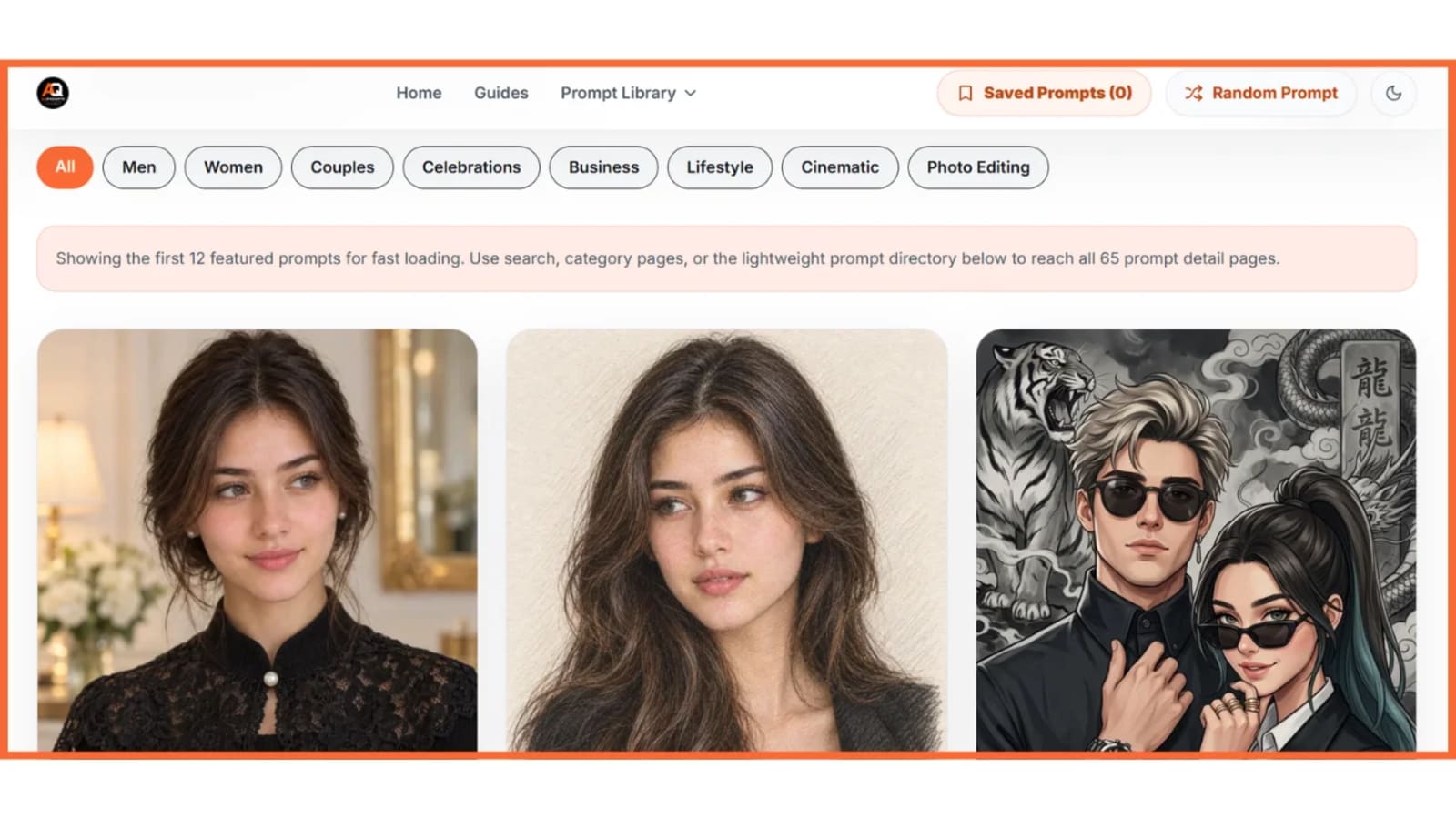
AQPrompts
AQPrompts provides a searchable library of copy-paste AI image prompts for creators who want ready-made ideas instead of writing every prompt from scratch.
You can use prompt libraries to discover concepts, then customize the wording for your own subject, clothing, location, composition, and preferred aspect ratio.
Other AI Prompt Generators
Several third-party tools now provide structured interfaces for turning image concepts into prompts. For example, prompt-generation tools commonly let users specify the subject, style, lighting, background, aspect ratio, and other parameters before generating a ready-to-paste instruction.

Use third-party generators for inspiration and structured prompt creation, but verify the generated prompt against the capabilities and workflow of the image tool you actually plan to use.
How Can You Build a Reusable ChatGPT Photo Prompt Workflow?
A reusable photo-prompt workflow involves choosing a goal, generating a structured prompt, creating the image, identifying one problem, and making targeted revisions.
Use this five-step workflow:
Choose the goal — Decide whether you need a portrait, headshot, fashion image, couple photo, product image, or edit.
Build the prompt — Define the subject, scene, composition, lighting, and style.
Generate the image — Run the prompt in ChatGPT Images.
Inspect the result — Identify the single most important mismatch.
Refine one element — Ask for a targeted correction.
This workflow prevents endless prompt rewriting.
Save Your Successful Prompts
Successful prompts should become reusable templates.
For example, save:
Subject:
Clothing:
Location:
Pose:
Lighting:
Composition:
Style:
Aspect ratio:
Elements to preserve:
You can then replace individual fields without rebuilding your entire prompt.
Build Prompt Collections Around Real Use Cases
Instead of saving hundreds of unrelated prompts, organize them by purpose:
Portraits
Couples
Weddings
Fashion
Professional headshots
Instagram
Cinematic
Travel
Product photography
Photo editing
This makes your prompt library easier to reuse. For a ready-made starting point, check out this ChatGPT prompts for photos guide.
What's Next? How Can You Create Better ChatGPT Photos Today?
The fastest way to improve your ChatGPT photo prompts is to start with one clear image goal and add only the visual details that materially affect the result.
Begin with this template:
Create a [type of photo] featuring [subject] in [setting]. The subject is [appearance/clothing/pose]. Use [lighting] and [composition]. Apply a [style] photography aesthetic. Keep [important elements] unchanged. Use a [aspect ratio] composition.
Then customize it for your project.
For example:
Create a realistic 4:5 Instagram portrait featuring a young man wearing a black jacket in a rainy downtown street at night. Use soft neon reflections, natural skin texture, shallow depth of field, and cinematic editorial photography. Keep his facial features recognizable and natural.
Next, generate the image and identify one thing you would change.
If the background works but the lighting does not, change only the lighting. If the subject works but the pose does not, revise only the pose.
For more inspiration to start from, browse this collection of AI image prompt ideas.
Conclusion
A ChatGPT photo prompt generator turns a simple visual idea into a structured instruction that can guide AI image creation or editing.
The most useful prompts do not depend on complicated wording. They clearly communicate the purpose, subject, setting, pose, lighting, composition, style, and important constraints.
ChatGPT's current image-generation guidance also emphasizes a simple principle: describe what matters, generate an image, and refine the specific parts that need improvement.
You can start with the reusable formula in this guide, test it with one photo idea, and save the versions that produce useful results. Over time, those successful prompts can become your own library of repeatable templates.
For ready-to-use inspiration, explore AI image prompts and adapt the ideas to your own photos, creative projects, and social-media content.
Written by The AQPrompts Team — AI prompt researchers and content creators focused on practical AI image-generation and prompting workflows.
Reviewed by Abdul Qudoos — reviewed for AI image-generation accuracy, practical prompting guidance, and current ChatGPT image-editing capabilities.
Disclaimer: This article was initially drafted using AI assistance. However, the content has undergone thorough revisions, editing, and fact-checking by human editors and subject matter experts to ensure accuracy.
Learn how we review our guides →
Topics:
Abdul Qudoos creates and reviews AQPrompts guides and prompt-library content for creators using AI image tools.
