ChatGPT vs Gemini for Image Generation: Which Is Better? (+15 Prompts)

ChatGPT vs Gemini for Image Generation: Which One Should You Actually Use? (+15 Ready-to-Use Prompts)
By the Abdul Qudoos · Last verified: September 2026
ChatGPT and Gemini will both confidently hand you an image the question is which one you'll actually reach for once you know what each is good at. This guide breaks down both platforms model-by-model, compares their free tiers honestly, and hands you 15 tested prompt templates you can copy straight into either app.
Last verified: September 2026. Both platforms have shipped new image models multiple times this year alone OpenAI alone released three updates between April and September — so treat the specifics below as directional and always check the in-app banner or official docs for your exact current model and allowance.
Quick Verdict
Neither tool wins everything. ChatGPT's current image model, GPT Image 2.5 (branded in-app as ChatGPT Images 2.5), is the safer pick when you need a prompt followed precisely layouts, mockups, and complex multi-object scenes come out cleaner and with fewer stray artifacts. Gemini's Nano Banana Pro pulls ahead the moment text needs to look right inside the image, and its faster Flash-based models make it the better tool for quick iteration and free-tier volume.
Category Winner Text-in-image accuracy Gemini (Nano Banana Pro) Photorealism ChatGPT (GPT Image 2.5) UI mockups & layout precision ChatGPT Free tier accessibility Gemini Generation speed Gemini

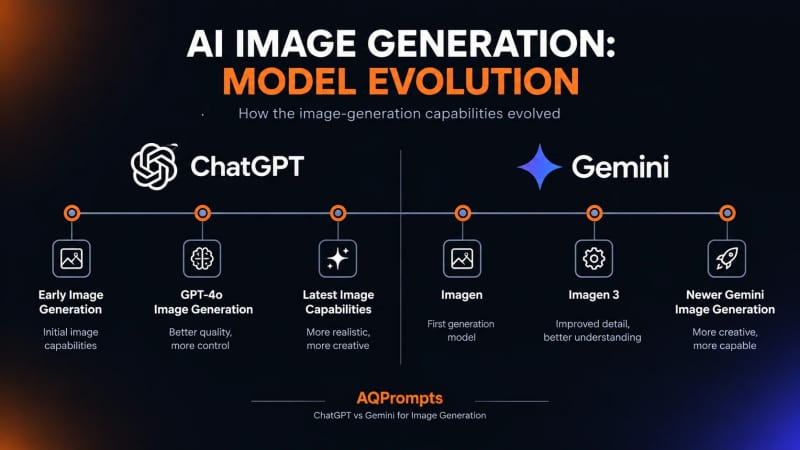
Model Names Are Confusing — Here's the Decoder
Both companies rename things constantly, so here's what's actually running under the hood in September 2026.
ChatGPT side
Name you see What it means DALL·E 2 / DALL·E 3 Retired May 12, 2026. No longer available anywhere in ChatGPT. GPT Image 1 (gpt-image-1) The original native image model that replaced DALL·E in ChatGPT. GPT Image 1.5 (gpt-image-1.5) Released December 2025. Faster and more prompt-accurate than the original now superseded. GPT Image 2 (gpt-image-2) Released April 21, 2026 as ChatGPT Images 2.0. Added flexible image sizing and stronger instruction-following. Also now superseded. GPT Image 2.5 (gpt-image-2.5-flare / gpt-image-2.5-sunburst) The current flagship, released September 8, 2026 as ChatGPT Images 2.5. Flare is the fast default for everyday and high-volume work; Sunburst trades speed for precision on premium edits. Sharper detail, more natural lighting, better multi-turn edit consistency, and up to 50% faster than Images 2.0.
Gemini side
Name you see What it means Nano Banana Nickname for Gemini 2.5 Flash Image the original fast, lightweight image model. Nano Banana 2 Gemini 3.1 Flash Image, launched February 26, 2026. Now the default free-tier model across the Gemini app, Google AI Mode, and Google Lens. Faster and cheaper than Pro while still reaching 4K. Nano Banana Pro Gemini 3 Pro Image (gemini-3-pro-image). The premium "thinking" model it plans out composition before rendering, and leads on text rendering and brand/logo accuracy. This is the one gated hardest on free accounts. Imagen 4 Google's older image family, mostly reached now through the API/Vertex AI rather than the consumer Gemini app.
Free Tier & Limits: The Honest Comparison
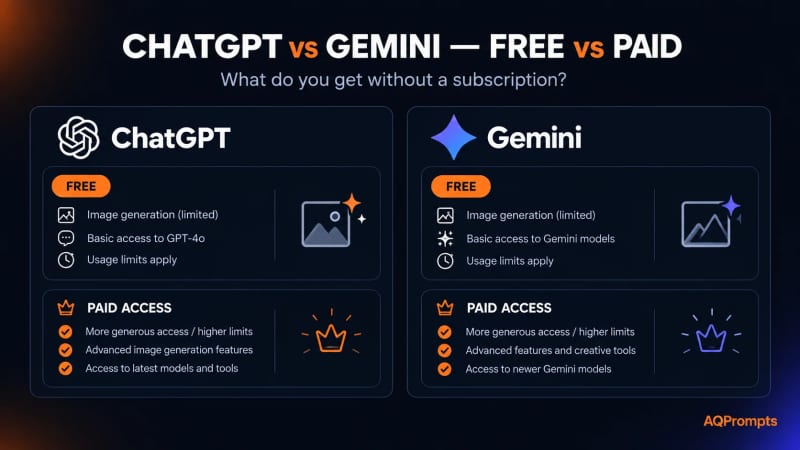
This is where things get genuinely messy, and any article that gives you one clean permanent number is oversimplifying. Both OpenAI and Google explicitly reserve the right to change limits without notice based on server load, and access rules have already shifted more than once in 2026.
ChatGPT
Native image generation is available on every ChatGPT tier, including Free OpenAI's own announcement confirms Images 2.5 is "available to all ChatGPT... users." The free tier is just tightly capped: community reports and OpenAI's rollout messaging put it around 2–3 images per rolling 24-hour window (the clock starts from your first generation, not midnight). OpenAI doesn't publish one official fixed number, so treat the in-app counter as the source of truth for your account.
Plus ($20/mo): community reports put usage around 40–50 generations per rolling 3-hour window, working out to roughly 150–200 images a day under ideal timing.
Pro ($200/mo): OpenAI describes this tier as offering "unlimited and faster image creation," subject to standard abuse guardrails. Team and Enterprise sit even higher, described as "virtually unlimited" check your admin console for your plan's exact allowance, since OpenAI doesn't publish one fixed number across all regions.
Gemini
Free plan: Google's own help pages confirm limits "may change without notice" and don't commit to one hard number. Reported real-world allowances for the standard Nano Banana / Nano Banana 2 model have ranged anywhere from about 20 to 100+ images a day depending on when you check, with a much smaller separate daily allowance for Nano Banana Pro often just a handful of generations.
Google AI Plus / Pro / Ultra: paid tiers step the Nano Banana Pro daily cap up significantly at each level, with Ultra ($249.99/mo) sitting far above Plus and Pro.
Bottom line: both platforms now give you some free access, but the shape of that access differs. Gemini's free tier is roomier day-to-day for the standard Nano Banana models, while ChatGPT's free tier is capped tight (a few images a day) with its best output quality effectively unlocked at Plus. If you're already paying for ChatGPT Plus anyway, its numbers are simpler and more predictable to plan a content calendar around.
How We Approached This Comparison
We ran the same prompt, worded identically, through both ChatGPT (GPT Image 2.5) and Gemini (Nano Banana Pro and Nano Banana 2) across the fifteen creative categories below, then compared which platform followed the instruction subject, composition, text, and aspect ratio most faithfully on the first try. Prompts that leaned on text rendering, brand consistency, or layout precision were weighted more heavily toward those specific strengths rather than generic "which looks nicer" preference.

The Prompt Pack: 15 Ready-to-Use Prompts by Category
Copy any of these directly. Where one platform clearly has the edge for that category, it's tagged but both are worth trying since results vary by exact wording.

1. Social Media Graphics (Instagram / LinkedIn)
Better on: Gemini (Nano Banana Pro) cleaner typography on carousel covers.
A minimalist Instagram carousel cover, soft cream background, bold black sans-serif headline text "5 MORNING HABITS", small subtext below "that changed everything", generous white space, subtle geometric shape accent in the corner, 4:5 aspect ratio.
Tip: state the exact headline text in quotes both models render literal quoted text more accurately than paraphrased instructions. For the ratio, set 4:5 directly on Gemini; on ChatGPT, describe it as a "tall Instagram-style crop" instead.
2. Product Photography / E-Commerce
Better on: ChatGPT (GPT Image 2.5) more convincing studio lighting and material texture.
Professional product photo of a matte ceramic coffee mug on a light gray seamless studio backdrop, soft top-left softbox lighting, subtle shadow beneath the mug, sharp focus, commercial e-commerce style, square crop.
Tip: name the exact material ("matte ceramic," "brushed aluminum") vague material words are where product shots fall apart.
3. Headshots & Avatars
Better on: Gemini faster turnaround, slightly less "AI sheen" on skin texture.
A natural, professional headshot of a person in their late 20s, soft neutral background, warm daylight from a window to the left, relaxed genuine smile, shot on a portrait lens with shallow depth of field, realistic skin texture, 4:5 portrait crop.
Tip: add "realistic skin texture" explicitly both models default to over-smoothing skin unless told otherwise. For the ratio, Gemini takes 4:5 as a direct parameter; on ChatGPT, just describe it as a "vertical portrait crop."
4. UI Mockups & Wireframes
Better on: ChatGPT sticks to layout instructions more consistently.
A clean mobile app UI mockup for a habit-tracking app, home screen showing a progress ring at the top, three habit cards below with icons and checkmarks, bottom navigation bar with four icons, soft purple and white color scheme, flat modern design, 9:16 mobile screen ratio.
Tip: describe the layout top-to-bottom, section by section both models follow spatial order better than a jumbled description. On Gemini, set the ratio to 9:16 directly for a true phone-screen shape; on ChatGPT, describe it as a "tall vertical phone-screen frame."
5. Logos & Brand Icons
Better on: Gemini (Nano Banana Pro) cleaner vector-style shapes and more legible lettering.
A minimalist logo for a coffee brand called "Roast & Co," simple line-art coffee cup icon, modern serif wordmark below the icon, black and white, flat vector style, centered on a plain white background, 1:1 square format.
Tip: always specify "flat vector style" or "flat design" without it, both models default to a rendered 3D look that's unusable as an actual logo. Set the ratio to 1:1 on Gemini for an icon-safe square; on ChatGPT, describe it as "centered on a square canvas."
6. Text-Heavy Posters / Headers
Better on: Gemini (Nano Banana Pro) this is its strongest category by a clear margin.
A vintage travel poster for "Kyoto, Japan," bold retro typography at the top reading "VISIT KYOTO", illustrated pagoda and cherry blossoms below, warm sunset color palette, subtitle text at the bottom reading "Where tradition meets tranquility", 2:3 poster proportions.
Tip: keep quoted text short even the strongest text-rendering models start dropping or mangling letters past 6-8 words. For the ratio, set 2:3 directly on Gemini; on ChatGPT, describe it as a "tall poster-shaped canvas."
7. Realistic Portraits / Scenes
Better on: ChatGPT fewer distortions on complex, multi-element scenes.
A photorealistic image of an elderly fisherman mending a net on a wooden dock at golden hour, weathered hands, detailed rope texture, soft warm backlighting, shallow depth of field, shot like a documentary photograph, 3:2 landscape ratio.
Tip: reference a shooting style ("documentary photograph," "editorial photo") it anchors realism far better than just saying "realistic." Add the ratio as a plain phrase on ChatGPT ("wide landscape frame"); on Gemini, set 3:2 directly.
8. Stylized / Illustration Art
Better on: Gemini faster iteration, good stylization on the first try.
A flat illustration in a modern editorial style of a person reading a book under a large tree, muted earthy color palette, subtle grain texture, simple geometric shapes, no outlines, calm and cozy mood, 4:5 ratio.
Tip: name a color palette by mood ("muted earthy," "pastel dreamy") instead of listing hex codes both models respond better to descriptive language here. For the ratio, set 4:5 directly on Gemini; on ChatGPT, describe it as a "tall portrait-oriented illustration."
9. Memes & Fun Content
Better on: ChatGPT better at keeping character expressions and text placement coherent for humor timing.
A comic-style single-panel meme image of a golden retriever wearing tiny glasses, sitting at a laptop with a serious expression, caption text at the top reading "Me pretending to work", flat bright colors, simple cartoon style, 1:1 square format.
Tip: put the caption text at the top or bottom explicitly leaving placement unspecified often results in text awkwardly overlapping the subject.
10. Event Flyers / Invitations
Better on: Gemini (Nano Banana Pro) handles multiple text blocks at different sizes more reliably.
A modern event flyer for a "Summer Rooftop Party," large bold title at the top, date and time text below reading "Sat, July 18 · 7 PM", venue name at the bottom "The Loft Downtown", warm sunset gradient background, minimal geometric confetti accents, 4:5 aspect ratio.
Tip: separate each text block onto its own described "line" in the prompt (title, then date, then venue) this mirrors how both models actually lay out multi-line text. For the ratio, set 4:5 directly on Gemini; on ChatGPT, describe it as a "tall flyer-shaped canvas."
11. Food Photography
Better on: ChatGPT (GPT Image 2.5) more convincing texture on steam, oil, and moisture.
A photorealistic overhead shot of a bowl of ramen with a soft-boiled egg, sliced pork belly, and scallions, steam rising gently, warm broth with visible oil droplets on the surface, natural window light from the side, shallow depth of field, wooden table background, food magazine editorial style, 1:1 square crop.
Tip: call out texture cues like "steam rising" and "oil droplets" explicitly small details like these separate convincing food photography from flat, waxy-looking renders.
12. Infographics & Data Visualization
Better on: Gemini (Nano Banana Pro) most reliable for multi-line labeled diagrams.
A clean infographic titled "The Water Cycle," four labeled stages arranged in a circular flow: "Evaporation", "Condensation", "Precipitation", "Collection", each with a simple flat icon, soft blue and white color scheme, thin connecting arrows between stages, minimal educational poster style, 4:3 aspect ratio.
Tip: keep each label to one or two words Nano Banana Pro handles short labeled diagrams far more reliably than dense paragraph text inside an infographic. Set the ratio to 4:3 directly on Gemini; on ChatGPT, describe it as a "wide educational poster shape."
13. Real Estate & Interior Photography
Better on: ChatGPT (GPT Image 2.5) more convincing depth and material realism in staged interiors.
A photorealistic interior photo of a bright modern living room, large windows with natural daylight, neutral beige sofa, wooden coffee table, potted plant in the corner, wide-angle real estate listing photography style, sharp focus throughout, 16:9 landscape ratio.
Tip: name the shooting style explicitly ("wide-angle real estate listing photography") without it, both models default to a narrower, portrait-lens framing that doesn't read as a listing photo.
14. Character & Mascot Concept Art
Better on: Gemini faster iteration for exploring multiple concept variations.
A friendly cartoon mascot character for a tech startup, a small round robot with big expressive eyes and a single antenna, holding a tablet, flat vector illustration style, bright orange and navy color palette, simple background, front-facing pose, 1:1 square format.
Tip: describe the pose explicitly ("front-facing," "three-quarter view") mascot prompts left vague often come back at an awkward angle that's hard to reuse across brand assets.
15. Business Card & Stationery Branding
Better on: Gemini (Nano Banana Pro) cleanest small-text legibility for print-style layouts.
A minimalist business card design for a graphic designer named "Sara Malik," name in bold modern sans-serif at the top left, title "Graphic Designer" in smaller text below, email "hello@aqprompts.com" in the bottom corner, thin geometric line accent, white background with a single black accent color, flat print design, 7:4 aspect ratio.
Tip: spell out every line of text in quotes exactly as you want it printed business card prompts pack in more small text than any other category here, so quoting discipline matters most.
The Prompt Formula Cheat Sheet
Both platforms respond well to the same underlying structure the difference is in phrasing, not order.
Subject → Style → Lighting → Composition → Aspect Ratio → Text Instructions → Negative Constraints
Subject: be specific about who/what, age, pose, and key details.
Style: name a genre or medium ("editorial photo," "flat illustration," "3D render").
Lighting: direction and quality ("soft window light from the left," "harsh studio flash").
Composition: camera angle, framing, depth of field.
Aspect ratio: on ChatGPT, describe it in words ("wide cinematic frame," "vertical portrait crop") since there's no dedicated ratio field. On Gemini, you can state the exact ratio as a short tag ("16:9," "9:16") and it reads it almost like a parameter.
Text instructions: always put literal text in quotes on both platforms.
Negative constraints: phrase these as plain instructions ("no extra fingers," "no watermark," "avoid text") neither platform uses a separate negative-prompt field the way older diffusion tools did.
Style Modifier Quick Reference
If you're not sure what to put in the "Style" slot, these anchor phrases have tested reliably on both platforms drop one in when your prompt feels too generic:
Photorealistic: "editorial photograph," "documentary photograph," "shot on a portrait lens"
Illustration: "flat vector illustration," "flat design, no outlines," "watercolor illustration"
3D/Product: "3D render, studio lighting," "isometric illustration"
Print/Poster: "vintage travel poster," "mid-century modern poster design"
UI/Digital: "isometric UI mockup," "flat modern app design"
One caveat: older diffusion-era boosters like "trending on artstation" or "8k, ultra detailed" do much less on ChatGPT and Gemini than they did on tools like Midjourney or Stable Diffusion both models respond more to a clear style reference than a vague quality booster.

Aspect Ratio & Technical Control
This is one of the more practical differences once you're actually producing content at volume.
ChatGPT (GPT Image 2.5) uses flexible image sizing rather than a fixed ratio selector you describe the general shape in words (square, portrait, landscape, or something more specific like "tall phone-screen frame") and the model generates to match. There's no dedicated ratio parameter the way Gemini has one.
Gemini's Nano Banana and Nano Banana Pro models expose a dedicated aspect ratio parameter with ten options: 1:1, 3:2, 2:3, 3:4, 4:3, 4:5, 5:4, 9:16, 16:9, and 21:9. If your workflow needs a specific Instagram (4:5), Reels/Story (9:16), or ultra-wide banner (21:9) format without cropping afterward, Gemini gets you there natively.
Example same prompt, two platforms:
On Gemini: "A minimalist coffee logo, flat vector style, black and white." → set the aspect ratio parameter to 1:1.
On ChatGPT: "A minimalist coffee logo, flat vector style, black and white, centered on a square canvas." → the ratio instruction has to live inside the sentence itself.
Practical takeaway: if your content calendar runs on precise, platform-specific dimensions, Gemini saves you a cropping step. If you only need "roughly square" or "roughly landscape" and care more about output quality, ChatGPT's word-based sizing isn't a real limitation.

Text Rendering Face-Off
Text-in-image used to be the weak point of every AI image generator, and it's still where the two platforms diverge most.
Short labels a single word, a logo wordmark, a 2-3 word headline render reliably on both platforms today. The gap opens up with longer text. Google's own benchmarks put Nano Banana Pro's text rendering accuracy meaningfully ahead of standard Flash-tier models, and it's specifically built to handle multi-language text, signage, and full sentences across 100+ languages at up to 4K resolution which is why it's the pick for posters, flyers, and infographics above.
Example test: prompting for a poster with a 6-word headline and a separate 8-word subheading. Gemini's Nano Banana Pro rendered both lines cleanly in one pass. ChatGPT got the short headline right consistently but occasionally dropped or warped a word in the longer subheading line still usable, but more likely to need a second generation.
Rule of thumb: anything longer than a short headline, lean Gemini (Nano Banana Pro specifically, not the base Nano Banana models). Anything short and paired with a complex photorealistic scene, either platform holds up fine.

What Creators Are Actually Saying
Pulling together recurring themes from creator testing and community discussion in 2026:
Complex, multi-object prompts — several independent side-by-side tests found ChatGPT producing fewer visual errors (garbled hands, broken objects, inconsistent lighting) than Gemini on prompts with a lot of moving parts, like detailed diagrams or busy scenes.
Speed and iteration — the recurring complaint about ChatGPT is wait time on complex prompts. Gemini's Flash-based models are consistently described as faster for quick drafts.
Free tier frustration — a common thread on both platforms' community forums is access and limits changing suddenly with no warning this year alone, ChatGPT's free-tier image caps have shifted more than once, and Gemini's Nano Banana Pro allowance has been reported dropping without notice during high-demand periods.
Text and branding — creators doing flyers, posters, and branded graphics increasingly favor Nano Banana Pro specifically for that use case, even when they use ChatGPT for everything else.
FAQ
Is ChatGPT or Gemini better for image generation? Neither wins outright ChatGPT (GPT Image 2.5) is stronger for photorealism and complex scene accuracy, while Gemini (Nano Banana Pro) leads on text rendering, brand/logo work, and free-tier accessibility for its standard models.
Can ChatGPT generate photos? Yes. ChatGPT generates images natively through GPT Image 2.5, available on every tier including Free though the free tier's daily allowance is tight (a few images per rolling 24 hours) compared to Plus and above.
Can Gemini generate photos? Yes. Gemini generates images through Nano Banana (Gemini 2.5 Flash Image), Nano Banana 2 (Gemini 3.1 Flash Image), and Nano Banana Pro (Gemini 3 Pro Image), all accessible from the free tier with varying limits.
What chatbot can generate images? Both ChatGPT and Gemini generate images natively inside their chat interfaces, alongside other tools like Midjourney, Grok, and various API-based platforms.
Which ChatGPT version creates images? As of September 2026, image generation runs on GPT Image 2.5 (ChatGPT Images 2.5), the successor to GPT Image 2, GPT Image 1.5, and the original GPT Image 1 that replaced DALL·E 3 across ChatGPT.
Final Verdict: Which One Should You Pick?

There's no single winner here it genuinely depends on what you're making.
Making Instagram carousels, flyers, or anything text-heavy? Go with Gemini and specifically Nano Banana Pro.
Need photorealistic product shots or detailed portrait scenes? ChatGPT's GPT Image 2.5 is the more reliable choice.
Building UI mockups or need a layout followed precisely? ChatGPT.
Iterating fast and want a roomier free daily allowance? Gemini's standard Nano Banana models are currently the more generous free option.
Want exact platform-specific aspect ratios without cropping? Gemini's native ratio selector wins.
Realistically, most creators end up using both Gemini for text-heavy and branded graphics or when working for free, ChatGPT for anything photorealistic or layout-sensitive once you're on a paid plan. Bookmark this page; we'll keep it updated as both platforms keep shipping new models.
Learn how we review our guides →
Topics:
Abdul Qudoos creates and reviews AQPrompts guides and prompt-library content for creators using AI image tools.