Professional Studio Double Exposure | South Asian Man Portrait
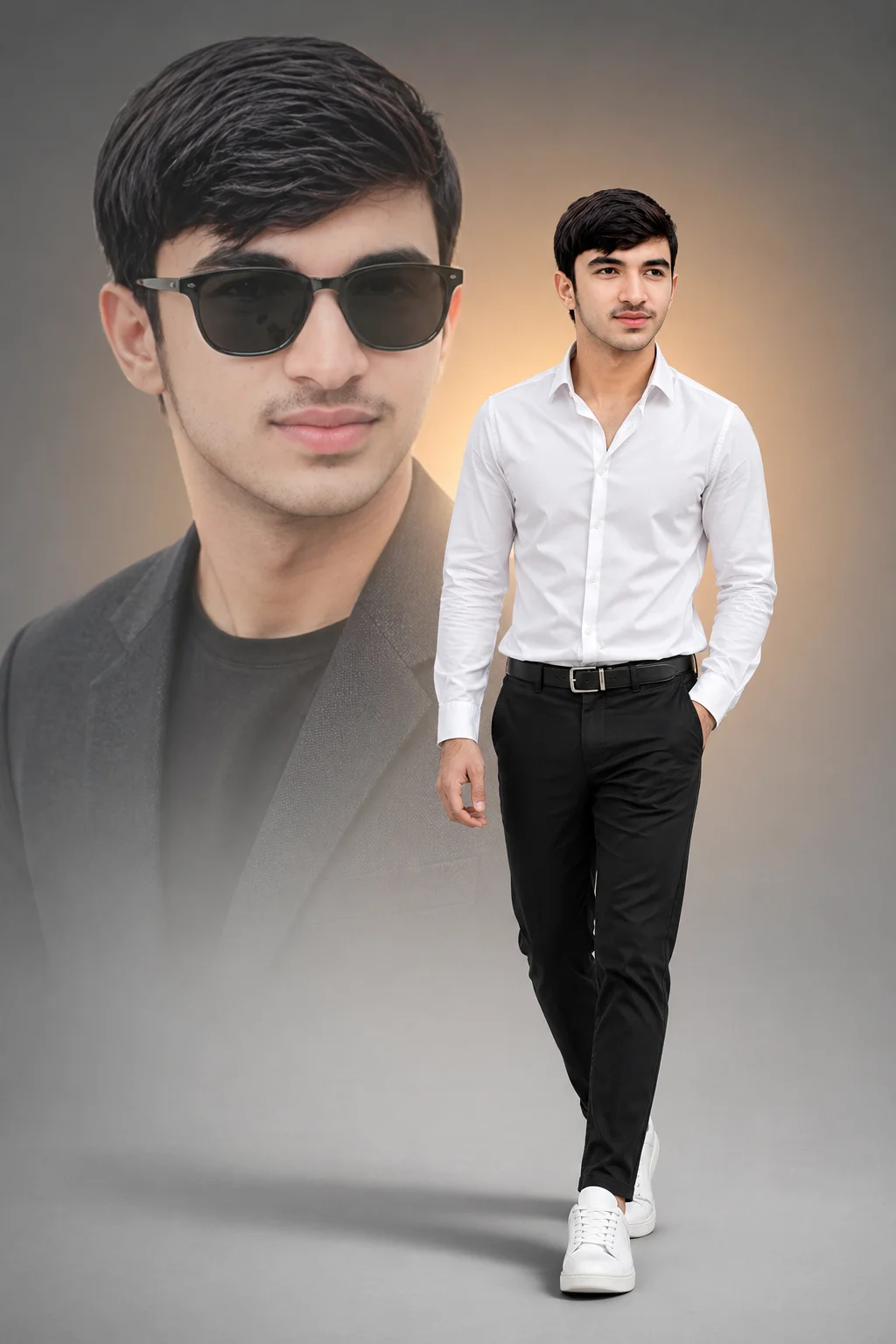
Professional studio artistry merges fashion photography with double-exposure technique in matte grey environment. A South Asian man with quiff hairstyle walks forward confidently while semi-transparent ghosted close-up of his sunglass-wearing face overlaps center-left. Warm amber radial glow emanates from behind subjects creating depth. High-key 1 o'clock lighting casts clean highlights on white shirt and soft ground shadows. Ultra-sharp focus and neutral-cool color grade deliver editorial fashion results.
Recommended: 4:5 — 4:5 vertical frame provides space for both the main subject and the semi-transparent overlay without crowding either compositional element.
Rate this prompt
Be the first to rate
Free prompt — one-click copy, no login required
Visual Character
Lighting
High-key studio lighting from the 1 o'clock direction creates clean highlights on the white shirt and a soft drop shadow on the ground towar
Color
The background is a minimalist matte grey with a soft warm amber radial glow behind the subjects
Background
A professional studio double-exposure composite featuring a well-groomed young South Asian man with a quiff hairstyle and mustache
Camera
Shot on Sony A7IV, 85mm f/1
Mood
0 aperture, shallow depth of field, natural golden hour lighting, Kodak Portra 400 color grade, cinematic color grading, photorealistic, hig
Full Prompt
Best For
Professional portfolio headshotsfashion editorial Instagram postsand sophisticated artistic profile photos.
How To Use This Prompt
Step 01
Copy the prompt
Use the copy button above to grab the complete prompt with your selected aspect ratio.
Step 02
Open your AI tool
Use a generator that supports the input and reference-image features you need.
Step 03
Generate your image
Create variations, pick the best result, then download and use it in your content.
Common Output Problems
Issues you may encounter and how to fix them
The overlay element appears as a solid object rather than a transparent blend+
Why it happens
AI generators sometimes render the overlay as an opaque shape instead of a translucent double-exposure effect.
Fix
Add semi-transparent overlay with visible blazer through the blend and specify blend opacity.
The tight crop cuts off the forehead or chin at an awkward point+
Why it happens
AI generators miscalculate headroom in close-up compositions, especially with headwear or hair.
Fix
Specify centered face with balanced space above head and below chin.
Customize This Prompt
Adapt these elements to fit your vision
Swap the black chinos for a black alternative to shift the mood — different fabric colors dramatically change the overall tone of the portrait.
Move the setting outdoors to a park or urban location to add environmental context and natural lighting variation.
Replace the golden hour lighting with cool blue-hour tones for a more moody, twilight atmosphere.
Remove the wayfarer for a cleaner, less accessorized look, or swap it for a different style to match your branding.
Which AI Tools Can I Use?
This prompt works with popular AI image generators.
Links to official tool websites. Not a claim that this prompt was tested in every tool or model version.
Frequently Asked Questions
Quick answers before you copy this prompt
Can I use this prompt with a reference photo to preserve someone's face?+
Yes. Add identity-preservation instructions like "preserve exact facial features from the uploaded reference photo" at the beginning of the prompt. This works best with clear, front-facing reference images.
Why does the text in the generated image look wrong or misspelled?+
AI image generators struggle with text rendering. Keep text to 1-3 words maximum, use simple fonts, and add "clean sharp text, no placeholder characters" to improve accuracy. For perfect text, consider adding it in post-processing.
What aspect ratio works best for this composition?+
4:5 is recommended for Instagram feeds and portrait-style layouts. Use 1:1 for profile pictures or square-format social posts. 9:16 works for Stories and Reels covers, but may crop important composition elements.
How do I get more dramatic lighting on the face?+
Specify the light position and intensity: "dramatic key light from 45-degree angle, deep shadows on the opposite side, subtle fill light to prevent total blackness" for more cinematic, moody studio lighting.