AI-generated example image for demonstration purposes. AI-generated example image for demonstration purposes.
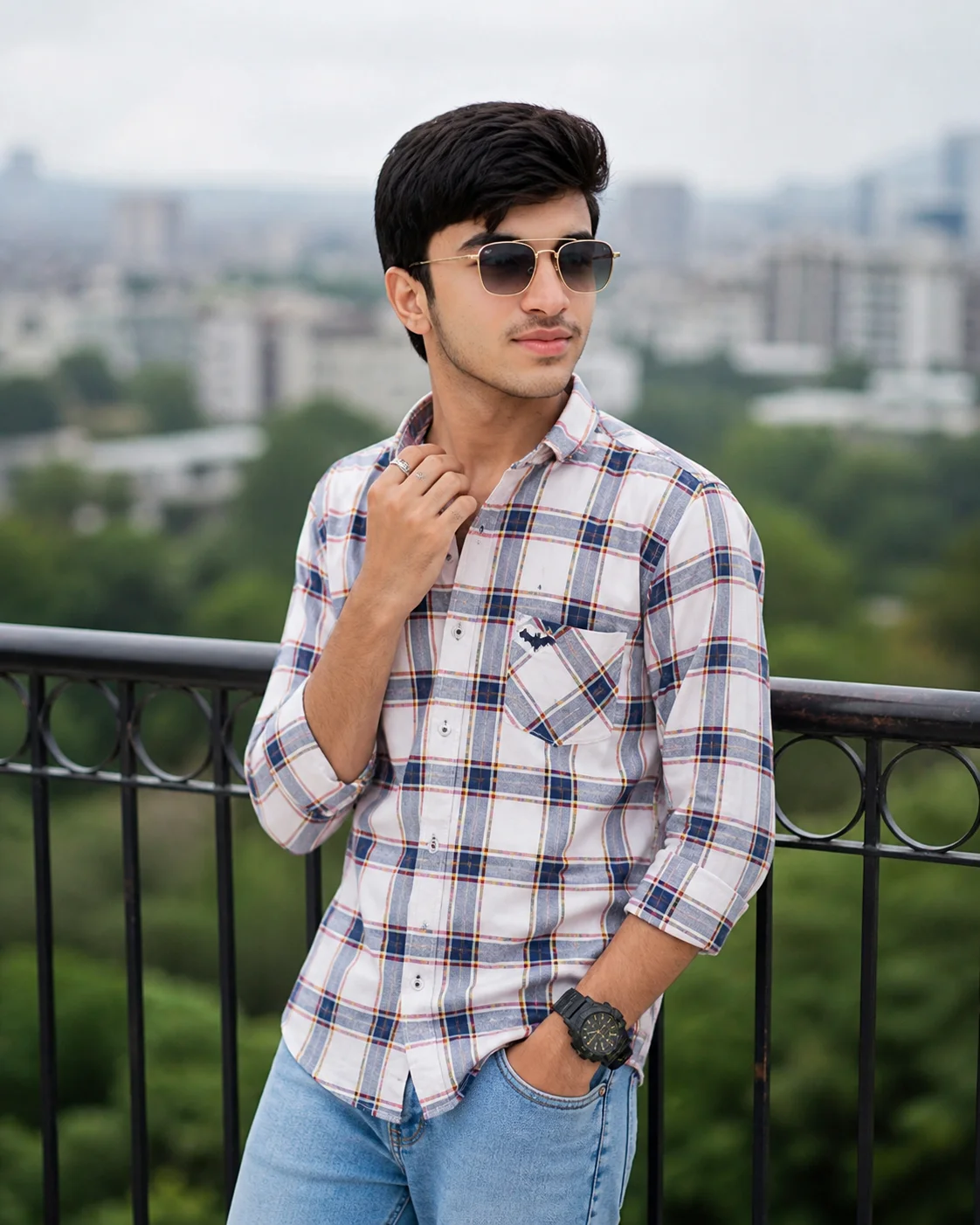
A detailed medium portrait shot of a pensive young South Asian man, late teens, standing and looking in a 3/4 profile to the right. He has thick black hair styled upwards and away from his face. He wears a white-based cotton button-down shirt with a navy blue, red, and yellow-gold plaid pattern and a small black Batlogo emblem on the chest pocket, paired with light-wash blue denim jeans. His left hand is in his jean pocket, and his right hand is raised, fingers near his neck collar, holding a silver ring on his ring finger. He has on gold-framed square sunglasses with dark graduated lenses and a large all-black tactical-style digital-analog watch on his left wrist. The composition places the subject in the foreground with a dark metal railing directly behind him, set against a deeply blurred background of dense green trees and a distant urban cityscape of multi-story buildings, all under soft, diffused natural daylight from an overcast sky. The color grading is natural with rich, true-to-life colors and even skin tones, medium contrast, with minimal soft shadows. The image is a photorealistic shot with shallow depth of field from a 85mm f/2. 0 lens, with creamy bokeh and minimal grain. quality, photorealistic, no text, no watermark. Shot on Sony A7IV, 85mm f/1.4 lens, f/2.0 aperture, shallow depth of field, natural golden hour lighting, Kodak Portra 400 color grade, cinematic color grading, photorealistic, high-resolution, aspect ratio 4:5
Plaid Shirt Urban Portrait | South Asian Teen Aesthetic
Capture the essence of contemporary South Asian street style with this highly detailed plaid shirt portrait prompt. Combining traditional urban elements like a metal railing and cityscape with a sophisticated 85mm lens effect, this prompt delivers a professional fashion editorial look. The intricate details—from the specific plaid pattern to the tactical-style watch—make it a perfect choice for users looking to generate realistic, high-quality male avatars or lifestyle photography for digital marketing.
Identity preservationPhotorealistic outputEditorial lightingSocial-ready format
Aspect Ratio
Select before copying
Recommended: 4:5 — 4:5 vertical frame accommodates the text overlay and the subject without either element feeling cramped or cropped.
Rate this prompt
Be the first to rate
Free prompt — one-click copy, no login required
Visual Character
Lighting
0 aperture, shallow depth of field, natural golden hour lighting, Kodak Portra 400 color grade, cinematic color grading, photorealistic, hig
Color
The color grading is natural with rich, true-to-life colors and even skin tones, medium contrast, with minimal soft shadows
Texture
0 lens, with creamy bokeh and minimal grain
Background
The composition places the subject in the foreground with a dark metal railing directly behind him, set against a deeply blurred background
Camera
The image is a photorealistic shot with shallow depth of field from a 85mm f/2
Composition
A detailed medium portrait shot of a pensive young South Asian man, late teens, standing and looking in a 3/4 profile to the right
Full Prompt
Best For
Best for lifestyle blogshigh-quality social media profile picturesand AI-driven fashion lookbooks.
How To Use This Prompt
Step 01
Copy the prompt
Use the copy button above to grab the complete prompt with your selected aspect ratio.
Step 02
Open your AI tool
Use a generator that supports the input and reference-image features you need.
Step 03
Generate your image
Create variations, pick the best result, then download and use it in your content.
Common Output Problems
Issues you may encounter and how to fix them
The Plaid visual element renders with inconsistent detail or quality across the composition+
Why it happens
AI generators may interpret the Plaid concept with varying fidelity, producing inconsistent visual quality.
Fix
Specify the exact Plaid visual style and regenerate 3-5 times to select the most consistent result.
The Plaid element competes with the subject for visual attention in the composition+
Why it happens
AI generators may over-emphasize the Plaid element, drawing focus away from the primary subject.
Fix
Reduce the Plaid element visual prominence or add clear visual hierarchy with subject as focal point.
Customize This Prompt
Adapt these elements to fit your vision
Replace the railing background with a minimalist studio backdrop to isolate the subject and create a cleaner, more focused composition.
Replace the golden hour lighting with cool blue-hour tones for a more moody, twilight atmosphere.
Change the expression from pensive to direct eye contact for a more engaging, connection-driven portrait.
Remove the sunglasses for a cleaner, less accessorized look, or swap it for a different style to match your branding.
Which AI Tools Can I Use?
This prompt works with popular AI image generators.
Links to official tool websites. Not a claim that this prompt was tested in every tool or model version.
Tags
#Urban Portrait
Frequently Asked Questions
Quick answers before you copy this prompt
Can I use this prompt with a reference photo to preserve someone's face?+
Yes. Add identity-preservation instructions like "preserve exact facial features from the uploaded reference photo" at the beginning of the prompt. This works best with clear, front-facing reference images.
Why does the text in the generated image look wrong or misspelled?+
AI image generators struggle with text rendering. Keep text to 1-3 words maximum, use simple fonts, and add "clean sharp text, no placeholder characters" to improve accuracy. For perfect text, consider adding it in post-processing.
What aspect ratio works best for this composition?+
4:5 is recommended for Instagram feeds and portrait-style layouts. Use 1:1 for profile pictures or square-format social posts. 9:16 works for Stories and Reels covers, but may crop important composition elements.
The background looks too bright or washed out. How do I fix it?+
Add "retain background detail and texture, avoid blown-out highlights in the sky and bright areas" to the prompt. You can also specify "balanced exposure between subject and background" to prevent the golden-hour light from overexposing the scene.