Urban night
Change the trees background to a softly blurred city street with warm storefront lights, and swap the daylight for evening ambient light for a night fashion editorial.
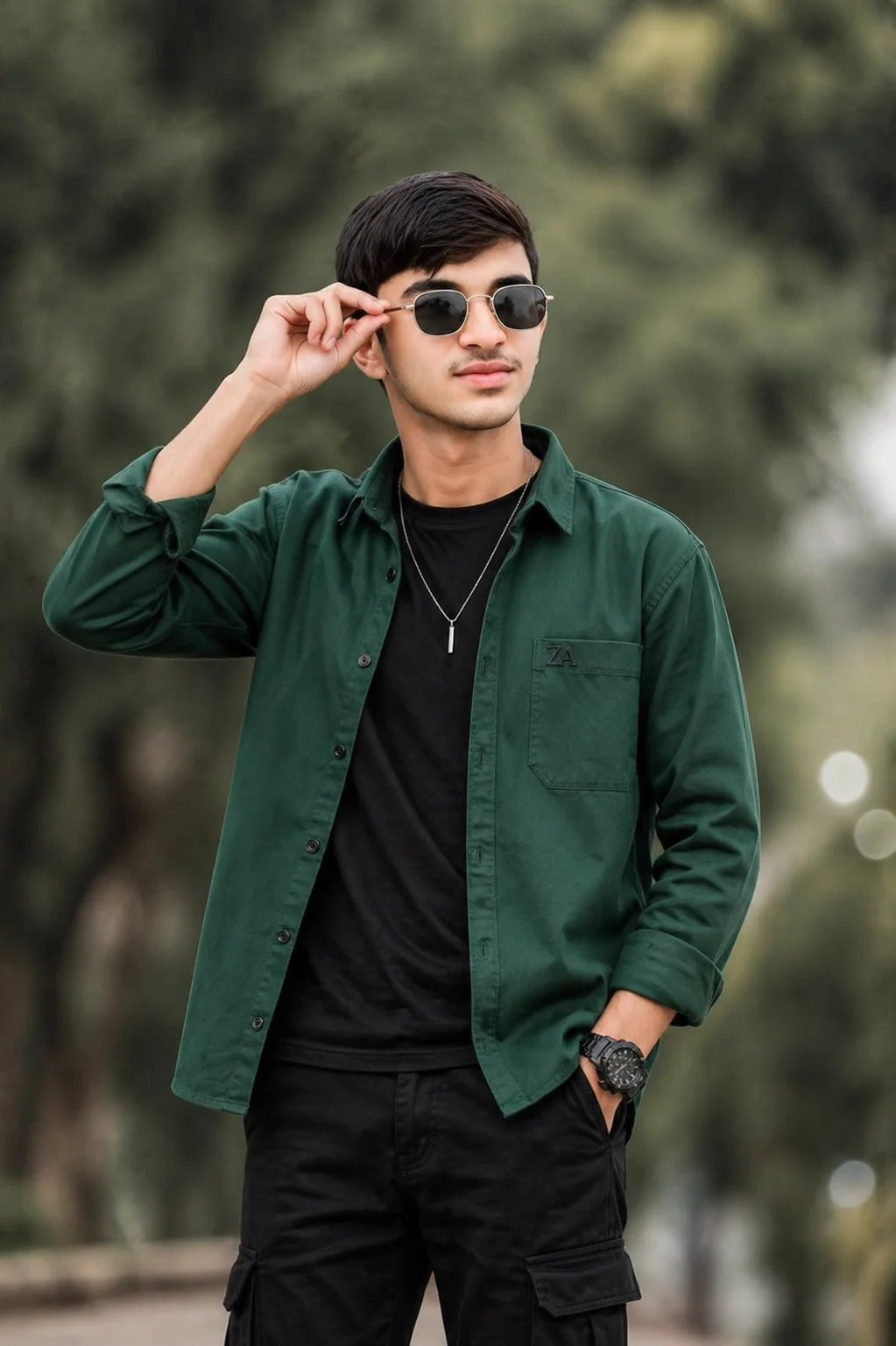
AI-generated example image for demonstration purposes.
Aspect Ratio
Select before copyingCopy this ready-to-use AI prompt and generate polished creator visuals in your favorite AI tool.
Male Portraits
This outdoor fashion portrait prompt is a ready made street style editorial: a young South Asian man around eighteen or nineteen, shot vertical, facing forward but looking up and to the right with a confident slight smile. The pose carries the whole concept. His right hand is raised adjusting dark lens sunglasses with thin silver metal frames while his left hand rests in the pocket of black cotton cargo pants. It is a small gesture, but it turns a static portrait into a moment that feels caught rather than staged.
The styling does the heavy lifting for the fashion feel. A rich emerald green cotton twill button down shirt jacket is worn open over a black cotton t-shirt, and the color contrast is carefully managed: the jacket is saturated and rich, the foliage soft and blurred with creamy bokeh, so the subject pops out of the scene instead of sinking into it. Small details make it believable as real fashion photography: a tiny black embroidered ZA logo on the left chest, a thin silver chain with a solid vertical bar pendant, and a large black tactical watch. Soft diffused natural daylight keeps the skin tones clean and even, and the 85mm f/1.8 framing gives a natural telephoto compression that flatters the face.
This one is made for fashion creators, streetwear brands, and anyone building a stylish profile or lookbook feed. ChatGPT (https://chatgpt.com) handles this kind of realistic full styling well and was used for generation testing on this prompt. Browse more masculine looks in the male portraits collection (https://www.aqprompts.com/tools/ai-image-prompts/men), or try the related soft aesthetic balcony portrait for men (https://www.aqprompts.com/tools/ai-image-prompts/p/soft-aesthetic-balcony-portrait-for-men) for a quieter take on the same idea. Keep the hand to sunglasses pose in the prompt, because that gesture is what gives the shot its energy.
ChatGPT fits this prompt because the concept depends on accurate multi item styling rendered realistically: the open jacket over the t-shirt, the small embroidered logo, the pendant, and the tactical watch all have to coexist without turning into clutter. This prompt was generation tested on ChatGPT, which keeps layered outfits coherent in natural daylight. Midjourney is a good alternative when you want a stronger editorial grade, but ChatGPT handles the small branded details with fewer artifact
Change the trees background to a softly blurred city street with warm storefront lights, and swap the daylight for evening ambient light for a night fashion editorial.
Convert the scene to black and white with high contrast, keeping the open jacket, sunglasses, and watch, for a timeless fashion magazine look.
Change the background to a softly blurred shoreline with warm daylight, and swap the cargo pants for black linen trousers for a vacation editorial version.
This is the hardest part of the prompt. Regenerate with the exact same wording first. If the problem repeats, simplify the phrase to right hand adjusting his sunglasses and remove extra finger or grip detail words, which reduce the chances of distortion.
Keep the logo line short and let the no text instruction stay in the prompt. Small embroidered logos render best when the wording is minimal: a small black embroidered ZA logo. Adding size or style words usually makes the letters worse.
Yes. Upload a clear front facing photo and ask the tool to preserve your exact facial features. Keep the pose, styling, and background lines unchanged so the fashion composition stays the same around your face.
Yes. The concept suits any age with the right styling. Change the age line to your age, and consider swapping the tactical watch for a slimmer timepiece if you want a more mature version of the look.