Mirror Reflection Portrait | Dual Tone Red & Blue Lighting
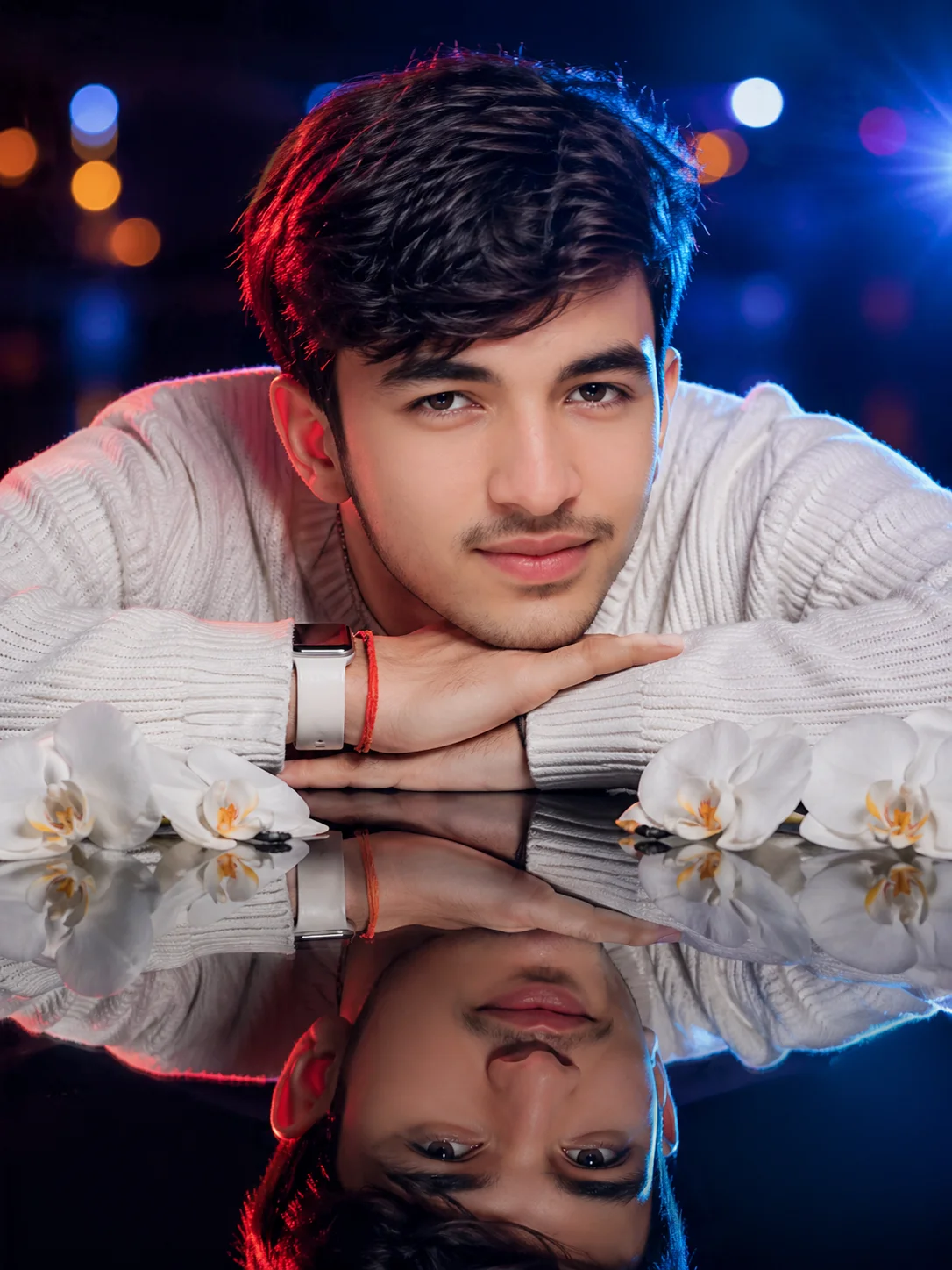
Noir-inspired artistry unfolds on a reflective black mirror surface where five white orchid blooms add delicate contrast. Complex dual-tone lighting paints the subject with deep red from rear-left and blue-cyan from rear-right, creating vibrant colored hair and sweater highlights. Perfect identical mirror reflection doubles visual impact in lower frame. Neutral white key light from front-right maintains natural skin tones while orange and blue bokeh lights blur beautifully behind.
Identity preservationPhotorealistic outputEditorial lightingDepth of field
Aspect Ratio
Select before copying
Recommended: 4:5 — 4:5 vertical framing captures both the subject and their mirror reflection in a single balanced composition.
Rate this prompt
Be the first to rate
Free prompt — one-click copy, no login required
Visual Character
Lighting
The lighting is complex, with neutral white key light from the front-right, and dual-colored rim lights: deep red from the rear-left, and po
Color
0 aperture, shallow depth of field, natural golden hour lighting, Kodak Portra 400 color grade, cinematic color grading, photorealistic, hig
Texture
The texture of the sweater is defined
Background
The background is a deeply blurred, dark nocturnal outdoor scene with large, soft orange and blue bokeh lights and a subtle blue lens flare
Composition
A striking, photorealistic portrait of a young male model, early 20s, with voluminous dark wavy hair and a pensive, contemplative gaze, cent
Use the copy button above to grab the complete prompt with your selected aspect ratio.
Step 02
Open your AI tool
Use a generator that supports the input and reference-image features you need.
Step 03
Generate your image
Create variations, pick the best result, then download and use it in your content.
Common Output Problems
Issues you may encounter and how to fix them
The mirror reflection shows a different face, inconsistent clothing, or a distorted angle+
Why it happens
AI models often treat the reflection as a separate generation rather than an exact mirror of the subject, causing identity drift between subject and reflection.
Fix
Describe the reflection explicitly as "the exact same person, identical face and clothing, mirrored precisely" and avoid complex or angled mirror positions that confuse the model.
The depth of field doesn't match the lens specifications described in the prompt+
Why it happens
AI models don't physically simulate lens optics — they interpret depth-of-field instructions as general blur rather than accurate f-stop rendering.
Fix
Be explicit about what should be sharp vs. blurred: "tack-sharp focus on the face, gradual blur beginning at the shoulders, creamy circular bokeh highlights in the background."
Customize This Prompt
Adapt these elements to fit your vision
Replace the bokeh lights background with a minimalist studio backdrop to isolate the subject and create a cleaner, more focused composition.
Replace the golden hour lighting with cool blue-hour tones for a more moody, twilight atmosphere.
Change the expression from pensive to direct eye contact for a more engaging, connection-driven portrait.
Remove the smartwatch for a cleaner, less accessorized look, or swap it for a different style to match your branding.
Which AI Tools Can I Use?
This prompt works with popular AI image generators.
Links to official tool websites. Not a claim that this prompt was tested in every tool or model version.
Tags
#dual lighting
Frequently Asked Questions
Quick answers before you copy this prompt
Can I use this prompt with a reference photo to preserve someone's face?+
Yes. Add identity-preservation instructions like "preserve exact facial features from the uploaded reference photo" at the beginning of the prompt. This works best with clear, front-facing reference images.
Why does the text in the generated image look wrong or misspelled?+
AI image generators struggle with text rendering. Keep text to 1-3 words maximum, use simple fonts, and add "clean sharp text, no placeholder characters" to improve accuracy. For perfect text, consider adding it in post-processing.
What aspect ratio works best for this composition?+
4:5 is recommended for Instagram feeds and portrait-style layouts. Use 1:1 for profile pictures or square-format social posts. 9:16 works for Stories and Reels covers, but may crop important composition elements.
The background looks too bright or washed out. How do I fix it?+
Add "retain background detail and texture, avoid blown-out highlights in the sky and bright areas" to the prompt. You can also specify "balanced exposure between subject and background" to prevent the golden-hour light from overexposing the scene.