5 Elegant Female AI Portrait Prompts for Women (Copy and Paste)

These elegant female portrait prompts turn an ordinary photo into a refined, magazine quality AI portrait. Each prompt below is copy paste ready for ChatGPT, Gemini, or any modern AI image tool, and every one includes face preservation instructions so the result still looks like you. If you want one fast starting point, here is a compact version you can paste right now:
Quick start prompt:
Prompt
Use my uploaded photo as the exact face reference and preserve my real facial identity completely. Keep my facial structure, eyes, nose, lips, skin tone, and natural expression unchanged and fully recognizable. Create a photorealistic elegant female portrait of me wearing a fitted black high neck top with delicate gold jewelry, soft natural makeup, and softly styled dark hair. Pose me in a close up composition with my chin slightly lifted, looking just past the camera. Use soft directional window light from the left, a dark charcoal studio background, realistic skin texture, and shallow depth of field, shot on an 85mm lens. Luxury editorial photography quality, ultra detailed.
The five full prompts below go much further: each one controls wardrobe, pose, lighting, camera settings, and mood in detail, and each is followed by a short explanation of why it works. You will also find a face preservation workflow, customization ideas, and fixes for the most common AI portrait problems.
In This Guide
How to Use Elegant Female Portrait Prompts With Your Own Photo
Customize These Elegant Female Portrait Prompts to Your Style
Frequently Asked Questions About Elegant Female Portrait Prompts
What Makes Elegant Female Portrait Prompts Work
A short request like "elegant woman portrait" leaves wardrobe, pose, light, background, and crop undefined, so the generator guesses and the result feels generic. A high quality elegant female portrait prompt supplies those choices in plain language. Every prompt below includes these six building blocks:
Face preservation: a clear instruction to use the uploaded photo as the exact face reference and keep the identity recognizable.
Wardrobe detail: specific clothing (fitted black ribbed high neck top), not vague styling ("stylish clothes").
Pose direction: camera angle, body position, and expression ("camera held slightly above eye level, chin lifted").
Lighting language: the type and direction of light ("soft directional window light from the left").
Camera and composition: lens, focal length, depth of field, and framing ("85mm lens, close up, shallow depth of field").
Quality anchors: terms like photorealistic, realistic skin texture, and editorial photography quality that push the model toward realism.
Keep a reference photo with good resolution and a clearly visible face nearby. Each prompt starts with the same face preservation line, so you can upload your photo once and reuse the whole set.
Prompt 1: The Beauty Influencer Selfie
A close up selfie style portrait with a polished beauty influencer look. Best when you want something natural, personal, and social media ready.
Copy the prompt:
Prompt
Use my uploaded photo as the exact face reference and preserve my real facial identity completely. Keep my facial structure, eyes, nose, lips, skin tone, and natural expression unchanged and fully recognizable. Do not alter my identity or make me look like a different person. Create a photorealistic elegant female portrait in a natural beauty influencer selfie style. I am wearing a fitted black ribbed high neck top with a small chest cutout, delicate thin gold necklace, and soft natural makeup with pink lips and lightly defined brows. Long dark brown center parted hair falls softly over one shoulder. The camera is held slightly above eye level with my face angled gently upward, lips in a soft closed mouth smile. Bright diffused daylight from a nearby window lights the face evenly, with a softly blurred warm beige room behind me. Realistic skin texture with visible pores, natural catchlights in the eyes, sharp focus on the eyes, 35mm lens, shallow depth of field, vertical 4:5 composition. Ultra detailed, photorealistic, high resolution.Why this prompt works: the exact camera angle ("slightly above eye level") removes the awkward distortions of a badly aimed selfie, and naming the clothing, jewelry, and lip color keeps the styling consistent instead of random. The realistic skin texture line matters ecause it stops the model from producing the airbrushed plastic look that ruins so many AI portraits.
Prompt 2: The Window Light Editorial
A refined editorial portrait lit by soft natural window light. This is the most flattering of the five and the easiest to adapt to different outfits.
Copy the prompt:
Prompt
Use my uploaded photo as the exact face reference and preserve my real facial identity completely. Keep my facial structure, eyes, nose, lips, skin tone, and natural expression unchanged and fully recognizable. Do not alter my identity or make me look like a different person. Create a photorealistic elegant female portrait in a refined fashion editorial style. I am wearing a fitted black ribbed high neck top and small gold hoop earrings, with soft natural makeup and neatly styled long dark brown center parted hair. I stand beside a tall window with sheer white curtains in a minimal beige studio, body in a three quarter view, face turned toward the camera with a calm confident expression. Bright soft window light falls across my face from the left, with gentle shadows shaping the cheekbones. Warm neutral background, shallow depth of field, upper body composition, shot on an 85mm lens at f2.0. Realistic skin texture, natural color grading, ultra detailed, luxury editorial photography quality.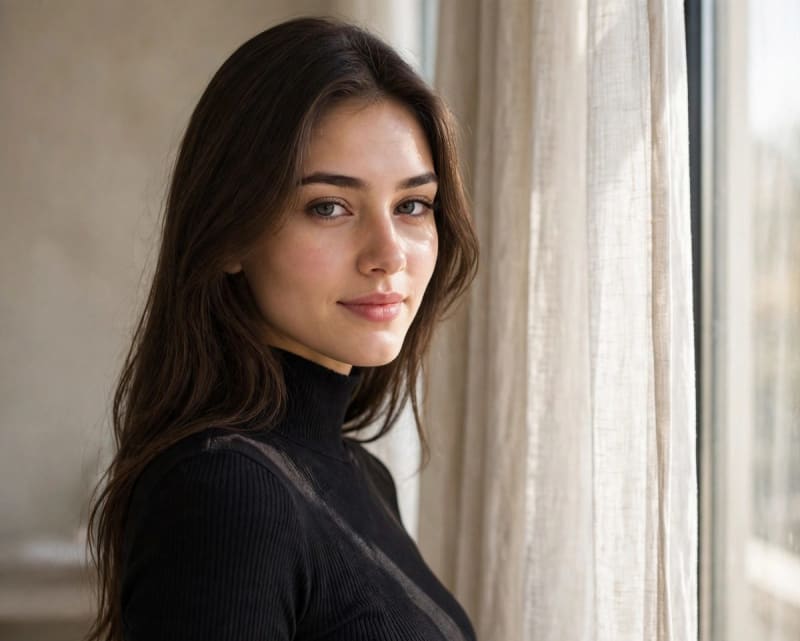
Why this prompt works: window light is the most forgiving light in real photography, and it behaves the same way in AI generation. Describing the light as "bright soft window light from the left" with "gentle shadows shaping the cheekbones" gives the image natural dimension, while the 85mm lens keeps facial
proportions realistic and prevents the stretched features a wide lens can produce.
Prompt 3: The Over the Shoulder Cinematic Portrait
A dramatic golden hour portrait with cinematic depth. Best for profile pictures and posts that should feel bold and high end.
Copy the prompt:
Prompt
Use my uploaded photo as the exact face reference and preserve my real facial identity completely. Keep my facial structure, eyes, nose, lips, skin tone, and natural expression unchanged and fully recognizable. Do not alter my identity or make me look like a different person. Create a photorealistic elegant female portrait in a cinematic golden hour style. I am wearing an elegant black satin evening dress, subtle gold earrings, and soft glam makeup with warm tones, with long dark brown hair sweeping naturally in a light breeze. I look back over my shoulder directly into the camera with a calm alluring expression. Warm golden hour backlight rims my hair and shoulders while a softly blurred evening city terrace with warm bokeh lights fills the background. Gentle rim light on the hair, realistic skin texture, shallow depth of field, 50mm lens, vertical 4:5 composition. Cinematic color grading, ultra detailed, high end magazine photography quality.
Why this prompt works: the over the shoulder pose is one of the most used poses in professional portrait photography because it flatters the face and adds depth. Naming the dress fabric ("black satin") and the light source ("golden hour backlight") stops the generator from inventing its own styling, and the bokeh background keeps the attention on you.
Prompt 4: The Luxury Beauty Campaign Portrait
A high contrast studio portrait with a luxury beauty campaign feel. This one works best when you want maximum polish, for example for a portfolio or a business profile.
Copy the prompt:
Prompt
Use my uploaded photo as the exact face reference and preserve my real facial identity completely. Keep my facial structure, eyes, nose, lips, skin tone, and natural expression unchanged and fully recognizable. Do not alter my identity or make me look like a different person. Create a photorealistic elegant female portrait in a luxury beauty campaign style. I am wearing a fitted black high neck top with delicate layered gold jewelry and a soft glam makeup look with defined brows, subtle eyeshadow, and soft pink lips, with sleek long dark brown center parted hair. Close up composition with my chin slightly lifted, looking just past the camera with a confident gentle expression. Soft directional key light from the left, a dark charcoal seamless studio background, subtle edge light separating my hair from the background, realistic skin texture with fine detail, sharp focus on the eyes, shot on an 85mm lens. Premium retouching look without losing skin realism, ultra detailed, luxury beauty campaign photography quality.Why this prompt works: the dark background creates contrast that makes the face the undeniable center of the image, while "soft directional key light" and "subtle edge light" produce the three dimensional look of real studio photography. The phrase "premium retouching look without losing skin realism" keeps the polish without crossing into artificial smoothness.
Prompt 5: The Mirror Selfie Lifestyle Portrait
A lifestyle mirror selfie with an elegant fashion touch. The most casual of the five, ideal for Instagram stories and everyday posts.
Copy the prompt:
Prompt
Use my uploaded photo as the exact face reference and preserve my real facial identity completely. Keep my facial structure, eyes, nose, lips, skin tone, and natural expression unchanged and fully recognizable. Do not alter my identity or make me look like a different person. Create a photorealistic elegant female portrait as a stylish mirror selfie. I am wearing a fitted black ribbed high neck top, high waisted dark jeans, small gold earrings, and soft natural makeup, with long dark brown center parted hair falling naturally. I hold a phone at chest height to capture my reflection in a large frameless mirror in a bright modern dressing room, one hand relaxed in my pocket, soft confident smile. Clean bright ambient light, marble and soft beige interior tones visible in the mirror edges, full body reflection in sharp focus, realistic proportions, 35mm lens, vertical 4:5 composition. Realistic skin texture, natural reflections in the mirror, ultra detailed, high resolution lifestyle photography.Why this prompt works: mirror selfies fail in AI when the generator cannot decide which figure is the reflection. Stating "full body reflection in sharp focus" and "natural reflections in the mirror" gives the model one clear instruction about the mirror, and "realistic proportions" counters the stretched limbs that mirror scenes often produce.
How to Use Elegant Female Portrait Prompts With Your Own Photo
The face preservation line at the start of every prompt is the most important sentence on this page. Here is how to use it well:
Upload a clear photo first. Use a front facing photo with good light, no sunglasses, and your face fully visible. In ChatGPT, attach the photo and paste the prompt in the same message. In Gemini, upload the image to the prompt bar before sending.
Keep the first two sentences of each prompt. They tell the model to treat your photo as the exact face reference. Removing them is the most common reason a portrait comes back looking like a stranger.
Use the same reference for the whole set. Running all five prompts from one photo gives you a consistent looking series, which is useful for a profile refresh across platforms.
Regenerate instead of arguing. If the face drifts, regenerate with the same prompt before rewriting it. Small variations in the seed change facial likeness more than wording tweaks do.
Keep one person in frame. These prompts are written for a single subject. If you need a couple or group portrait, use the couple AI photo editing prompts , which handle two identities.
For a deeper workflow on keeping one face consistent across many different generated images, see the consistent face AI portrait guide for women and girls.
Customize These Elegant Female Portrait Prompts to Your Style
The structure of each prompt stays the same while you swap individual details. Change one thing at a time so you can see what each choice does:
Wardrobe: replace the black top with an emerald silk blouse, a cream knit sweater, or a navy blazer. Keep the fit and fabric specific.
Lighting: change "soft directional window light" to "warm golden hour sunlight" for warmth, or "soft studio key light" for a cooler editorial look.
Background: swap the studio backdrop for a bookshelf office, a Parisian balcony, or a softly blurred garden. Simple backgrounds keep the elegant feel; busy ones fight it.
Makeup and hair: ask for "bold red lips and a low bun" or "minimal makeup and loose waves". One strong choice beats three small ones.
Aspect ratio: keep 4:5 for Instagram portraits, switch to square for profile photos, or 16:9 for banners.
If you want to explore outfit led concepts in full body compositions, browse the female portrait prompts
library or the AI fashion photo prompts for women.
Troubleshooting Common Problems With Elegant AI Portraits
The face does not look like me. Make sure your photo is attached in the same message as the prompt, and keep the first two face preservation sentences intact. Try a higher resolution reference photo with your face clearly lit.
The skin looks plastic or over smoothed. Add "realistic skin texture with visible pores" and "natural skin detail". These prompts already include it, but it can help to repeat it at the end of the prompt when a model over beautifies.
The hands look wrong. Ask for "hands in a natural relaxed position" or keep hands out of frame, for example "hands resting at my sides, out of frame". Close up and mid length crops have fewer hand problems than full body shots.
The lighting looks flat. Name a light direction ("from the left") and a light quality ("soft directional"). Generators produce flat light when the prompt says nothing about it.
Text or logos appear in the image. Add "no text, no logos, no watermark" at the end of the prompt. Mirror and street scenes are the usual offenders.
The outfit changes between generations. Copy the exact wardrobe sentence from the prompt into your next message.
What is the best prompt for an elegant female AI portrait?
The best prompt combines face preservation instructions with specific wardrobe, pose, lighting, and camera detail. A strong template is: use the uploaded photo as the exact face reference, describe one elegant outfit precisely, name the light direction, and set a lens and composition. All five prompts on this page follow that structure.
Which AI tool is best for elegant female portraits?
ChatGPT image generation and Gemini both handle these prompts well. ChatGPT tends to follow detailed styling instructions closely, while Gemini is fast for quick iterations. Midjourney produces strong cinematic results but needs a separate face reference workflow. The prompts on this page were written to work across tools.
How do I keep my face looking like me in an AI portrait?
Upload a clear front facing photo in the same message as the prompt, keep the face preservation sentences at the start of the prompt, and regenerate with the same wording before rewriting it. Using one reference photo across a whole series also improves consistency.
Can I use these prompts for free?
Yes. The prompts themselves are free to copy and use. The AI tools have their own free and paid tiers, so check the current limits of the tool you use.
Why does my AI portrait look fake?
The usual causes are missing skin texture detail, no light direction, and a vague outfit description. Add "realistic skin texture", name the light source and direction, and describe the clothing precisely. Those three fixes solve most artificial looking results.
More Prompts to Explore
Female portrait prompts library: the full collection of female portrait concepts.
Consistent face AI portrait guide: keep one identity across many generated portraits.
Luxury AI fashion photography prompts for women: full body editorial and fashion concepts.
AI fashion photo prompts for Instagram: outfit led ideas for social posts.
AI image prompts for women: browse the prompt tool by category.
External references worth a look: TechPlaceAI's 30+ AI portrait prompts for women offers a large example library in a different structure, and TycoonStory's ChatGPT photo editing prompts includes a useful female portrait editing section.
Conclusion
Elegant results come from specific instructions, not from luck. Pick the prompt that matches the mood you want, upload one clear reference photo, and paste the full text with the face preservation lines intact. Small, deliberate changes to wardrobe, light, or background will teach you what each part of a prompt controls, and after a few generations you will be writing your own elegant female portrait prompts with the same confidence.
Learn how we review our guides →
Common Questions
Frequently Asked Questions
Which AI tools can accept this kind of portrait prompt?
Several image generators accept natural-language portrait descriptions, but their reference controls and syntax differ. Check the current official instructions for your chosen tool; this article does not present a tool-performance comparison.
Can I use these prompts without a reference image?
The prompts can be used without a reference image. If the selected tool supports references, a permitted photo can provide identity guidance, but it does not guarantee realism, facial continuity, or an unchanged skin tone.
Are these AI fashion prompts free to use?
Yes, every prompt included in this article is free to use. AQPrompts also offers optional paid Starter and Pro memberships for separate premium resources. Always check the licensing terms of your specific AI platform before using images commercially.
How do I make AI female portraits look more realistic?
Use one clear pose, coherent clothing, one main light source, and an appropriate crop. Camera terms can describe the intended perspective, but realism is not guaranteed; inspect skin, eyes, hands, hair, fabric, and reflections.
What is the best image ratio for Instagram fashion portraits?
These prompts request a 4:5 vertical composition for portrait-oriented feed images. Check the destination platform's current specifications and adjust the crop for other placements.
Can I change the outfit in these prompts?
Yes. Replace the clothing as one complete block, including its color, fabric, fit, and neckline, then remove any conflicting outfit details elsewhere in the prompt.
What should a woman portrait prompt include?
Define the adult subject, one pose, a coherent outfit, the background, one main light source, and the crop. Add optional mood or camera language only when it clarifies the intended portrait.
Topics:
Abdul Qudoos creates and reviews AQPrompts guides and prompt-library content for creators using AI image tools.