Surreal Alpine Lake Dual Exposure Canvas Painting Prompt
Photo Editing Prompts
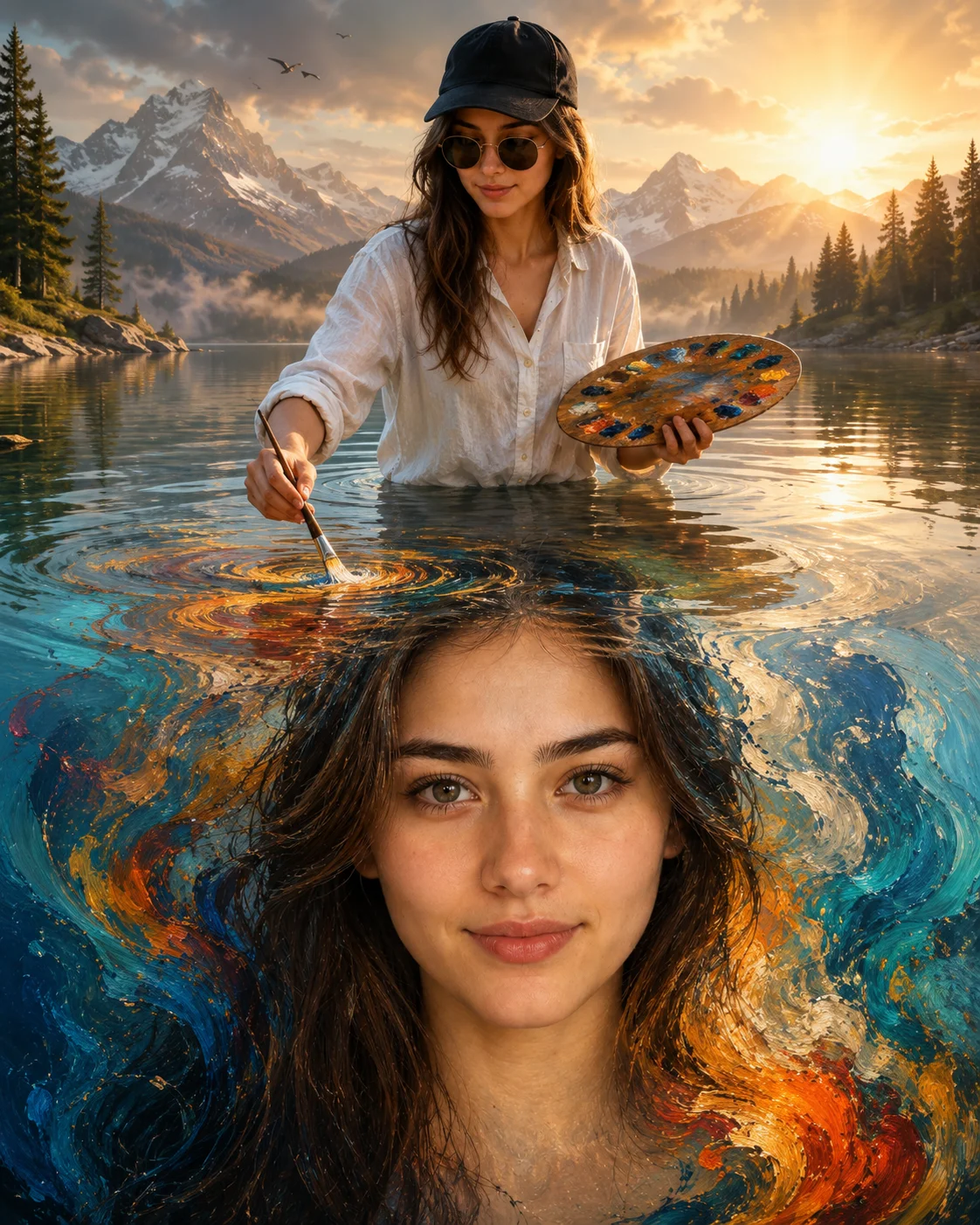
Unlock the true potential of magical realism with this high-concept, multi-exposure surreal fantasy prompt. Striking an incredible balance between vast landscape environment design and hyper-focused human identity, this template features an artist painting a giant, swirling oil-paint canvas replica of himself directly onto the surface of a crystalline alpine lake. Bathed in a heavy 3200K sunrise color matrix, this prompt is a carefully composed image-tier addition for digital artists, gallery creators, and publishers searching for high-impact visual storytelling layouts.
Identity preservationPhotorealistic outputEditorial lightingDepth of field
Aspect Ratio
Select before copying
Recommended: 4:5 — 4:5 vertical frame keeps the subject as the focal point while retaining the environmental backdrop — water, sky, or landscape — in the background.
Rate this prompt
Be the first to rate
Free prompt — one-click copy, no login required
Visual Character
Color
Breathtaking surreal fantasy artwork featuring a young man twice in a single cinematic composition, preserving 100% exact facial structure,
Background
Background features majestic snow-covered mountains, evergreen forests, soft morning mist, calm reflections, and warm golden sunrise light w
Full Prompt
Best For
Fine-art gallery digital showcasescinematic book cover templateshigh-concept promotional brand postersand high-visibility creative portfolios.
How To Use This Prompt
Step 01
Copy the prompt
Use the copy button above to grab the complete prompt with your selected aspect ratio.
Step 02
Open your AI tool
Use a generator that supports the input and reference-image features you need.
Step 03
Generate your image
Create variations, pick the best result, then download and use it in your content.
Common Output Problems
Issues you may encounter and how to fix them
The face doesn't look like the reference photo or appears distorted+
Why it happens
AI models sometimes reinterpret facial features rather than preserving them exactly, especially with complex poses, unusual lighting, or low-quality reference images.
Fix
Use a well-lit, front-facing reference photo with clear facial features. Add "preserve exact facial structure, proportions, and likeness from the reference" at the beginning of the prompt.
The warm tones become oversaturated or the background blows out with too much brightness+
Why it happens
Golden hour lighting instructions can push models toward extreme orange/yellow saturation, especially when combined with "warm" or "amber" descriptors.
Fix
Add "natural warm tones, avoid oversaturated oranges, retain background detail in bright areas" to keep the golden-hour effect balanced and photorealistic.
The image lacks the professional quality or sharpness described in the prompt+
Why it happens
Some AI models prioritize artistic interpretation over photorealistic rendering, especially when the prompt contains both stylistic and technical instructions.
Fix
Move all camera and quality specifications to the beginning of the prompt and add "ultra-sharp focus on the subject, fine detail rendering, professional photography quality" to reinforce the desired output.
Customize This Prompt
Adapt these elements to fit your vision
Swap the linen shirt for a white alternative to shift the mood — different fabric colors dramatically change the overall tone of the portrait.
Replace the golden hour lighting with cool blue-hour tones for a more moody, twilight atmosphere.
Change the expression from calm to direct eye contact for a more engaging, connection-driven portrait.
Remove the sunglasses for a cleaner, less accessorized look, or swap it for a different style to match your branding.
Which AI Tools Can I Use?
This prompt works with popular AI image generators.
Links to official tool websites. Not a claim that this prompt was tested in every tool or model version.
Frequently Asked Questions
Quick answers before you copy this prompt
Do I need to upload a reference photo for this prompt to work?+
Yes, this prompt is designed for reference-image workflows. Upload a clear, well-lit photo of the subject's face. A front-facing photo with visible facial features produces the best identity preservation. Removing the identity-preservation instructions will cause the model to generate a new face.
How do I prevent the water background from looking overexposed or flat?+
Add "retain wave detail, water texture, and natural light reflections on the surface" to the prompt. Also specify "balanced exposure between subject and background" to prevent the bright water surface from blowing out.
How do I keep the subject recognizable in the watercolor style?+
Emphasize "preserve the subject's unique facial proportions, eye shape, and bone structure within the watercolor rendering style." The more specific the facial description, the better the identity preservation in stylized output.
How do I make the rain or weather effects look more realistic?+
Add "rain droplets of varying sizes with realistic light refraction, some droplets merging into streaks, condensation trails on glass" for more natural weather effects. Avoid the word "rainy" alone — specify droplet characteristics.