Human Crowd Mosaic Optical Illusion Portrait Prompt
Photo Editing Prompts
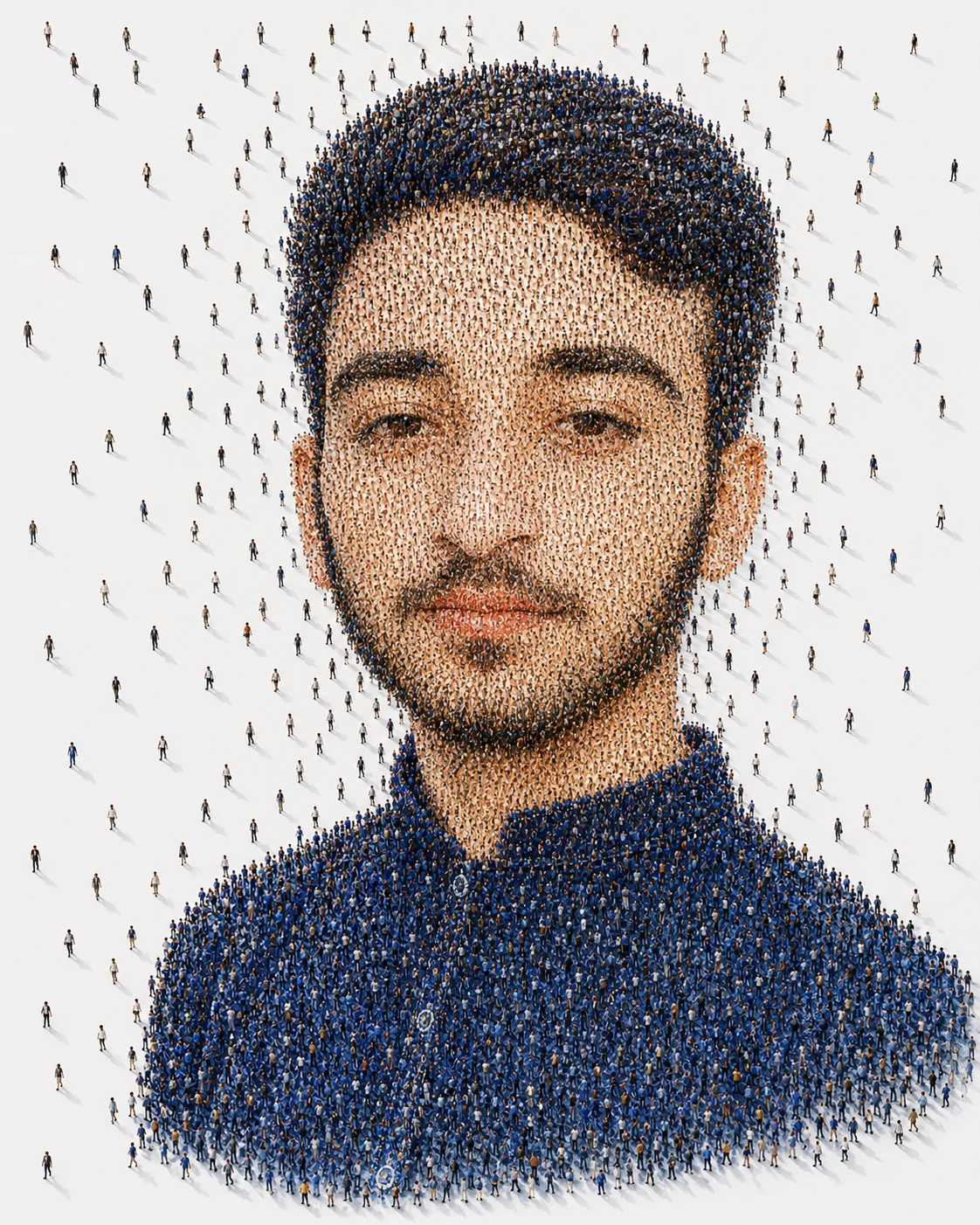
Transform your website's fine art catalog with this breathtaking, museum-quality conceptual mosaic prompt. Harnessing a brilliant optical illusion, this template uses thousands of highly detailed miniature people as living pixels to meticulously craft a perfectly recognizable human face. The clever transition from a tight crowd configuration to scattered individual figures at the edges creates an incredible surreal depth. It provides digital artists and creative directors with a masterful visual narrative exploring humanity, connectivity, and collective identity.
Identity preservationPhotorealistic outputEditorial lightingDepth of field
Aspect Ratio
Select before copying
Recommended: 4:5 — 4:5 vertical framing comfortably accommodates two subjects while maintaining intimate composition and enough headroom for both faces.
Rate this prompt
Be the first to rate
Free prompt — one-click copy, no login required
Visual Character
Lighting
Set on a clean white minimalist background with soft natural lighting and long cinematic shadows cast by each tiny person from a top-down ae
Color
Extraordinary conceptual fine art human crowd mosaic portrait of a young man, preserving 100% exact facial structure, hairstyle, beard, skin
Use the copy button above to grab the complete prompt with your selected aspect ratio.
Step 02
Open your AI tool
Use a generator that supports the input and reference-image features you need.
Step 03
Generate your image
Create variations, pick the best result, then download and use it in your content.
Common Output Problems
Issues you may encounter and how to fix them
One person's face is preserved correctly while the other looks different or generic+
Why it happens
Dual-subject identity preservation is significantly harder than single-subject — most models prioritize the face they detect first and treat the second as optional.
Fix
Specify separate identity-preservation instructions for each person (e.g., "person on the left must match reference face A, person on the right must match reference face B") and use a higher-quality reference photo for each.
The full-body composition distorts proportions or creates awkward limb positioning+
Why it happens
Full-body portraits require the model to correctly render hands, feet, and body proportions simultaneously — a known challenge for AI image generators.
Fix
Specify "natural relaxed pose, correct body proportions, anatomically coherent limbs and hands" and keep the pose simple to minimize proportion errors.
The image lacks the professional quality or sharpness described in the prompt+
Why it happens
Some AI models prioritize artistic interpretation over photorealistic rendering, especially when the prompt contains both stylistic and technical instructions.
Fix
Move all camera and quality specifications to the beginning of the prompt and add "ultra-sharp focus on the subject, fine detail rendering, professional photography quality" to reinforce the desired output.
Customize This Prompt
Adapt these elements to fit your vision
Ensure both exposure layers have compatible lighting directions for realism.
Add a border or gap between panels to create clean separation in the collage layout.
Add atmospheric elements — smoke, haze, or practical lights — for cinematic depth and mood.
Which AI Tools Can I Use?
This prompt works with popular AI image generators.
Links to official tool websites. Not a claim that this prompt was tested in every tool or model version.
Frequently Asked Questions
Quick answers before you copy this prompt
Do I need to upload a reference photo to use this prompt?+
Yes, this prompt is designed for reference-image workflows. Upload a clear, well-lit photo of the subject. If you remove the identity-preservation instructions, the model will generate a new face instead.
How do I get both people to look like their reference photos?+
Use separate reference photos for each person and specify which reference corresponds to which person in the prompt. For example: "the woman must match reference photo A, the man must match reference photo B." Quality reference photos with clear facial features work best.
How do I adapt this for different social media platforms?+
Use 4:5 for Instagram feed posts (best vertical coverage), 1:1 for profile pictures and square grids, and 9:16 for Stories and Reels. For landscape platforms like Twitter/X, try 16:9 but note the full-body composition may need adjustment.
The skin looks too smooth or artificial. How do I make it more realistic?+
Add "natural skin texture with visible pores, subtle imperfections, realistic skin tone variation" to the prompt. Avoid words like "flawless" or "perfect skin" which push models toward artificial smoothness.