By Abdul QudoosPublished Apr 30, 2026Updated Nov 11, 2026
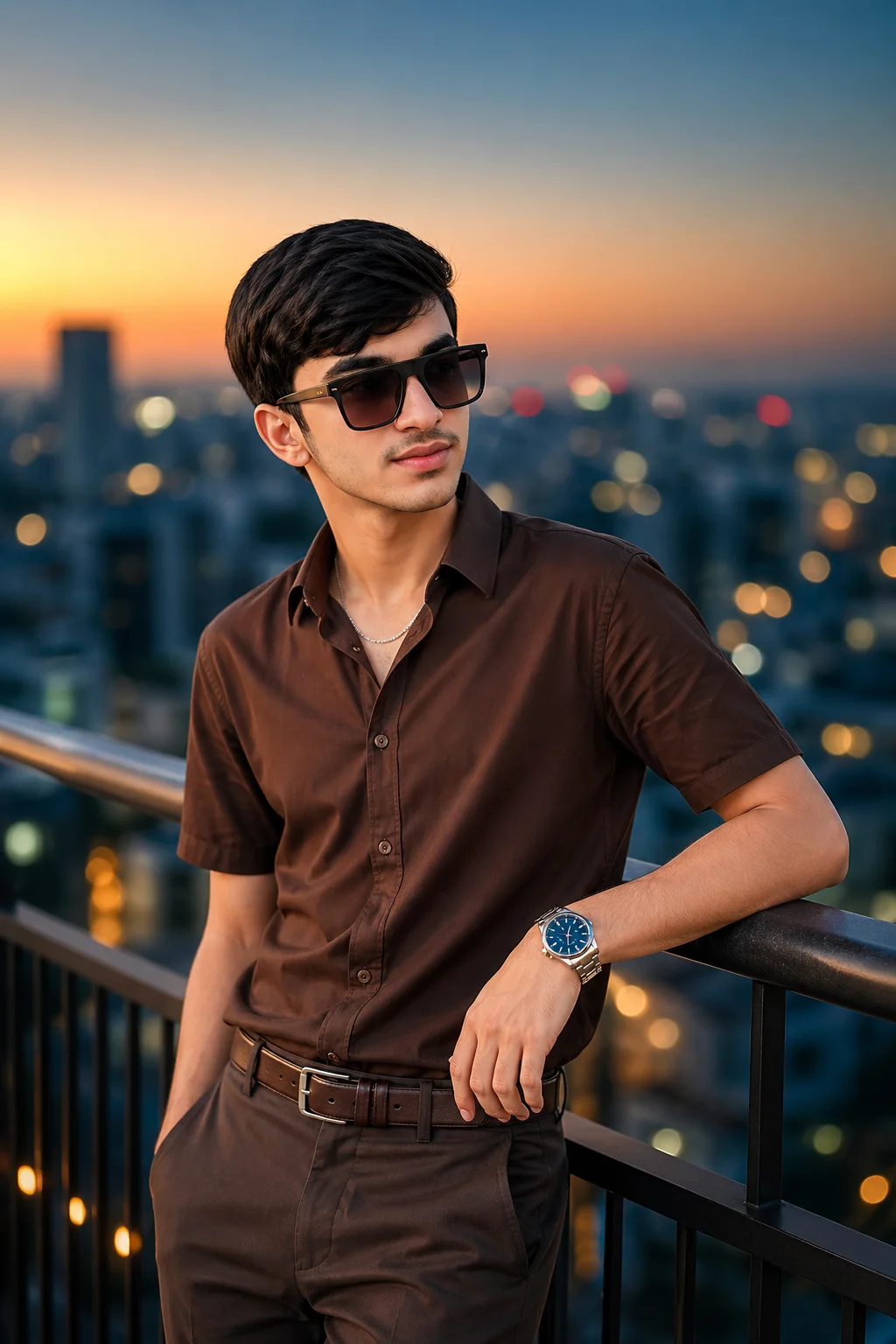
Young boy in a monochromatic chocolate brown shirt and trousers with black sunglasses leaning on a rooftop railing against a blurred twilight cityscape with warm bokeh lights.

AI-generated example image for demonstration purposes.

Ready-to-use image prompt

Golden Hour Urban Portrait | Boy in Monochromatic Chocolate Brown AI Prompt

MenMale Portraits

Aspect Ratio

Choose a format
Recommended: 4:5 · 4:5 vertical frame accommodates the text overlay and the subject without either element feeling cramped or cropped.

Copy this ready-to-use AI prompt and generate polished creator visuals in your favorite AI tool.

Identity preservationPhotorealistic outputEditorial lightingProfessional quality
The promptReady to copy and create
Personalize the ratio above, then copy your prompt.173 words
A professional vertical portrait of a stylish 14-year-old boy with a South Asian appearance and neat side-swept black hair. He is leaning against a dark metal rooftop railing, wearing a monochromatic chocolate-brown short-sleeved button-down shirt tucked into matching brown tailored trousers with a brown leather belt. He wears oversized square black sunglasses, a thin silver chain necklace, and a large wristwatch with a blue dial. The subject is in sharp focus against a sprawling, blurred urban cityscape at twilight. The background features buildings in teal and grey with warm circular bokeh city lights. The sky is a smooth gradient from soft amber to deep blue. Soft diffused golden hour lighting illuminates his face, creating natural skin tones and subtle highlights on the silver accessories. Shot on a 85mm lens at f/1. 8 for professional depth of field and creamy bokeh. quality, photorealistic, no text, no watermark. Shot on Sony A7IV, 85mm f/1.4 lens, f/2.0 aperture, shallow depth of field, natural golden hour lighting, Kodak Portra 400 color grade, cinematic color grading, photorealistic, high-resolution, aspect ratio 4:5

Prompt breakdown

About this Golden Hour Urban Portrait | Boy in Monochromatic Chocolate Brown AI prompt

The idea, details, and creative choices behind this image prompt.

#golden hour portrait#chocolate brown outfit#monochromatic style

Golden hour urban portrait prompt builds a polished rooftop portrait from a single outfit idea: one chocolate brown tone worn head to toe. A stylish young subject leans against a dark metal rooftop railing in a monochromatic chocolate brown short sleeved button down shirt, matching brown tailored trousers, and a brown leather belt, with oversized square black sunglasses, a thin silver chain, and a large blue dial wristwatch. Behind him a blurred urban cityscape at twilight dissolves into teal and grey buildings and warm circular bokeh lights, while the sky grades from soft amber to deep blue. Soft diffused golden hour light on the face keeps skin tones natural and lets the silver accessories catch the light. This prompt suits young creators and fashion pages that want a premium street editorial without a studio: the monochrome outfit does the styling work, and the rooftop plus city bokeh does the atmosphere. ChatGPT (https://chatgpt.com) is the recommended tool, and the prompt was generation tested there, because the long camera and lens instructions and the exact outfit layering are followed more faithfully there than in looser style generators. For more golden hour work, see the identity locked golden hour rooftop scrapbook poster (https://www.aqprompts.com/tools/ai-image-prompts/p/identity-locked-golden-hour-rooftop-scrapbook-poster) or the urban monochrome male portrait with concrete aesthetic (https://www.aqprompts.com/tools/ai-image-prompts/p/urban-monochrome-south-asian-male-portrait-concrete-aesthetic). Keep the outfit strictly one brown family so the tonal harmony survives generation.

How to use this prompt

  1. 1Copy the full prompt from this page using the copy button.
  2. 2Open ChatGPT image generation and start a new image.
  3. 3Paste the prompt and set the aspect ratio to 4:5 before generating.
  4. 4Check the outfit first: shirt, trousers, and belt must all read as chocolate brown. If any piece drifts color, restate the monochrome line and regenerate.

Practical tips

  • Keep the outfit strictly monochromatic. Every piece must stay in the chocolate brown family, because the tonal harmony is the whole styling idea. If trousers or the belt drift to black or grey, restate "monochromatic chocolate brown" for each garment and regenerate.
  • Protect the golden hour light. Do not swap it for blue hour or studio light, because the amber sky, warm bokeh, and soft face light are one lighting design. Changing the hour changes the mood from warm editorial to cold night shot.
  • Keep the sunglasses and the blue dial watch. The oversized square black sunglasses and the blue watch face are the two contrast points in an otherwise all brown frame. Removing both leaves a flat brown block with no focal accent.

Make it yours

Prompt variations

No sunglasses edition

Remove the sunglasses for a direct eye contact version that suits a personal profile or portfolio headshot.
Sunset skyline edition

Keep the outfit and pose but push the skyline bokeh warmer and larger for a stronger golden hour post.

Casual edition

Swap the tailored trousers for brown chinos and drop the belt for a relaxed weekend version of the same tonal look.

Good to know

Frequently asked questions

Can I use my own photo with this prompt?+

Yes. Add "preserve exact facial features from the uploaded reference photo" at the start and upload a clear front facing photo. The leaning pose works best when the reference photo is also upright and well lit.

Why does the brown outfit look mismatched?+

Generators often drift garment colors separately. Restate "monochromatic chocolate brown" for the shirt, trousers, and belt in one sentence, and keep the word brown attached to each piece rather than only once at the start.

Does this prompt include any text?+

No. The prompt ends with "no text, no watermark", so no lettering should appear. If stray text shows up in the skyline, add "no visible text anywhere" and regenerate.

What aspect ratio should I use?+

Use 4:5 as written. The vertical frame fits the leaning pose and the skyline above the railing, and it matches Instagram feed posts. A square crop cuts the skyline gradient that gives the golden hour effect its depth.

Prompt themes

Style, subject & mood

#golden hour portrait#chocolate brown outfit#monochromatic style#urban cityscape bokeh#rooftop portrait#teen fashion portrait#85mm portrait#sunset lighting

Keep exploring

Find your next creative idea

Browse prompt collections made for portraits, creative edits, and everyday inspiration.

Browse all prompts

More like this

Related prompts

From the blog: ChatGPT image prompts for men