AI-generated example image for demonstration purposes. AI-edited example image for demonstration purposes.
Business Portraits
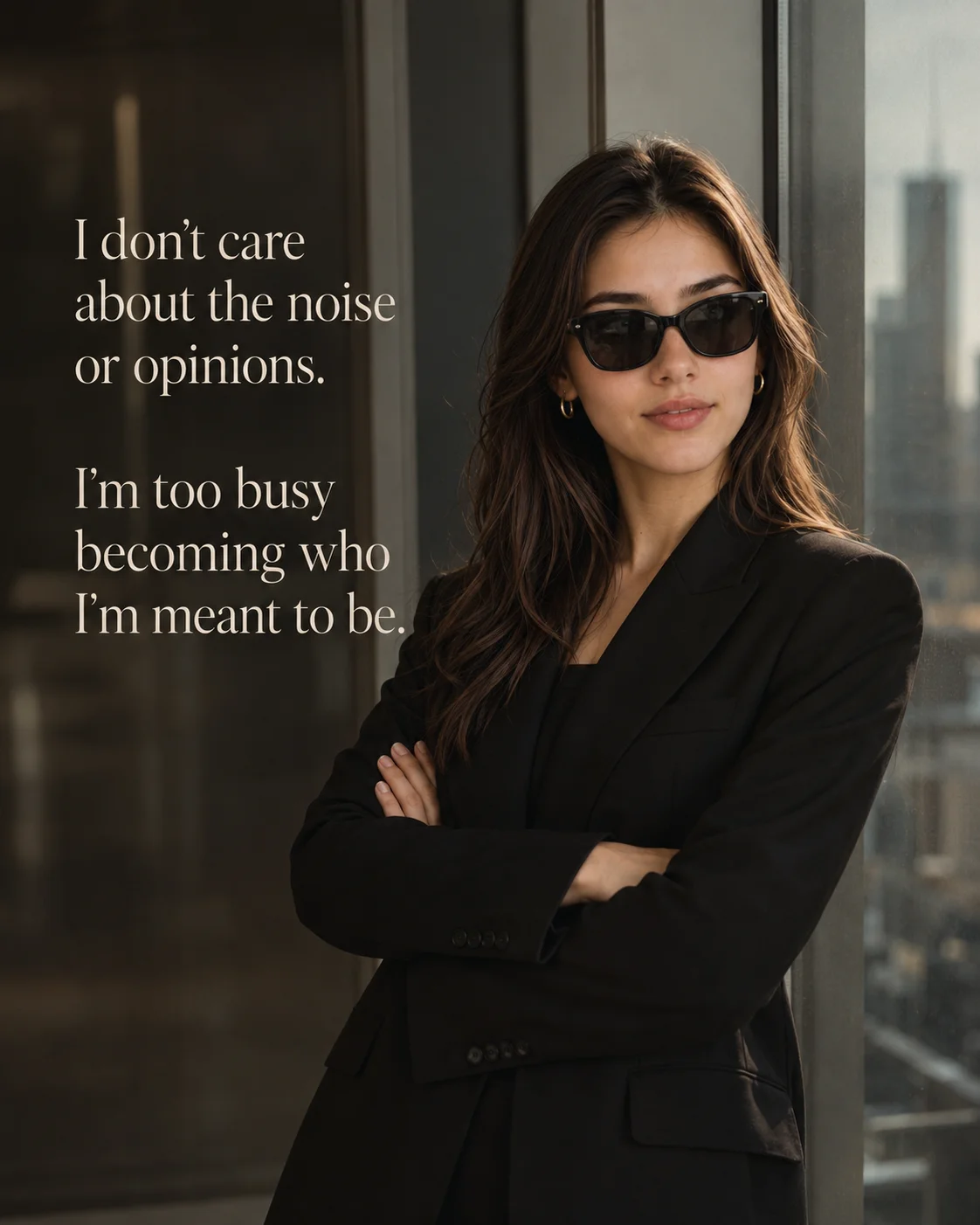
A sleek, minimal quiet luxury manifesto template positioning structured corporate tailoring against an airy floor-to-ceiling office window view.
Aspect Ratio
Select before copying
Recommended: 4:5 — 4:5 vertical frame accommodates the text overlay and the subject without either element feeling cramped or cropped.
Free prompt — one-click copy, no login required
Color
Ultra-realistic luxury editorial fashion photograph of a young woman, preserving 100% exact facial structure, hairstyle, skin tone, and feat
Camera
Soft natural window daylight streams from the side, creating an 85mm full-frame portrait lens look, f/1
Ultra-realistic luxury editorial fashion photograph of a young woman, preserving 100% exact facial structure, hairstyle, skin tone, and features from a reference photo. She stands from the waist upward beside a floor-to-ceiling glass window inside a modern luxury office with arms crossed confidently, wearing premium black designer sunglasses. Dressed in a luxury oversized black blazer over a black inner top, accessorized with small gold hoop earrings, looking sideways with a calm, powerful expression. Set against a blurred modern city skyline visible through the window paneling. Features elegant, left-aligned warm ivory serif typography in the negative space reading: 'I don't care\nabout the noise\nor opinions.\n\nI'm too busy\nbecoming who\nI'm meant to be.' styled in a luxury Canela font. Soft natural window daylight streams from the side, creating an 85mm full-frame portrait lens look, f/1.8, cinematic shallow depth of field, muted neutral color grading, high-resolution, 4:5 aspect ratio High-intent Pinterest executive lifestyle boards personal growth microblog graphics luxury personal branding text carousels and elegant wall art files.
Step 01
Copy the prompt Use the copy button above to grab the complete prompt with your selected aspect ratio.
Step 02
Open your AI tool Use a generator that supports the input and reference-image features you need.
Step 03
Generate your image Create variations, pick the best result, then download and use it in your content.
Common Output Problems Issues you may encounter and how to fix them
The skin tones appear unnatural or inconsistent across different areas of the face + Why it happens
AI generators may render skin with uneven color patches or an artificial plastic quality in certain regions.
Fix
Specify natural even skin tones with subtle variation and regenerate to find the most flattering result.
The overall contrast ratio feels too harsh or too flat for the intended mood + Why it happens
AI generators may interpret contrast instructions inconsistently, producing either blown highlights or muddy shadows.
Fix
Fine-tune the contrast with explicit tonal range descriptors — retain highlights, preserve shadow detail, smooth midtone transitions.
Customize This Prompt Adapt these elements to fit your vision
Swap the black blazer for a gold alternative to shift the mood — different fabric colors dramatically change the overall tone of the portrait. Replace the skyline background with a minimalist studio backdrop to isolate the subject and create a cleaner, more focused composition. Adjust the lighting direction to create more dramatic shadows and depth — try moving the key light from front to a 45-degree angle. Change the expression from confident to direct eye contact for a more engaging, connection-driven portrait. Results and responsible use
Results vary by tool, model, version, settings, seed, safety system, and input. Use only a reference image you own or have permission to use, and do not create deceptive or harmful impersonations. See how AQPrompts reviews prompt wording .
This prompt works with popular AI image generators.
Links to official tool websites. Not a claim that this prompt was tested in every tool or model version.
Frequently Asked Questions Quick answers before you copy this prompt
Do I need to upload a reference photo to use this prompt? + Yes, this prompt is designed for reference-image workflows. Upload a clear, well-lit photo of the subject. If you remove the identity-preservation instructions, the model will generate a new face instead.
Why does the text in the generated image look wrong or misspelled? + AI image generators struggle with text rendering. Keep text to 1-3 words maximum, use simple fonts, and add "clean sharp text, no placeholder characters" to improve accuracy. For perfect text, consider adding it in post-processing.
What aspect ratio works best for this composition? + 4:5 is recommended for Instagram feeds and portrait-style layouts. Use 1:1 for profile pictures or square-format social posts. 9:16 works for Stories and Reels covers, but may crop important composition elements.
The skin looks too smooth or artificial. How do I make it more realistic? + Add "natural skin texture with visible pores, subtle imperfections, realistic skin tone variation" to the prompt. Avoid words like "flawless" or "perfect skin" which push models toward artificial smoothness.