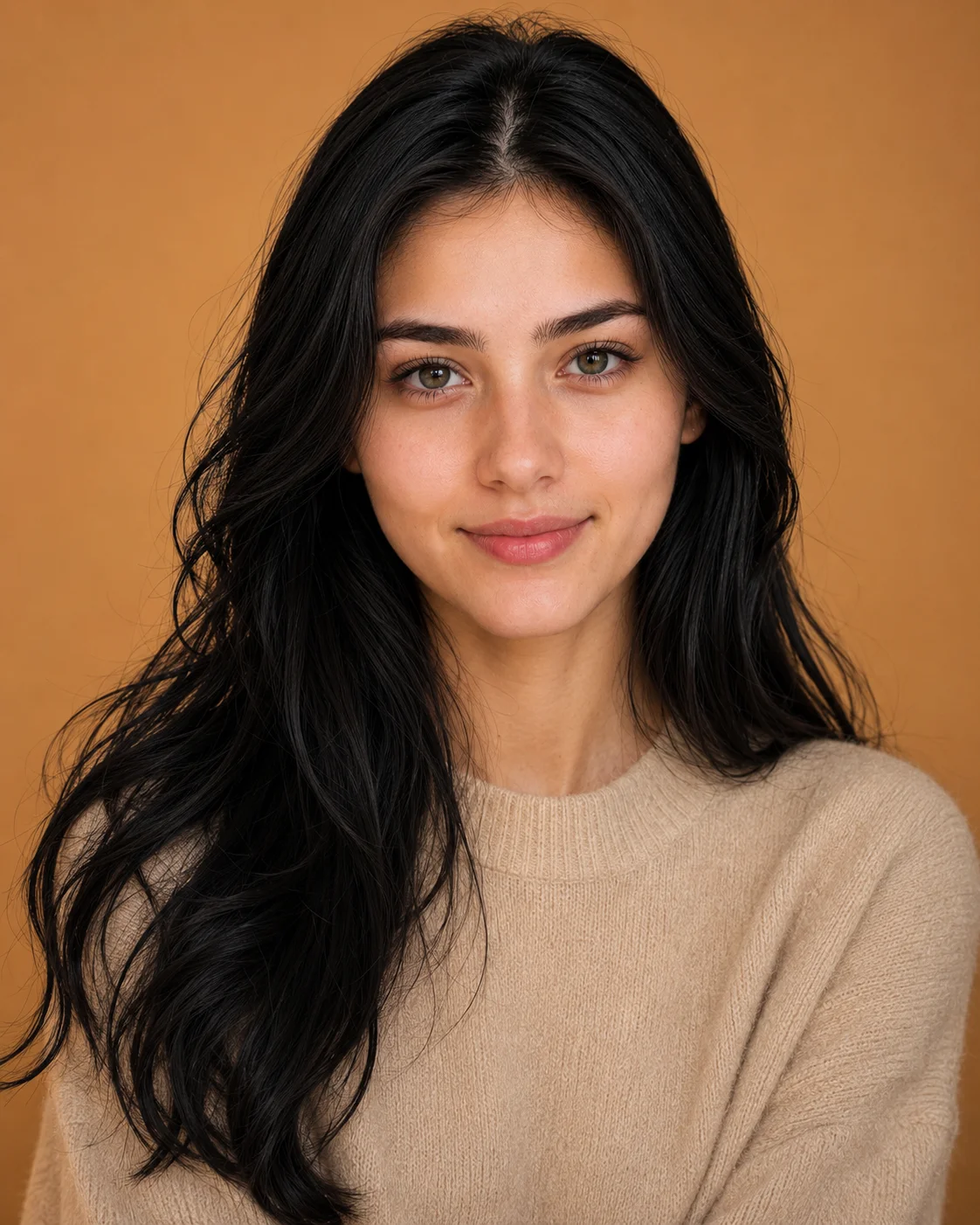
Jet Black Hair Cashmere Sweater Studio Portrait Prompt
Female Portrait Prompts
Deliver absolute cosmetic and editorial refinement to your library with this hyper-focused luxury beauty campaign prompt. Specifically engineered to showcase precise hair color customization while maintaining an uncompromised facial structure, this layout features a vibrant, rich jet-black hairstyle paired with a premium neutral cashmere knit sweater. Set against a seamless, solid warm camel studio void and bathed in diffused commercial beauty lighting, it serves as a top-tier framework for cosmetic advertisements, upscale model portfolios, and premium skin-texture lookbooks.
Identity preservationPhotorealistic outputEditorial lightingDepth of field
Aspect Ratio
Select before copying
Recommended: 4:5 — 4:5 vertical frame keeps the subject as the focal point while retaining the environmental backdrop — water, sky, or landscape — in the background.
Rate this prompt
Be the first to rate
Free prompt — one-click copy, no login required
Visual Character
Lighting
Captured in a head-and-shoulders composition on an 85mm portrait lens with soft beauty studio lighting, even skin tones, and razor-sharp foc
Color
Ultra-realistic luxury beauty campaign portrait photograph of a young woman, preserving 100% exact facial structure, smile, dimples, skin to
Background
Wearing a premium soft luxury beige cashmere knit sweater against a solid, seamless warm camel studio background
Camera
She has a bright, genuine smile with visible dimples and a soft, confident expression, looking directly into the camera
Full Prompt
Best For
Premium cosmetic and hair product advertisementsluxury fashion editorial lookbookshigh-end headshot packagesand pristine social media profile upgrades.
How To Use This Prompt
Step 01
Copy the prompt
Use the copy button above to grab the complete prompt with your selected aspect ratio.
Step 02
Open your AI tool
Use a generator that supports the input and reference-image features you need.
Step 03
Generate your image
Create variations, pick the best result, then download and use it in your content.
Common Output Problems
Issues you may encounter and how to fix them
The Hair element competes with the subject for visual attention in the composition+
Why it happens
AI generators may over-emphasize the Hair element, drawing focus away from the primary subject.
Fix
Reduce the Hair element visual prominence or add clear visual hierarchy with subject as focal point.
The Hair element appears visually disconnected from the overall scene+
Why it happens
AI generators may render the Hair element without proper integration into the scene lighting and perspective.
Fix
Ensure the Hair element shares the same lighting direction and color temperature as the rest of the scene.
Customize This Prompt
Adapt these elements to fit your vision
Swap the knit sweater for a brown alternative to shift the mood — different fabric colors dramatically change the overall tone of the portrait.
Move the setting outdoors to a park or urban location to add environmental context and natural lighting variation.
Add a colored rim light (warm amber or cool teal) to introduce cinematic color contrast without changing the composition.
Change the expression from confident to direct eye contact for a more engaging, connection-driven portrait.
Which AI Tools Can I Use?
This prompt works with popular AI image generators.
Links to official tool websites. Not a claim that this prompt was tested in every tool or model version.
Frequently Asked Questions
Quick answers before you copy this prompt
Do I need to upload a reference photo for this prompt to work?+
Yes, this prompt is designed for reference-image workflows. Upload a clear, well-lit photo of the subject's face. A front-facing photo with visible facial features produces the best identity preservation. Removing the identity-preservation instructions will cause the model to generate a new face.
How do I make the studio background less flat and more dynamic?+
Try adding a subtle gradient or texture to the backdrop: "dark grey gradient background with subtle texture, not pure black." You can also specify background lighting like "subtle backlight glow on the backdrop" for more depth.
Can I change the lens focal length without breaking the composition?+
Yes. Replace the lens specification (e.g., "85mm") with a different focal length — wider (35mm) for more environment, tighter (135mm) for more compression. Keep the aperture (f-stop) consistent to maintain similar depth of field.
What should I change if the subject looks distorted or unnatural?+
Simplify the pose description and remove conflicting instructions. Add "natural relaxed pose, correct body proportions, anatomically coherent" at the beginning. If the face looks wrong, add "preserve exact facial structure and proportions" and use a higher-quality reference photo.