AI-generated example image for demonstration purposes. AI-generated example image for demonstration purposes.
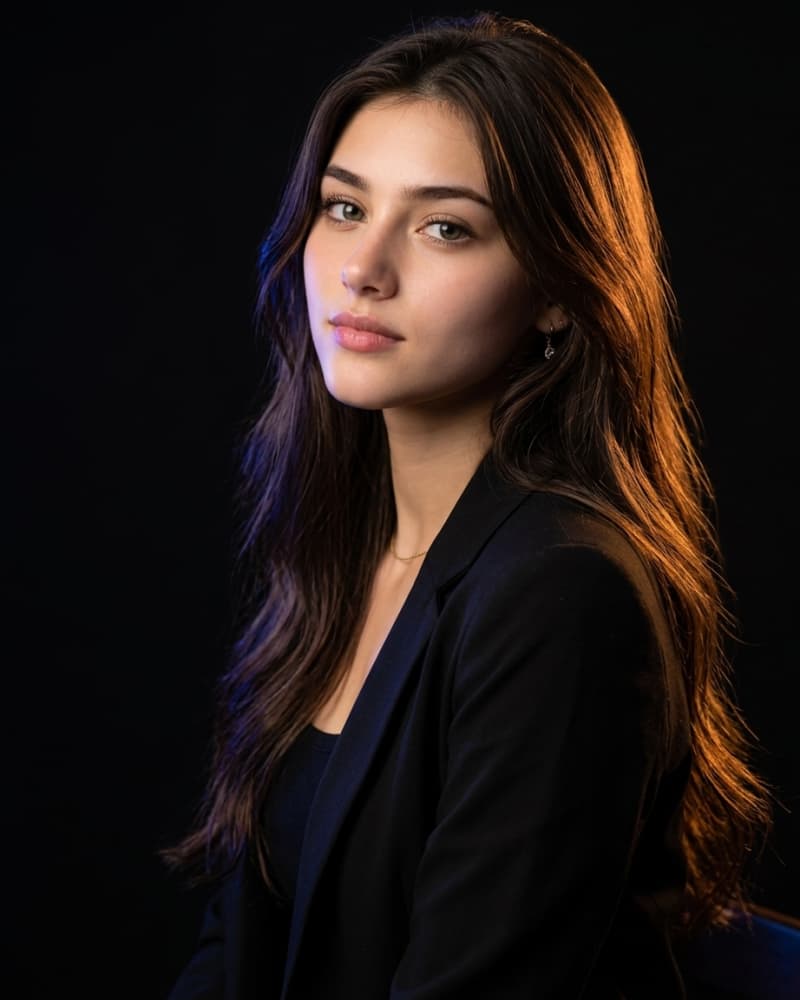
A young woman with long, dark wavy hair sits in a three-quarter turn, her body angled slightly away from the camera while her face turns back toward the lens in a soft over-the-shoulder gaze. She has a calm, confident expression with softly parted lips, subtle rosy-pink lip color, and naturally defined eyebrows. Her hair cascades past her shoulders in loose waves, catching warm rim light along its edges that separates her silhouette from the dark background. She wears a fitted black blazer over a simple black top, with a delicate thin gold necklace resting at her collarbone and small drop earrings peeking through her hair. The setting is a minimal studio backdrop, pure black and shadowed, allowing the subject to be the sole focus of the frame. Lighting is the defining feature: a warm amber-orange key light rakes across one side of her hair and cheek, while a cool blue rim light traces the opposite edge of her hair and shoulder, creating a striking two-tone color contrast against the black backdrop. The look is reminiscent of professional editorial studio lighting, with a soft key light gently illuminating her facial features while dramatic colored gels sculpt the hair and silhouette. Shot with a portrait lens equivalent to an 85mm at a wide aperture (f/1.8–f/2.2), producing creamy background blur and sharp focus on the eyes and face. Camera angle is slightly above eye level, tilted to emphasize the elegant curve of her neck and the flow of her hair. The mood is sophisticated, moody, and glamorous, blending fashion editorial polish with an intimate, cinematic feel. Color palette centers on deep blacks, warm golden amber tones, and cool indigo-blue accents, creating strong visual contrast and depth. Skin tones are warm and natural, retouched softly to retain texture. The overall composition follows a rule-of-thirds placement, with negative space on one side of the frame to balance the flowing hair. This prompt works well for Midjourney's cinematic lighting styles, ChatGPT image generation's clean portrait rendering, and Leonardo AI's photorealistic skin and hair detail models., aspect ratio 4:5
Golden Hour Glam Portrait with Dramatic Backlit Hair
Content creators and photographers use this for social media profile pictures, portfolio pieces, or editorial-style headshots that need a dramatic, high-fashion feel.
This prompt captures a striking studio portrait built around dramatic two-tone lighting and flowing dark hair. It blends the polish of high-fashion editorial photography with an intimate, moody atmosphere, making it a favorite for creators seeking a bold, gallery-worthy portrait style. The warm-and-cool contrast against a pure black backdrop gives it instant visual impact.
Recommended: 4:5 — This vertical ratio suits portrait-style compositions and performs well on Instagram and portfolio platforms where the subject fills most of the frame.
Rate this prompt
Be the first to rate
Free prompt — one-click copy, no login required
Visual Character
Lighting
Her hair cascades past her shoulders in loose waves, catching warm rim light along its edges that separates her silhouette from the dark bac
Texture
Skin tones are warm and natural, retouched softly to retain texture
Camera
A young woman with long, dark wavy hair sits in a three-quarter turn, her body angled slightly away from the camera while her face turns bac
Composition
Shot with a portrait lens equivalent to an 85mm at a wide aperture (f/1
Mood
She has a calm, confident expression with softly parted lips, subtle rosy-pink lip color, and naturally defined eyebrows
Technique
The prompt relies on dual-colored rim/key lighting against a pure black backdrop to sculpt the subject's silhouette and create depth.
Full Prompt
Best For
Use this prompt when you need a striking profile imageportfolio coveror social media feature that feels premium and editorial rather than casual. It's especially effective for beautyfashionor lifestyle brands wanting a moodyhigh-contrast aesthetic. It also suits content creators building a cohesivecinematic personal brand gallery.
How To Use This Prompt
Step 01
Copy the prompt
Use the copy button above to grab the complete prompt with your selected aspect ratio.
Step 02
Open your AI tool
Use a generator that supports the input and reference-image features you need.
Step 03
Generate your image
Create variations, pick the best result, then download and use it in your content.
Common Output Problems
Issues you may encounter and how to fix them
The two-tone lighting effect looks too subtle or washed out.+
Why it happens
AI models often default to a single, evenly diffused light source unless explicitly told to separate two distinct colored lights, so the amber and blue tones blend into a neutral glow instead of staying distinct on opposite sides of the subject.
Fix
Explicitly name both light colors and their placement separately (e.g., "warm amber key light on the left side of the face, cool blue rim light on the right edge of the hair"), and reinforce "black background" and "strong color contrast" to force higher contrast rendering.
The hair looks static, flat, or lacks the flowing, backlit quality described in the prompt.+
Why it happens
Many models prioritize facial detail and clothing accuracy over background hair rendering, so secondary elements like hair movement and rim-light separation get simplified or dropped when the prompt is lighting-and-pose heavy.
Fix
Add explicit motion and light-interaction language such as "wind-swept loose waves," "individual strands catching rim light," and repeat the lighting direction near the hair description rather than only mentioning it once earlier in the prompt.
Customize This Prompt
Adapt these elements to fit your vision
Swap the black blazer for a satin gown or casual knit for different style contexts. Change the lighting gel colors (e.g., pink/teal or red/blue) to shift the mood while keeping the same pose and setup.
Adjust the camera angle description to a straight-on close-up for a more intimate beauty-shot feel instead of the editorial half-body composition.
Prompt Breakdown
What each part of this prompt means
Core technique
The prompt relies on dual-colored rim/key lighting against a pure black backdrop to sculpt the subject's silhouette and create depth.
Recommended base models
Midjourney handles the colored lighting contrast and hair texture especially well, often adding extra stylistic flair. ChatGPT image gen tends to render cleaner, more even skin tones but may soften the dramatic lighting contrast slightly. Leonardo AI excels at photorealistic hair strands and fabric texture but may need explicit aperture/lens terms repeated for stronger bokeh.
Suggested negative prompt
blurry face, overexposed highlights, flat lighting, extra fingers, distorted jewelry, plastic skin texture, low contrast, washed out colors Notes on tested variations: Swapping the blazer for a satin dress or changing the necklace style works well without disrupting the lighting setup. Adjusting the color gels to purple and gold also produces strong results for a more luxurious mood.
Variation notes
Swapping the blazer for a satin dress or changing the necklace style works well without disrupting the lighting setup. Adjusting the color gels to purple and gold also produces strong results for a more luxurious mood
Which AI Tools Can I Use?
This prompt works with popular AI image generators.
Links to official tool websites. Not a claim that this prompt was tested in every tool or model version.
Tags
#backlit hair
Frequently Asked Questions
Quick answers before you copy this prompt
Will this prompt work well for male subjects too?+
Yes, simply adjust hair length and styling references; the two-tone lighting setup and pose structure translate well to any gender.
Can I change the color scheme from amber-blue to something else?+
Absolutely, swap the gel colors in the prompt (e.g., magenta and teal, or green and red) while keeping the lighting direction description intact.
Does this prompt require a real photography background to describe accurately?+
No, the prompt is written in plain descriptive language so image models interpret lighting and pose intent without needing technical photography jargon.