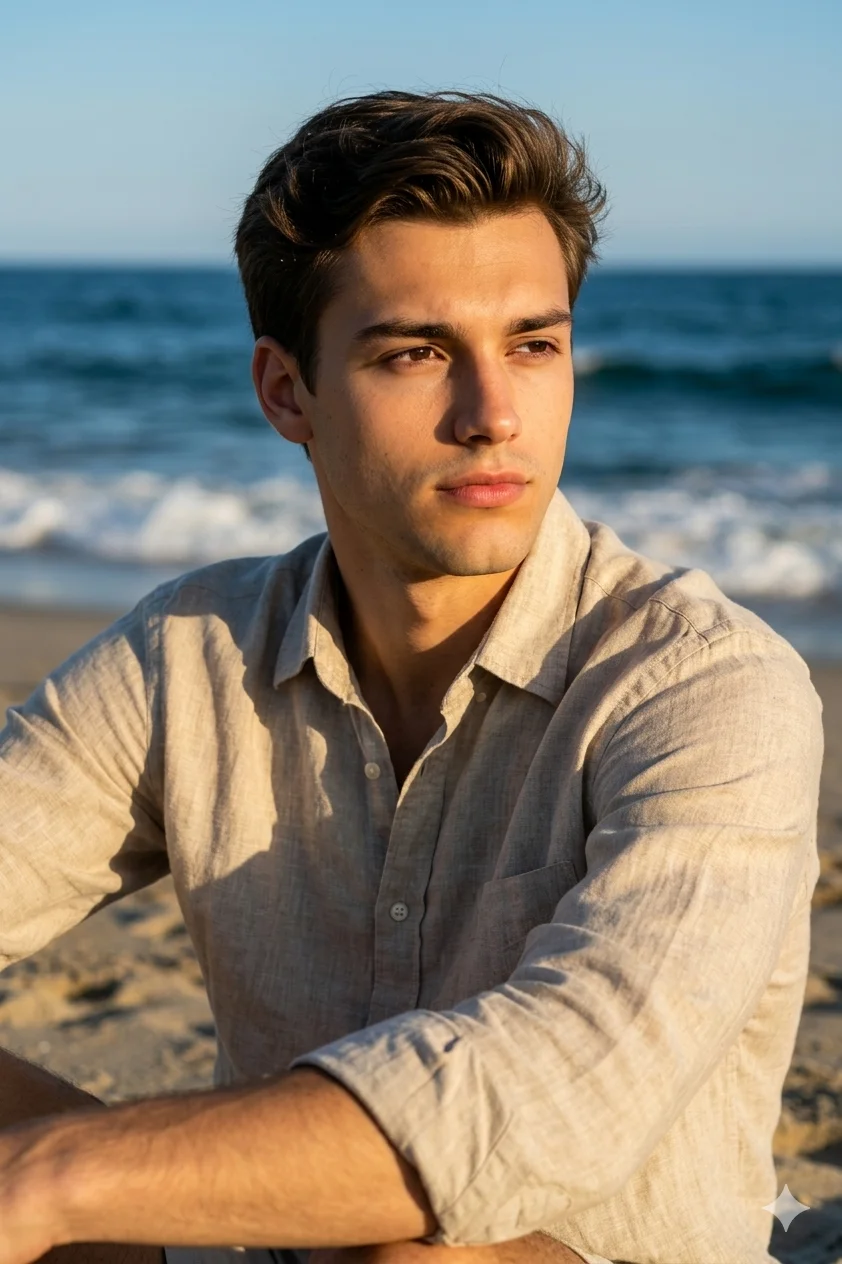
Golden hour sunlight paints warm highlights across a contemplative figure seated on sandy shores. Directional hard light from front-left casts distinct natural shadows across the textured beige linen shirt. Deep vibrant ocean blues contrast against warm earthy tones, creating editorial magazine quality. The 85mm lens captures razor-sharp focus while creamy bokeh softens the crashing waves behind.
Identity preservationPhotorealistic outputEditorial lightingSocial-ready format
Aspect Ratio
Select before copying
Recommended: 4:5 — 4:5 vertical framing captures the full-body composition from head to toe while maintaining portrait-style intimacy.
Rate this prompt
Be the first to rate
Free prompt — one-click copy, no login required
Visual Character
Lighting
The lighting must replicate golden hour or late afternoon sunlight striking, directional hard light coming from the front-left, casting warm
Color
Use the provided face image as the strict identity reference, preserving the user's exact facial features, skin tone, and personality withou
Texture
Deliver ultra-realistic, photorealistic rendering, resolution, capturing fine details like the weave of the linen and natural skin texture,
Background
8 aperture for a shallow depth of field, achieving a razor-sharp focus on the subject's face and clothing textures while rendering the ocean
Camera
Create a cinematic, production-level lifestyle portrait of the user sitting relaxed on a sandy beach, looking thoughtfully off-camera to the
Use the copy button above to grab the complete prompt with your selected aspect ratio.
Step 02
Open your AI tool
Use a generator that supports the input and reference-image features you need.
Step 03
Generate your image
Create variations, pick the best result, then download and use it in your content.
Common Output Problems
Issues you may encounter and how to fix them
The face doesn't look like the reference photo or appears distorted+
Why it happens
AI models sometimes reinterpret facial features rather than preserving them exactly, especially with complex poses, unusual lighting, or low-quality reference images.
Fix
Use a well-lit, front-facing reference photo with clear facial features. Add "preserve exact facial structure, proportions, and likeness from the reference" at the beginning of the prompt.
The warm tones become oversaturated or the background blows out with too much brightness+
Why it happens
Golden hour lighting instructions can push models toward extreme orange/yellow saturation, especially when combined with "warm" or "amber" descriptors.
Fix
Add "natural warm tones, avoid oversaturated oranges, retain background detail in bright areas" to keep the golden-hour effect balanced and photorealistic.
The depth of field doesn't match the lens specifications described in the prompt+
Why it happens
AI models don't physically simulate lens optics — they interpret depth-of-field instructions as general blur rather than accurate f-stop rendering.
Fix
Be explicit about what should be sharp vs. blurred: "tack-sharp focus on the face, gradual blur beginning at the shoulders, creamy circular bokeh highlights in the background."
Customize This Prompt
Adapt these elements to fit your vision
Replace the sand background with a minimalist studio backdrop to isolate the subject and create a cleaner, more focused composition.
Replace the golden hour lighting with cool blue-hour tones for a more moody, twilight atmosphere.
Which AI Tools Can I Use?
This prompt works with popular AI image generators.
Do I need to upload a reference photo for this prompt to work?+
Yes, this prompt is designed for reference-image workflows. Upload a clear, well-lit photo of the subject's face. A front-facing photo with visible facial features produces the best identity preservation. Removing the identity-preservation instructions will cause the model to generate a new face.
How do I make the studio background less flat and more dynamic?+
Try adding a subtle gradient or texture to the backdrop: "soft grey gradient backdrop with gentle tonal variation." You can also specify background lighting like "subtle backlight glow on the backdrop" for more depth.
Can I change the lens focal length without breaking the composition?+
Yes. Replace the lens specification (e.g., "85mm") with a different focal length — wider (35mm) for more environment, tighter (135mm) for more compression. Keep the aperture (f-stop) consistent to maintain similar depth of field.
What should I change if the subject looks distorted or unnatural?+
Simplify the pose description and remove conflicting instructions. Add "natural relaxed pose, correct body proportions, anatomically coherent" at the beginning. If the face looks wrong, add "preserve exact facial structure and proportions" and use a higher-quality reference photo.