Night edition
change golden hour to a night rooftop with string lights and neon signage bokeh, and swap the warm grade for cool blue tones with the neon line accents glowing brighter.
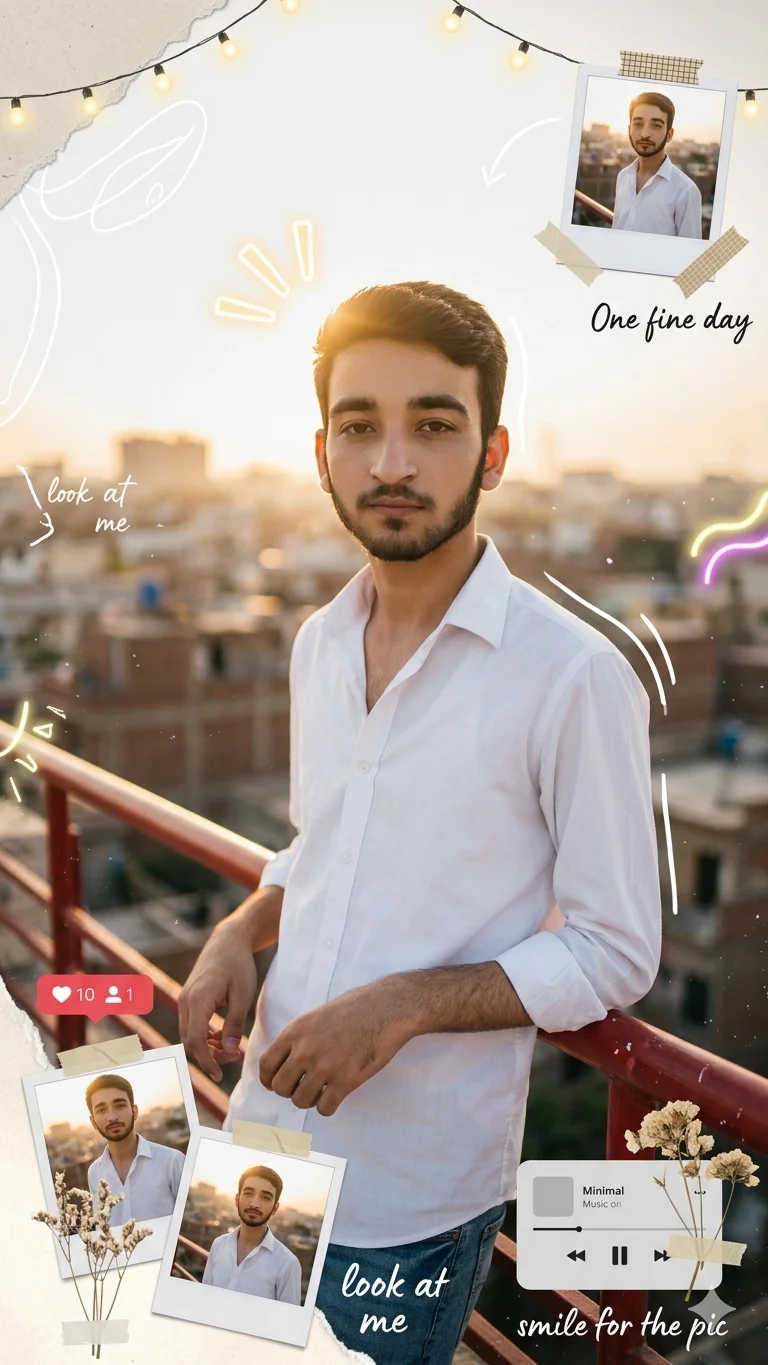
AI-edited example image for demonstration purposes.
Aspect Ratio
Select before copyingCopy this ready-to-use AI prompt and generate polished creator visuals in your favorite AI tool.
Lifestyle Portraits
This golden hour rooftop portrait prompt is built for one specific result: your face, exactly as you look in your own photo, placed inside a cinematic rooftop scene at golden hour with a handcrafted scrapbook overlay. The identity locking is the heart of this prompt. The tool works from your uploaded reference photo and keeps your facial features, skin tone, and likeness identical, so the final image feels like a real moment from your own life rather than stock content.
The scene itself does a lot of quiet work. You lean against a red metal handrail on a rooftop in a white open collar shirt with rolled sleeves and jeans, relaxed and confident, gazing slightly to the side. Warm backlight at golden hour gives you rim lighting on your shoulders and hair, a soft sun flare, and a cinematic color grade, while the city melts into bokeh behind you in a shallow 35mm f/1.8 feel. Then comes the scrapbook layer that makes this image shareable: hand drawn doodles, glowing neon line accents, string light bokeh, torn paper edges, washi tape strips, taped Polaroid snapshots, dried flowers, a music player widget UI, a like and heart counter UI, and handwritten notes reading One fine day, look at me, and smile for the pic, all finished with film grain, dust, and a dark vignette.
This is made for profile pictures, Instagram posts, and anyone who wants a personal aesthetic photo that is clearly them. ChatGPT handles reference image identity workflows very reliably (https://openai.com/chatgpt), so your face survives the stylization. If you enjoy layered collage aesthetics, our torn paper editorial photo collage prompt (https://www.aqprompts.com/tools/ai-image-prompts/p/aesthetic-torn-paper-editorial-photo-collage) explores a similar look. Browse more concepts in the lifestyle collection (https://www.aqprompts.com/tools/ai-image-prompts/lifestyle) and always generate at 4:5, because the scrapbook margins and vignette are composed for that frame.
ChatGPT is the most reliable choice for reference image identity workflows. It accepts your uploaded photo and carries your exact facial features through a heavily stylized scene without melting them into a generic face, which is exactly what this prompt demands. This prompt was generation tested on ChatGPT, and it also handles the scrapbook overlay text and widget UI elements without breaking the composition.
change golden hour to a night rooftop with string lights and neon signage bokeh, and swap the warm grade for cool blue tones with the neon line accents glowing brighter.
keep the same pose and outfit but place yourself on a rooftop overlooking a famous skyline, replace the handwritten notes with the city name in the same handwritten style.
remove all scrapbook overlays, doodles, Polaroids, and widget UI elements, keeping just the golden hour rooftop portrait with film grain for a classic profile picture.
It matters a lot. Use a sharp, front facing, well lit photo where your full face is visible, with a neutral expression and no sunglasses or heavy filters. A low quality or side angle photo gives the tool less to anchor on, and the likeness will drift even with the identity lock wording in place.
Do not accept a near miss. Reupload the same high quality reference photo in a fresh chat, keep the 100 percent identical face wording unchanged, and regenerate. Each retry reanchors the likeness, and the first result is often weaker than the second or third.
They render as decorative UI graphics rather than functional widgets. Handwritten notes like One fine day and look at me usually come out clean, but small interface text can distort, so treat those elements as visual texture and check them before sharing.
Yes. Describe a different outfit or location while keeping the identity lock and reference photo the same. The likeness instructions are independent of the scene, so the face stays yours while everything around it changes.