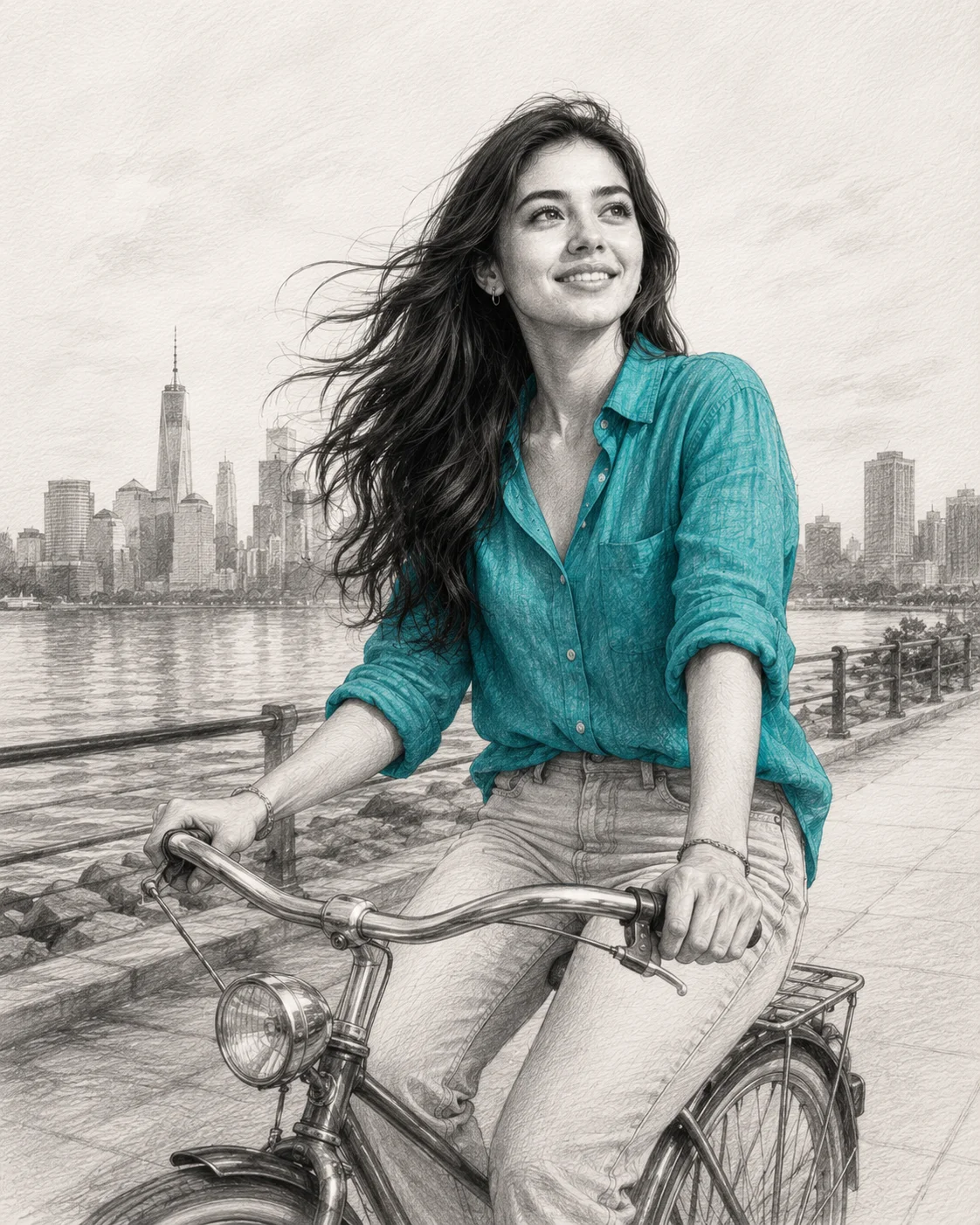
Teal Linen Shirt Graphite Bicycle Selective Color Prompt
Photo Editing Prompts
Introduce a striking, museum-quality narrative to your image platform with this masterful selective-color graphite portrait prompt. By combining the classic, detailed texture of a professional hand-drawn pencil sketch with a single pop of vibrant teal textile pigment, this composition effortlessly commands visual attention. The nostalgic storytelling of a joyful bike ride along a lightly sketched waterfront metropolis results in an elite, editorial-grade asset built for high-end digital design libraries.
Identity preservationPhotorealistic outputDepth of field
Aspect Ratio
Select before copying
Recommended: 4:5 — 4:5 vertical framing captures the outdoor setting context while keeping the subject prominently centered in the composition.
Rate this prompt
Be the first to rate
Free prompt — one-click copy, no login required
Visual Character
Color
Features a selective color effect where her stylish teal and turquoise linen button-up shirt with rolled sleeves is the only colored element
Background
The face, hands, bicycle, and waterfront skyline background remain in beautifully shaded black-and-white graphite using cross-hatching, smoo
Composition
Elegant fine-art graphite pencil portrait illustration of a young woman on premium white textured paper, preserving 100% exact facial struct
Full Prompt
Best For
Fine-art gallery digital showcasesluxury editorial book coverspremium custom portrait commissionsand high-visibility creative blog banners.
How To Use This Prompt
Step 01
Copy the prompt
Use the copy button above to grab the complete prompt with your selected aspect ratio.
Step 02
Open your AI tool
Use a generator that supports the input and reference-image features you need.
Step 03
Generate your image
Create variations, pick the best result, then download and use it in your content.
Common Output Problems
Issues you may encounter and how to fix them
The face doesn't look like the reference photo or appears distorted+
Why it happens
AI models sometimes reinterpret facial features rather than preserving them exactly, especially with complex poses, unusual lighting, or low-quality reference images.
Fix
Use a well-lit, front-facing reference photo with clear facial features. Add "preserve exact facial structure, proportions, and likeness from the reference" at the beginning of the prompt.
Rain droplets look like random dots rather than realistic water on glass or in the air+
Why it happens
AI models tend to render rain as uniform speckles rather than the varied size, shape, and refraction patterns of real water droplets.
Fix
Add "rain droplets of varying sizes with realistic light refraction, some droplets merging into streaks, condensation trails on glass" for more natural weather effects.
The image lacks the professional quality or sharpness described in the prompt+
Why it happens
Some AI models prioritize artistic interpretation over photorealistic rendering, especially when the prompt contains both stylistic and technical instructions.
Fix
Move all camera and quality specifications to the beginning of the prompt and add "ultra-sharp focus on the subject, fine detail rendering, professional photography quality" to reinforce the desired output.
Customize This Prompt
Adapt these elements to fit your vision
Replace the skyline background with a minimalist studio backdrop to isolate the subject and create a cleaner, more focused composition.
Adjust the lighting direction to create more dramatic shadows and depth — try moving the key light from front to a 45-degree angle.
Change the expression from confident to direct eye contact for a more engaging, connection-driven portrait.
Which AI Tools Can I Use?
This prompt works with popular AI image generators.
Links to official tool websites. Not a claim that this prompt was tested in every tool or model version.
Frequently Asked Questions
Quick answers before you copy this prompt
Do I need to upload a reference photo for this prompt to work?+
Yes, this prompt is designed for reference-image workflows. Upload a clear, well-lit photo of the subject's face. A front-facing photo with visible facial features produces the best identity preservation. Removing the identity-preservation instructions will cause the model to generate a new face.
How do I control which background elements appear?+
Specify what you want: "clean background with blurred buildings" or "minimal background with only architectural lines." Avoid vague descriptions which can introduce unwanted signs, people, or vehicles.
How do I keep the subject recognizable in the vector art style?+
Emphasize "preserve the subject's unique facial proportions, eye shape, and bone structure within the vector art rendering style." The more specific the facial description, the better the identity preservation in stylized output.
How do I make the rain or weather effects look more realistic?+
Add "rain droplets of varying sizes with realistic light refraction, some droplets merging into streaks, condensation trails on glass" for more natural weather effects. Avoid the word "rainy" alone — specify droplet characteristics.