Name reveal version
Change the glowing text to your own name or brand handle in the same warm golden white neon handwriting. Perfect for creator intros and channel branding.
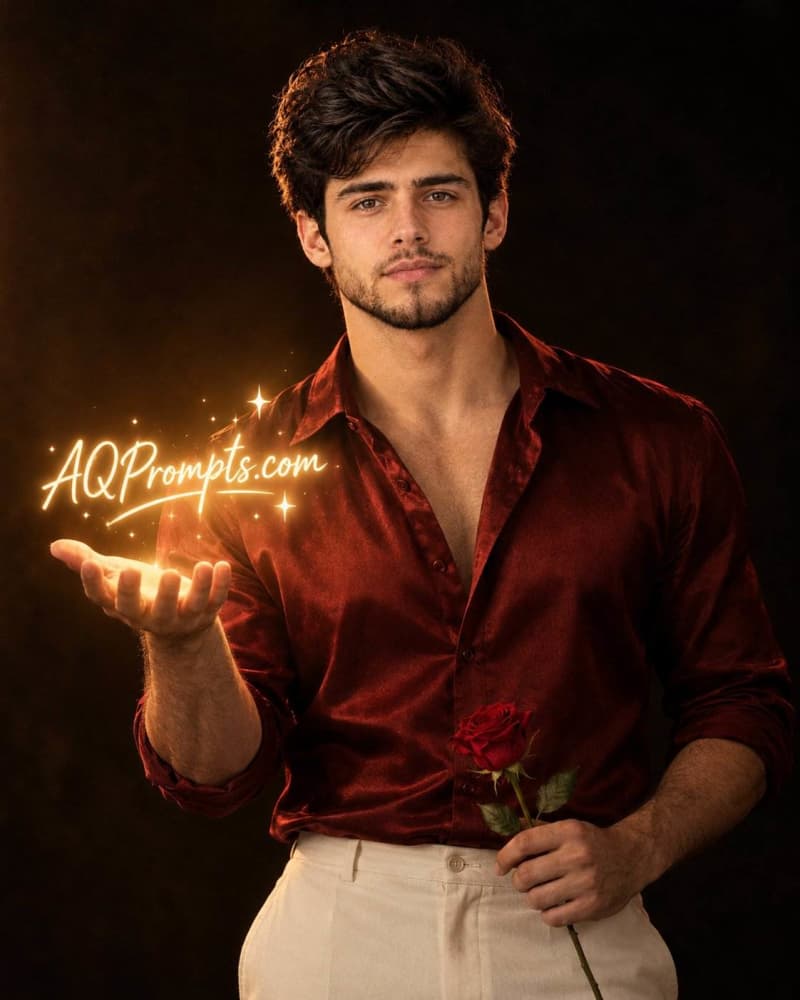
AI-edited example image for demonstration purposes.
Aspect Ratio
Select before copyingCopy this ready-to-use AI prompt and generate polished creator visuals in your favorite AI tool.
Male Portraits
Some portraits whisper, and this one glows. The red satin shirt portrait pairs old school romance with a modern creator twist: a single red rose in one hand and a glowing handwritten neon text floating above the open palm of the other. The dark room, the warm brown black background and the single soft light source give the frame a cinematic low key mood, while the satin fabric catches just enough light to show its rich sheen. It is a portrait built for profile pictures, creator branding and announcement posts, because the floating text space above the palm can carry a name, a handle or a short message. The look works because every element earns its place. The deep red shirt and the red rose echo each other, the cream trousers keep the lower frame calm, and the golden glow ties the whole palette together. What makes this prompt reliable is how precisely it directs the light and the hands. It names the light direction, fixes the rose at waist level, and describes the palm as open and raised, which are exactly the details generators usually get wrong. Follow the steps below, keep the negative space above the palm clean, and you will get a dramatic portrait that looks like a film still.
ChatGPT image generation handles face reference portraits and short glowing text more reliably than most tools, and it follows hand placement instructions closely, which matters here because the whole composition rests on one open palm and one rose held at waist level.
Change the glowing text to your own name or brand handle in the same warm golden white neon handwriting. Perfect for creator intros and channel branding.
Change the setting to "a dark wooden balcony at dusk, warm sunset glow from the left" and remove the neon text. The result is a softer romantic portrait with the same outfit and rose.
Change the shirt to "black satin" and the rose to "a single white rose". The mood turns colder and more formal, like a luxury editorial cover.
Yes, that is the best use of this prompt. Replace the quoted text with your name, handle or a short phrase of two or three words. Shorter text renders cleaner and keeps the neon effect believable.
Shorten the text and regenerate rather than adding more instructions. Text rendering improves with fewer characters, and one fresh generation usually fixes letter shapes that editing could not.
The dark warm background is what makes the glow read as light instead of decoration. On a bright background the neon effect disappears and the cinematic mood is lost.
You can, but keep the rose and the shirt in the same colour family. The matched red pairing is the design idea behind this portrait.