Color panels version
change the three black and white panels to full color with a teal and orange cinema grade for a warmer, more modern blockbuster poster.
AI-edited example image for demonstration purposes.
Aspect Ratio
Select before copyingCopy this ready-to-use AI prompt and generate polished creator visuals in your favorite AI tool.
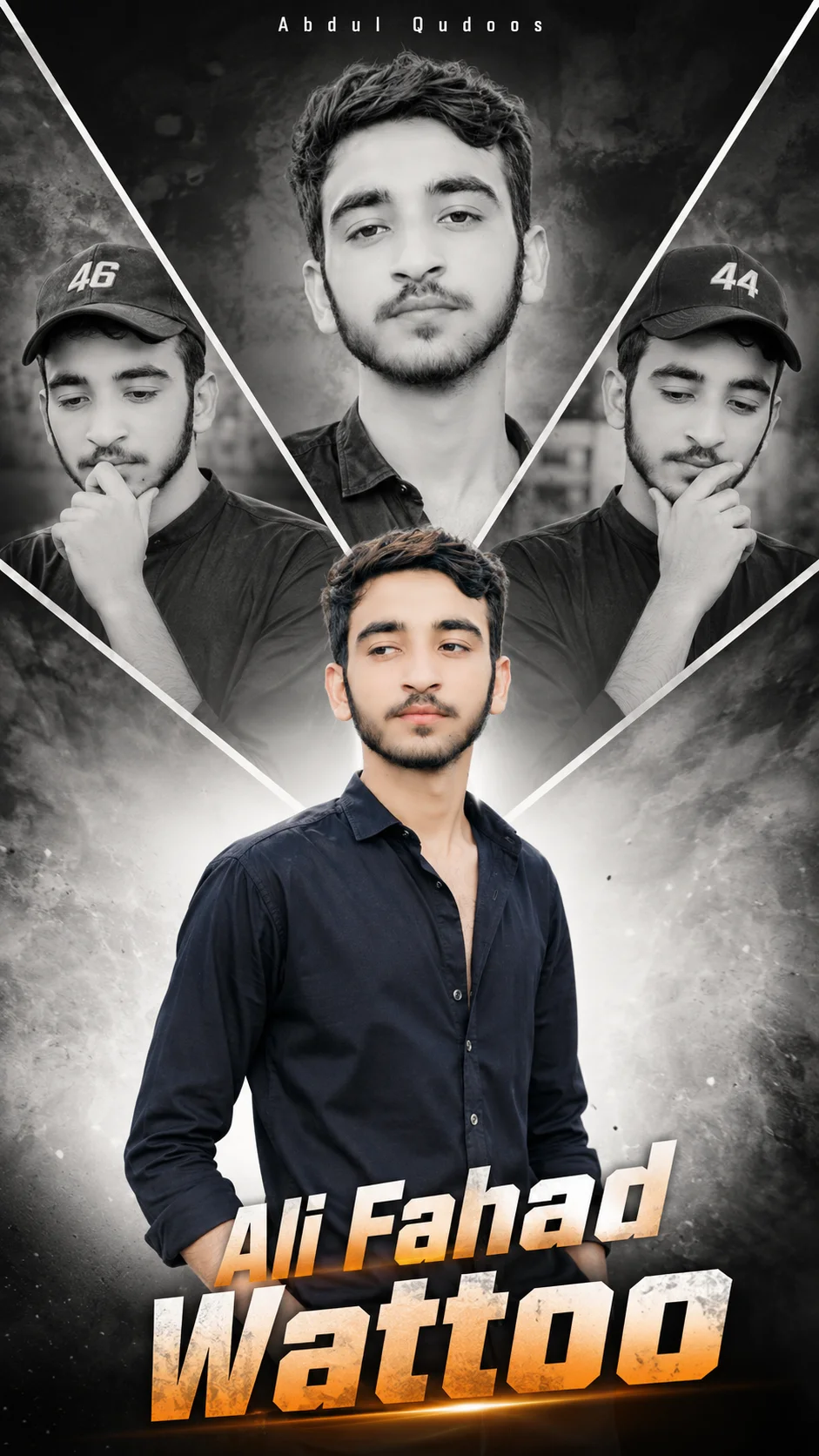
This cinematic birthday poster prompt is built like a real Indian studio banner, not a casual photo edit. The layout does the heavy lifting: three black and white panels arranged in a large V-shaped diagonal across the top, showing the same young man in three different moods, with a full color hero shot fading in at the bottom. That contrast is the whole design. The monochrome panels feel dramatic and filmy, while the color portrait grounds the poster in celebration. The typography carries the birthday energy, with bold italic slanted letters in an orange to white gradient spelling the name, and a small white name set at the top center, giving it the premium blockbuster finish that fan made birthday posters are known for.
This one is made for birthday editors, fan page creators, and anyone who wants a personalized celebration poster that looks professionally designed. It works best when the three black and white panels clearly show the same face, so keep the description of the man consistent across all three panels and do not let the tool change hairstyles or clothing between them. If you create these often, browse more ideas in our celebrations collection (https://www.aqprompts.com/tools/ai-image-prompts/celebrations), and try the minimalist high key birthday prompt with red signature text (https://www.aqprompts.com/tools/ai-image-prompts/p/minimalist-high-key-birthday-prompt-with-red-signature-text) for a cleaner style. Generate it in ChatGPT (https://chatgpt.com), which renders multi word poster text more reliably than most generators, and always check the spelling of the name letters before you share the result.
ChatGPT handles the two hardest parts of this poster: rendering multiple lines of stylized text without spelling errors, and keeping one face consistent across three separate black and white panels. This prompt was generation tested on ChatGPT, which keeps the orange to white gradient lettering clean and readable, where most image models still mangle decorative typography.
change the three black and white panels to full color with a teal and orange cinema grade for a warmer, more modern blockbuster poster.
replace the three-panel V layout with one large black and white close-up at top center, keeping the full color hero shot and the gradient name typography below.
swap the birthday styling for gold foil gradient letters with a soft spotlight behind the hero portrait for an anniversary or achievement poster.
Yes, as long as the description of the man stays identical in each panel. Use the same age, hair, and clothing words in all three. If a panel looks different, copy the exact face description from the best panel into the other two and regenerate.
Type the name on its own lines with exact capitalization and keep the gradient lettering description attached to it. Check every letter after generating. If one letter is wrong, retype just the name line rather than changing the whole prompt.
Yes. Replace the existing name lines with the new name, keeping the line breaks and the orange to white gradient description. Short names render most cleanly, so check longer names carefully for crowding.
They are part of the original poster styling, like jersey numbers on the caps worn in the panels. You can keep them, change them to an age or a favorite number, or remove the numbers entirely for a simpler look.