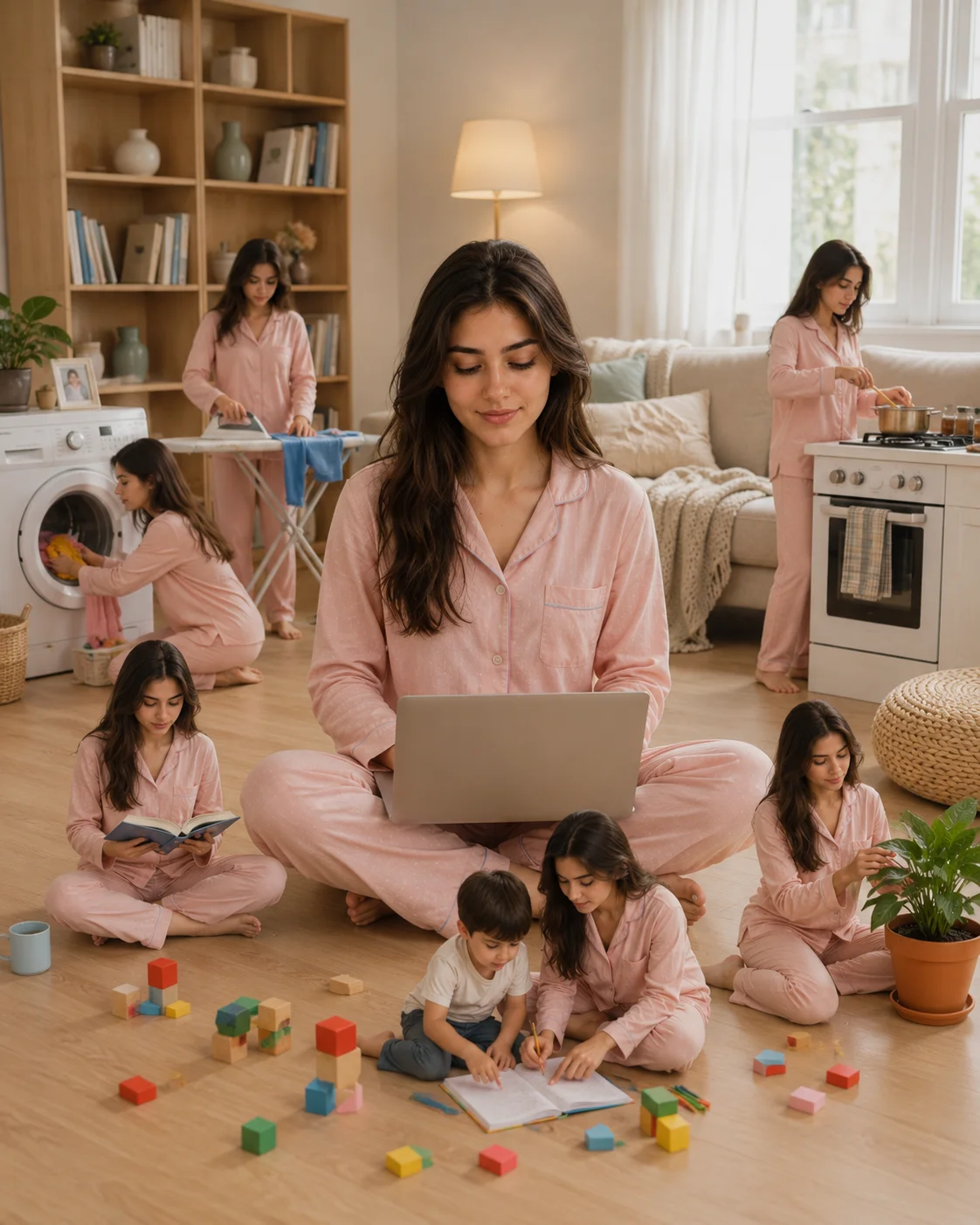
Miniature Clones Multitasking Cozy Living Room Prompt
Photo Editing Prompts
Bring a whimsical, high-concept narrative to your image bank with this clever and detailed multi-identity lifestyle prompt. Perfect for illustrating themes of busy motherhood, freelancing, and the chaotic beauty of modern multitasking, this template captures a central figure managing her day while miniature clones handle various household tasks around her. Wrapped in a soft, bright Scandinavian interior with a warm pastel blush-pink palette, it offers digital content creators an incredibly engaging, highly shareable creative concept graphic.
Identity preservationPhotorealistic outputEditorial lightingDepth of field
Aspect Ratio
Select before copying
Recommended: 4:5 — 4:5 vertical framing captures the full-body composition from head to toe while maintaining portrait-style intimacy.
Rate this prompt
Be the first to rate
Free prompt — one-click copy, no login required
Visual Character
Color
Background features warm beige walls, a bookshelf, a beige fabric sofa, and a large bright window with sheer curtains letting in soft natura
Camera
Soft warm airy atmosphere, blush pink and cream pastel palette, low contrast, shot with a 35mm wide lens, high-resolution quality, 4:5 aspec
Mood
Ultra-realistic cinematic lifestyle photograph of a young woman approximately 28 years old with long straight dark brown hair and a soft smi
Full Prompt
Best For
Viral social media lifestyle postscreative mom-blog header imageswork-life balance editorial layoutsand high-engagement digital story graphics.
How To Use This Prompt
Step 01
Copy the prompt
Use the copy button above to grab the complete prompt with your selected aspect ratio.
Step 02
Open your AI tool
Use a generator that supports the input and reference-image features you need.
Step 03
Generate your image
Create variations, pick the best result, then download and use it in your content.
Common Output Problems
Issues you may encounter and how to fix them
The fabric texture appears flat or loses its characteristic sheen and detail+
Why it happens
AI models often render textured fabrics as smooth surfaces because fine material detail requires specific rendering instructions beyond basic color and shape.
Fix
Add "preserve visible fabric texture with characteristic light reflections on folds, realistic weave pattern and drape" to guide the model toward accurate fabric rendering.
The depth of field doesn't match the lens specifications described in the prompt+
Why it happens
AI models don't physically simulate lens optics — they interpret depth-of-field instructions as general blur rather than accurate f-stop rendering.
Fix
Be explicit about what should be sharp vs. blurred: "tack-sharp focus on the face, gradual blur beginning at the shoulders, creamy circular bokeh highlights in the background."
Customize This Prompt
Adapt these elements to fit your vision
Try an outdoor setting like a garden or rooftop to introduce natural light and environmental depth.
Adjust the lighting direction to create more dramatic shadows and depth — try moving the key light from front to a 45-degree angle.
Remove the laptop for a cleaner, less accessorized look, or swap it for a different style to match your branding.
Which AI Tools Can I Use?
This prompt works with popular AI image generators.
Links to official tool websites. Not a claim that this prompt was tested in every tool or model version.
Frequently Asked Questions
Quick answers before you copy this prompt
Can I use this prompt with a reference photo to preserve someone's face?+
Yes. Add identity-preservation instructions like "preserve exact facial features from the uploaded reference photo" at the beginning of the prompt. This works best with clear, front-facing reference images.
Which AI image generator works best with this prompt?+
This prompt is compatible with ChatGPT, Midjourney, and Leonardo AI. Each generator interprets the instructions slightly differently — ChatGPT tends to follow composition rules closely, Midjourney excels at color grading, and Leonardo AI handles photorealistic textures well.
How do I adapt this for different social media platforms?+
Use 4:5 for Instagram feed posts (best vertical coverage), 1:1 for profile pictures and square grids, and 9:16 for Stories and Reels. For landscape platforms like Twitter/X, try 16:9 but note the full-body composition may need adjustment.
The skin looks too smooth or artificial. How do I make it more realistic?+
Add "natural skin texture with visible pores, subtle imperfections, realistic skin tone variation" to the prompt. Avoid words like "flawless" or "perfect skin" which push models toward artificial smoothness.