Deep Crimson Red Luxury Suit European Street Prompt
Male Portrait Prompts
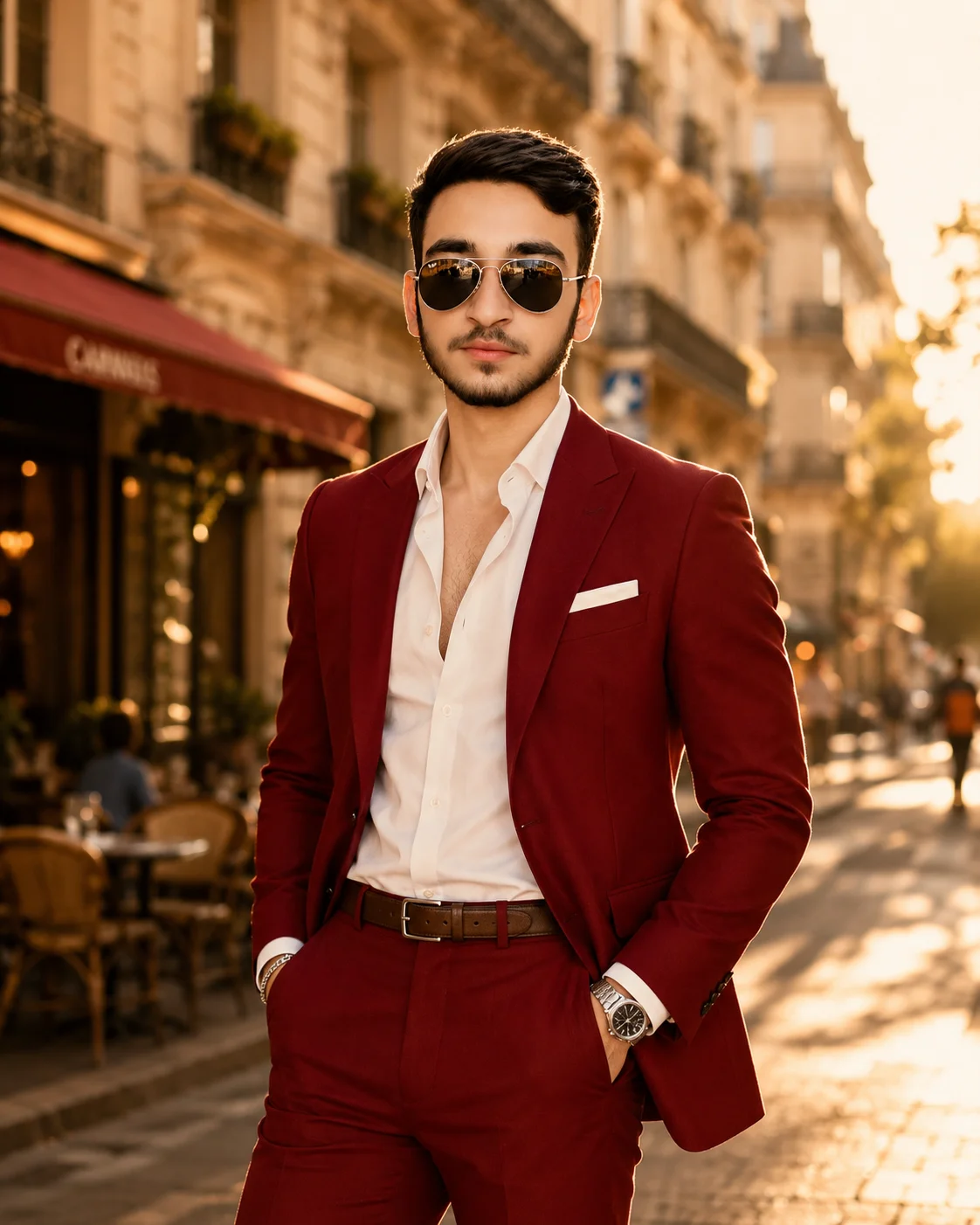
Command the ultimate level of high-end menswear authority with this striking crimson red luxury suit prompt. Simulating an elite, top-tier global fashion campaign for publications like menswear editorial or fashion editorial Men, this composition effortlessly juxtaposes a sharp, bold color statement against a romantic European street at peak golden hour. The confident hands-in-pocket posture, unbuttoned white shirt collar, and sleek aviator sunglasses deliver an aspirational lifestyle aesthetic that instantly elevates any personal branding or creative design project.
Photorealistic outputEditorial lightingDepth of field
Aspect Ratio
Select before copying
Recommended: 4:5 — 4:5 vertical framing captures the full-body composition from head to toe while maintaining portrait-style intimacy.
Rate this prompt
Be the first to rate
Free prompt — one-click copy, no login required
Visual Character
Lighting
Illuminated by warm golden-hour sunlight creating dramatic rim lighting, soft facial highlights, and a subtle lens flare, 85mm lens, f/1
Color
Ultra-realistic cinematic fashion photograph of a man, preserving 100% exact facial structure, hairstyle, beard, skin tone, and features fro
Background
Set against a beautifully blurred background of elegant urban buildings and trees with creamy bokeh
Camera
Captured in a full-body shot with both hands inside his trouser pockets, looking directly at the camera with a calm, powerful expression
Composition
8, menswear editorial magazine quality, high-resolution, 4:5 aspect ratio
Full Prompt
Best For
Premium menswear lookbooksexecutive lifestyle personal brandinghigh-visibility digital creative portfoliosand elite fashion publication mockups.
How To Use This Prompt
Step 01
Copy the prompt
Use the copy button above to grab the complete prompt with your selected aspect ratio.
Step 02
Open your AI tool
Use a generator that supports the input and reference-image features you need.
Step 03
Generate your image
Create variations, pick the best result, then download and use it in your content.
Common Output Problems
Issues you may encounter and how to fix them
Random urban elements clutter around the suit silhouette+
Why it happens
AI generators populate urban scenes with environmental detritus that fits the urban category near the suit.
Fix
Specify clean uncluttered urban backdrop with clear suit silhouette.
The suit color clashes with the urban environment palette+
Why it happens
AI generators may not harmonize the suit color with existing urban background elements.
Fix
Adjust the suit color to complement the urban palette, or add color-harmonized tones.
Customize This Prompt
Adapt these elements to fit your vision
Swap the white dress for a golden alternative to shift the mood — different fabric colors dramatically change the overall tone of the portrait.
Replace the buildings background with a minimalist studio backdrop to isolate the subject and create a cleaner, more focused composition.
Replace the golden hour lighting with cool blue-hour tones for a more moody, twilight atmosphere.
Change the expression from confident to direct eye contact for a more engaging, connection-driven portrait.
Which AI Tools Can I Use?
This prompt works with popular AI image generators.
Links to official tool websites. Not a claim that this prompt was tested in every tool or model version.
Frequently Asked Questions
Quick answers before you copy this prompt
Do I need to upload a reference photo for this prompt to work?+
Yes, this prompt is designed for reference-image workflows. Upload a clear, well-lit photo of the subject's face. A front-facing photo with visible facial features produces the best identity preservation. Removing the identity-preservation instructions will cause the model to generate a new face.
How do I control which background elements appear?+
Specify what you want: "clean background with blurred buildings" or "minimal background with only architectural lines." Avoid vague descriptions which can introduce unwanted signs, people, or vehicles.
Can I change the lens focal length without breaking the composition?+
Yes. Replace the lens specification (e.g., "85mm") with a different focal length — wider (35mm) for more environment, tighter (135mm) for more compression. Keep the aperture (f-stop) consistent to maintain similar depth of field.
What should I change if the subject looks distorted or unnatural?+
Simplify the pose description and remove conflicting instructions. Add "natural relaxed pose, correct body proportions, anatomically coherent" at the beginning. If the face looks wrong, add "preserve exact facial structure and proportions" and use a higher-quality reference photo.