By Abdul QudoosPublished Oct 22, 2026Updated Oct 23, 2026
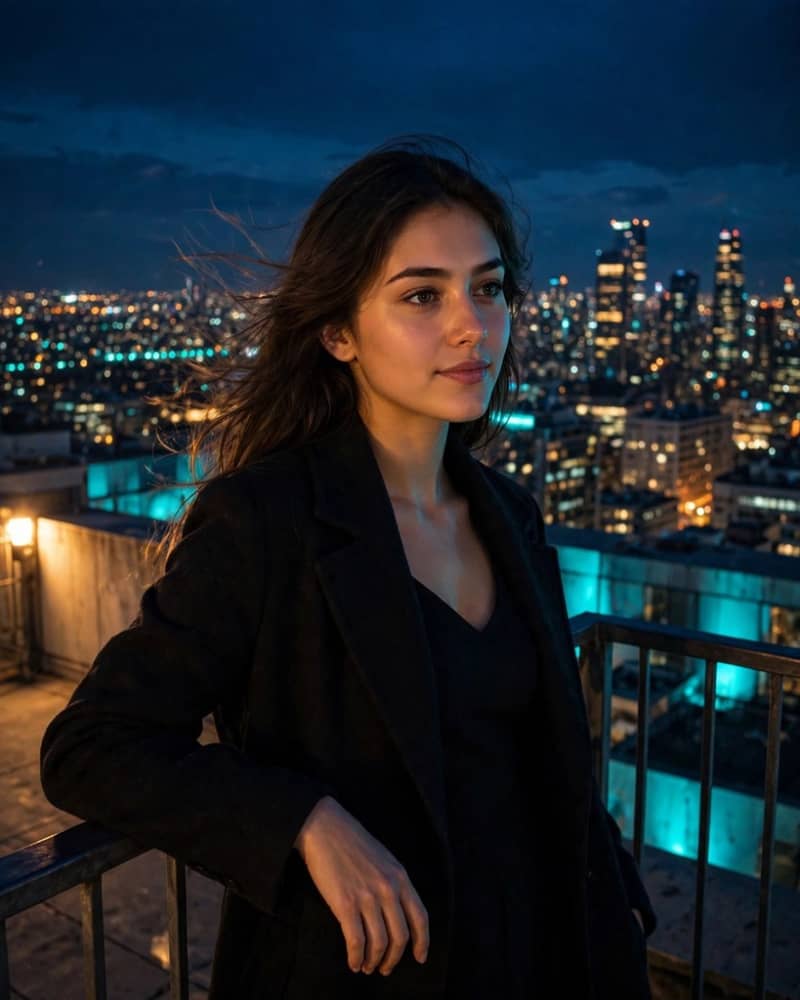
Young woman standing on a night rooftop above a glittering city skyline, leaning on the railing with city lights sparkling below.

AI-generated example image for demonstration purposes.

Cinematic Night Rooftop City Skyline Portrait AI Prompt

Aspect Ratio

Select before copying

Copy this ready-to-use AI prompt and generate polished creator visuals in your favorite AI tool.

Female Portraits

Identity preservationPhotorealistic outputEditorial lightingDepth of field
View Prompt
Use the reference face exactly for the subject's identity. Cinematic night portrait of a young woman standing on a high rooftop observation deck above a glittering city skyline, leaning lightly on the railing, hair moving softly in the night breeze, calm confident expression looking slightly past the lens. Thousands of city lights sparkle below and behind her, a few lit skyscrapers rising in the mid distance, deep blue night sky above. She wears an elegant dark coat over a sleek dress. Cool city glow on her face balanced with a warm practical light from the rooftop. Shot on a 50mm lens at f/1.8, shallow depth, film-like grain, teal and amber cinematic grade. Negative prompt: blurry face, distorted hands, plastic skin, cartoon, daytime, empty black sky, watermark, text. Style: photorealistic cinematic night portrait. Aspect: 4:5 aspect ratioportrait. No text, no watermark.

About this Cinematic Night Rooftop City Skyline Portrait AI prompt

The rooftop above a glittering city is the most evergreen viral portrait backdrop on the internet, and it keeps working because scale does the talking. One person small against a sea of lights reads as ambition, freedom, and arrival all at once. This prompt builds that scene deliberately, placing the subject on a high observation deck at night with the whole city sparkling below. The concept suits creators, entrepreneurs, and anyone telling an arrival story. It works beautifully for profile pictures, about pages, and announcement posts because the skyline gives the portrait instant drama without a single prop. Travel creators and city-based brands will find it fits their world especially naturally. Technically, the prompt is built to balance two light sources so the face stays readable. The cool city glow alone would turn the skin blue, so a warm practical rooftop light is specified to keep the face natural. The hair movement is described as soft rather than wild, which keeps the identity clear. The railing gives her a simple leaning pose that keeps the hands natural and the composition grounded.

Recommended tool: Leonardo AI

Leonardo AI renders night cityscapes and bokeh light fields with convincing depth. Its cinematic color handling keeps the teal and amber grade balanced, and the portrait model holds the face sharp against the bright background.

How to use this prompt

  1. Open your AI image tool and start a new generation from a text prompt.
  2. Upload your reference photo, then paste the full prompt including the reference face identity instruction.
  3. Set a 4:5 portrait aspect ratio so the subject and the skyline both sit comfortably in frame.
  4. Generate several versions, pick the one with the most natural light balance and sharpest face, and save it.

Practical tips

  • Attach the reference photo and keep it visible. The identity instruction anchors the face, but a clear well-lit reference gives the tool much better material to work from.
  • Keep the skyline slightly blurred. Sharp background buildings compete with the face. Soft bokeh lights read as more cinematic and more expensive.
  • Check the hands on the railing. Fingers gripping a rail are a common failure point. Inspect closely and reroll before editing anything else.

Prompt variations

Rain version

Add light rain and wet rooftop reflections for a moodier neo-noir take on the skyline.
Sunset version

Swap night for blue hour, with the last orange light on the horizon behind the towers.

Sitting version

Seat her on the rooftop ledge with the city below for a more relaxed editorial composition.

Frequently asked questions

Does the reference face work against a bright city background?

Yes. Attach the reference photo and keep the identity instruction at the top of the prompt. The tool preserves the face and builds the skyline around it, though a few rolls may be needed for a clean match.

Can I change the city?

Yes, name it plainly, for example Manhattan skyline or Dubai marina towers, and recognizable landmarks appear in the distance.

What if the face looks too dark against the lights?

Reroll with stronger warm rooftop light on the face requested. The practical light is what keeps the skin readable.

Is this suitable for commercial use?

Check the licensing terms of your generation tool first, since commercial rights differ between tools and plans.

Tags

#rooftop portrait#night city portrait#skyline portrait#cinematic night#city lights bokeh#urban night shoot#rooftop aesthetic#female portrait prompt#AI photo prompt#night photography

Explore More AI Image Prompts

Related Prompts