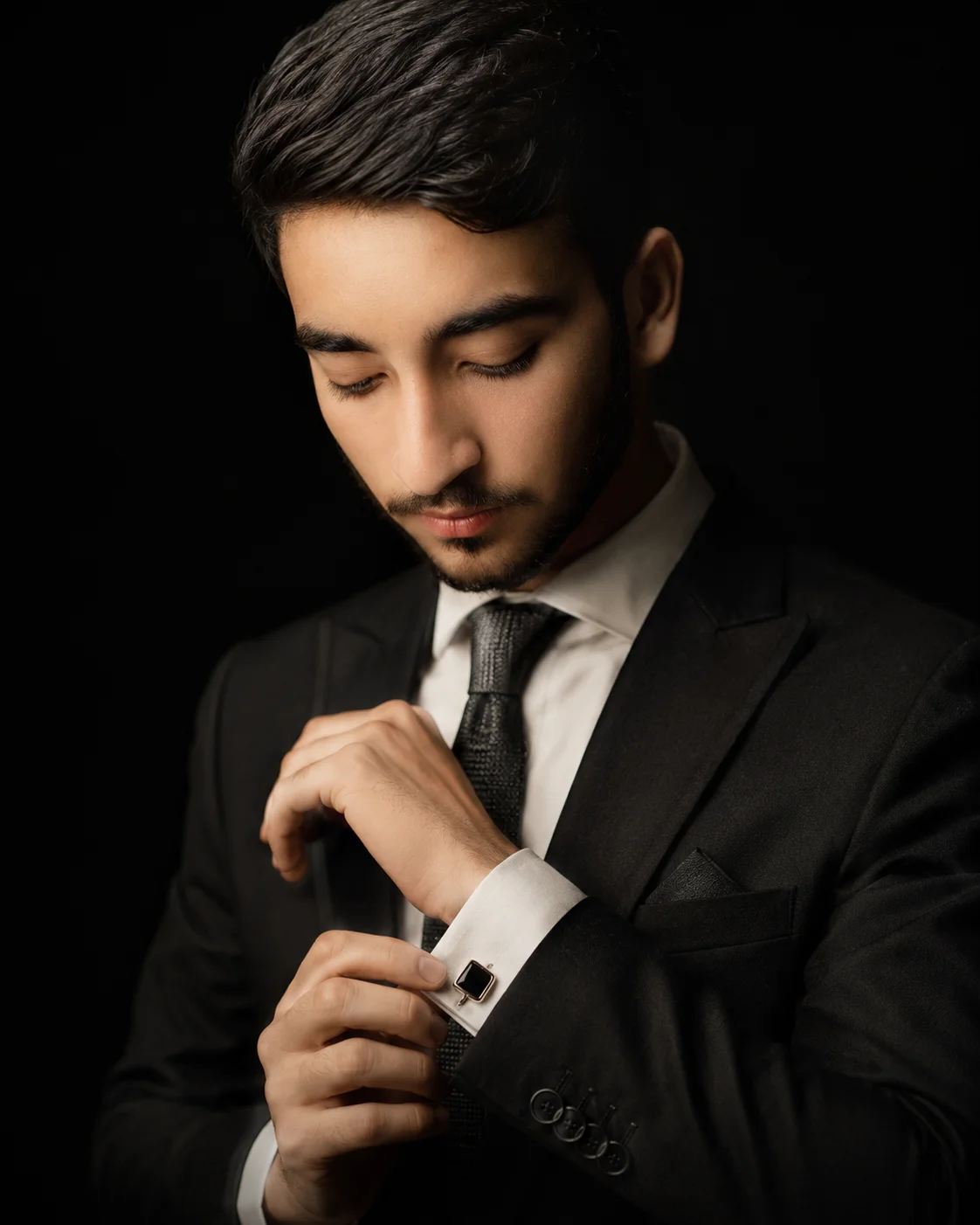
Exude peak class and timeless luxury fashion editorial vibes with this meticulously tailored gentleman's grooming prompt. Grounded in a stark, pitch-black void, this composition spotlights the subtle, candid art of an elite style adjustment—fixing a gemstone silver cufflink. The dramatic upper-left Rembrandt lighting rakes across the fine wool fibers of the charcoal jacket, the crisp angles of a French-cuff shirt, and sharp facial styling, making it an invaluable asset for building an ultra-premium menswear lookbook or executive identity portfolio.
Identity preservationEditorial lightingDepth of field
Aspect Ratio
Select before copying
Recommended: 4:5 — 4:5 vertical format suits digital artwork display on Instagram and portfolio platforms while providing balanced space for artistic composition.
Rate this prompt
Be the first to rate
Free prompt — one-click copy, no login required
Visual Character
Lighting
Dramatic Rembrandt-style single directional light source comes from the upper left, casting soft shadows across the right side of the face w
Color
Warm ivory skin tone with natural texture, dark moody cinematic color grading with high contrast, shot with an 85mm portrait lens, shallow d
Background
Set against a deep pitch-black dark studio background with zero distractions
Full Prompt
Best For
Bespoke menswear luxury campaignshigh-end personal branding cardsand authoritative style-centric social media grids.
How To Use This Prompt
Step 01
Copy the prompt
Use the copy button above to grab the complete prompt with your selected aspect ratio.
Step 02
Open your AI tool
Use a generator that supports the input and reference-image features you need.
Step 03
Generate your image
Create variations, pick the best result, then download and use it in your content.
Common Output Problems
Issues you may encounter and how to fix them
The pencil sketch looks too digital and clean rather than like an authentic hand-drawn artwork+
Why it happens
AI models tend to produce perfectly smooth strokes that lack the natural variation, grain, and imperfections of real pencil on paper.
Fix
Add "visible pencil grain texture, subtle stroke variation, slight paper texture showing through, natural graphite smudging at edges" for a more authentic hand-drawn appearance.
The depth of field doesn't match the lens specifications described in the prompt+
Why it happens
AI models don't physically simulate lens optics — they interpret depth-of-field instructions as general blur rather than accurate f-stop rendering.
Fix
Be explicit about what should be sharp vs. blurred: "tack-sharp focus on the face, gradual blur beginning at the shoulders, creamy circular bokeh highlights in the background."
Customize This Prompt
Adapt these elements to fit your vision
Swap the wool suit for a silver alternative to shift the mood — different fabric colors dramatically change the overall tone of the portrait.
Move the setting outdoors to a park or urban location to add environmental context and natural lighting variation.
Add a colored rim light (warm amber or cool teal) to introduce cinematic color contrast without changing the composition.
Change the expression from calm to direct eye contact for a more engaging, connection-driven portrait.
Which AI Tools Can I Use?
This prompt works with popular AI image generators.
Links to official tool websites. Not a claim that this prompt was tested in every tool or model version.
Frequently Asked Questions
Quick answers before you copy this prompt
Can I add a reference photo to preserve someone's face in this portrait?+
Yes. Add identity-preservation instructions like "preserve exact facial features from the uploaded reference photo" at the beginning of the prompt. This works best with clear, front-facing reference images.
How do I make the studio background less flat and more dynamic?+
Try adding a subtle gradient or texture to the backdrop: "dark grey gradient background with subtle texture, not pure black." You can also specify background lighting like "subtle backlight glow on the backdrop" for more depth.
How do I keep the subject recognizable in the sketch style?+
Emphasize "preserve the subject's unique facial proportions, eye shape, and bone structure within the sketch rendering style." The more specific the facial description, the better the identity preservation in stylized output.
What should I change if the subject looks distorted or unnatural?+
Simplify the pose description and remove conflicting instructions. Add "natural relaxed pose, correct body proportions, anatomically coherent" at the beginning. If the face looks wrong, add "preserve exact facial structure and proportions" and use a higher-quality reference photo.