Use the reference faces from my uploaded photos exactly, keeping both faces recognizable. Create a romantic double-exposure couple portrait, 4:5 aspect ratiovertical, with the same facial features, skin tones and hairstyles as the reference photos. BACKGROUND PORTRAIT (WOMAN): A very large, soft, faded portrait of the young woman in the upper center of the frame. She looks straight at the camera with a calm, slightly sad expression. She has long dark brown wavy hair with a center parting, defined brows, light brown eyes, soft natural makeup, peachy-pink lips and small earrings. DISSOLVE EFFECT: Her hair and shoulders gently dissolve into small floating ash-like particles and paper fragments, drifting upward and sideways. The effect is delicate and dreamy, not messy, and the particles fade softly into the background. FOREGROUND PORTRAIT (MAN): At the bottom left, a sharp, clear portrait of the young man. He has a voluminous dark swept-back quiff and a full trimmed beard and moustache. His head is slightly tilted and he looks down and to the left with a soft, serious expression. He wears a plain brown crew-neck t-shirt. LAYERING: The woman's large faded face sits behind the man like a double exposure. The man is crisp and sharp, while the woman is soft and translucent, creating a strong sense of depth and emotion between the two layers. BACKGROUND: A soft beige-grey misty background with warm golden bokeh lights glowing at the bottom left, near the man. LIGHTING AND CAMERA: Soft, diffused warm lighting with a gentle glow on the skin. Shallow depth of field with sharp focus on the man's face and a dreamy softness on the woman's portrait. QUALITY: Realistic skin texture, natural beard detail, photorealistic detail, cinematic colour grading, balanced composition, premium romantic movie poster style, high-resolution.
How to Use This Prompt
Step 1: Copy the prompt using the Copy button above.
Step 2: Open your preferred AI tool (ChatGPT, Midjourney, Leonardo AI, Gemini, or Stable Diffusion).
Step 3: If the tool supports reference images, upload your photo first, then paste the prompt.
Step 4: Select the recommended aspect ratio before generating.
Step 5: Adjust keywords like clothing color, background, or lighting to personalize the result.





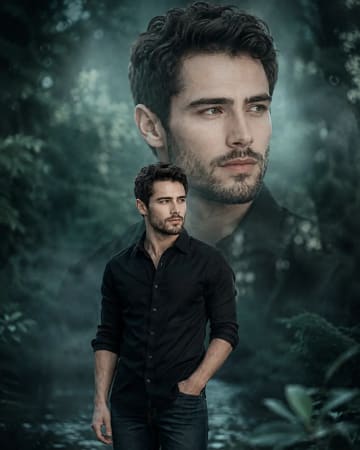 Cinematic Teal Double Exposure Man Portrait PromptCinematic Teal Double Exposure Man Portrait Prompt
