Anime Style Lavender Wall Art Floral Portrait Prompt
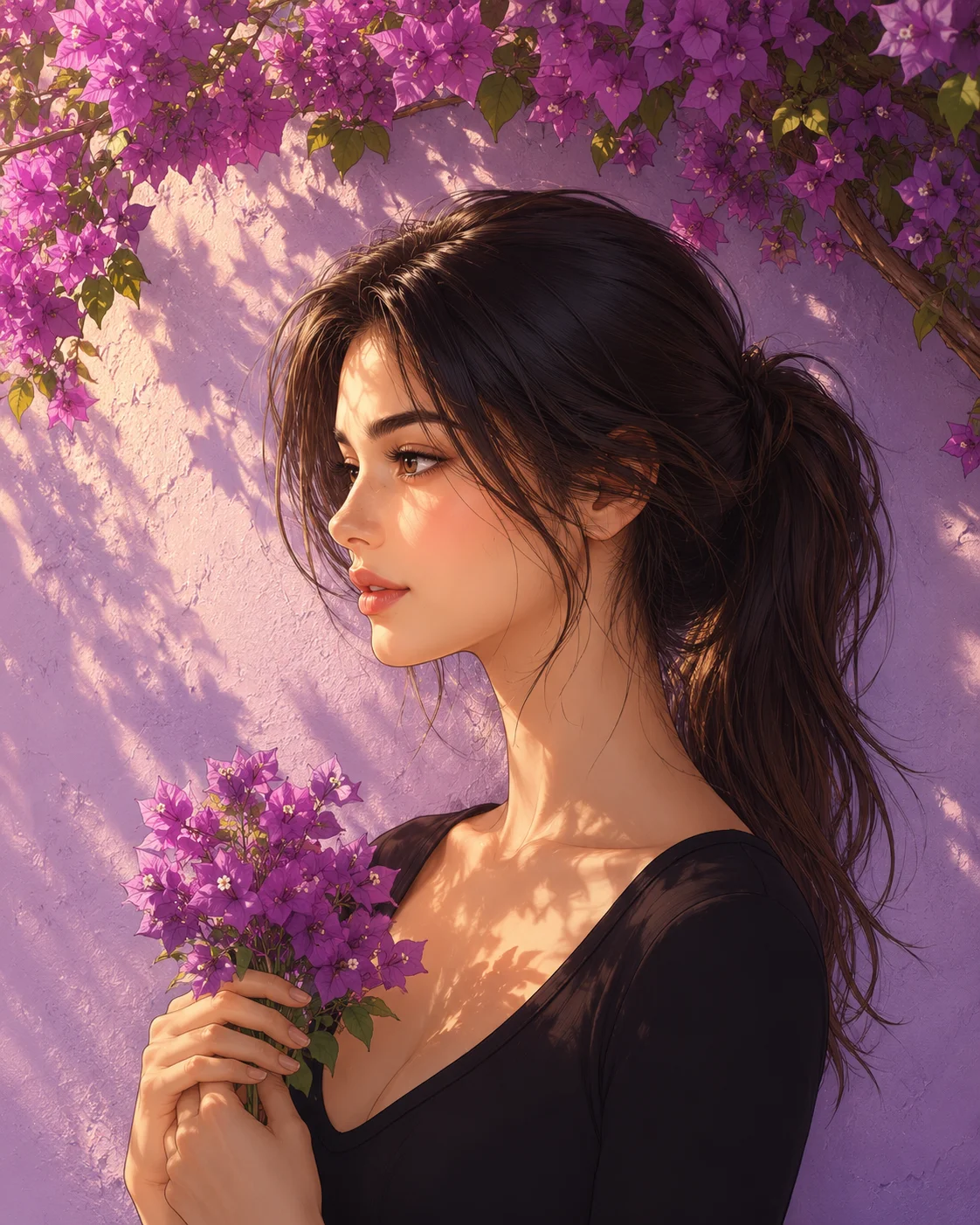
Embrace a dreamy, serene aesthetic with this beautifully unique anime-inspired wall-art prompt. Designed to mimic a premium printed mural sticker seamlessly applied to a textured lavender wall, this layout beautifully balances sharp, clean character linework with soft painterly background textures. The overhead bougainvillea canopy introduces organic lighting layers that cast delicate, dappled shadows across the scene. This prompt is a remarkable asset for creators looking to produce high-end, aesthetic digital posters, room decor templates, and artistic lifestyle wallpapers.
Identity preservationPhotorealistic outputDepth of field
Aspect Ratio
Select before copying
Recommended: 4:5 — 4:5 vertical format suits digital artwork display on Instagram and portfolio platforms while providing balanced space for artistic composition.
Rate this prompt
Be the first to rate
Free prompt — one-click copy, no login required
Visual Character
Color
Overarching blooming purple bougainvillea tree branches cast soft floral shadows and warm filtered sunlight across the scene
Texture
Background features a pastel lavender wall with a subtle plaster texture that stays behind her
Composition
Peaceful dreamy atmosphere, elegant floral portrait, high resolution, clean lines, vertical 4:5 aspect ratio
Full Prompt
Best For
Aesthetic wallpaper appshigh-end digital wall art storefrontsand cozy pastel-themed Pinterest boards.
How To Use This Prompt
Step 01
Copy the prompt
Use the copy button above to grab the complete prompt with your selected aspect ratio.
Step 02
Open your AI tool
Use a generator that supports the input and reference-image features you need.
Step 03
Generate your image
Create variations, pick the best result, then download and use it in your content.
Common Output Problems
Issues you may encounter and how to fix them
The anime style becomes too generic and loses the subject's recognizable features+
Why it happens
Anime rendering often defaults to template facial proportions that override the subject's unique features from the reference photo.
Fix
Emphasize "preserve the subject's unique facial proportions, eye shape, and bone structure within the anime rendering style" to maintain identity while achieving the illustrated look.
The image lacks the professional quality or sharpness described in the prompt+
Why it happens
Some AI models prioritize artistic interpretation over photorealistic rendering, especially when the prompt contains both stylistic and technical instructions.
Fix
Move all camera and quality specifications to the beginning of the prompt and add "ultra-sharp focus on the subject, fine detail rendering, professional photography quality" to reinforce the desired output.
Customize This Prompt
Adapt these elements to fit your vision
Specify the floral material and color to complement rather than compete with the outfit.
Adjust the collage panel sizes — equal grids for order, varied sizes for dynamic hierarchy.
Use a consistent color palette across all collage panels for visual cohesion.
Which AI Tools Can I Use?
This prompt works with popular AI image generators.
Links to official tool websites. Not a claim that this prompt was tested in every tool or model version.
Frequently Asked Questions
Quick answers before you copy this prompt
Can I use this prompt with a reference photo to preserve someone's face?+
Yes. Add identity-preservation instructions like "preserve exact facial features from the uploaded reference photo" at the beginning of the prompt. This works best with clear, front-facing reference images.
Does this work with Midjourney or only with ChatGPT?+
This prompt works with most AI image generators. For Midjourney, add "--ar 4:5" at the end for the correct aspect ratio. For ChatGPT, the composition and styling instructions should apply directly.
Can I change the outfit or setting without breaking the prompt?+
Yes. Replace the specific clothing items and setting details with your preferred alternatives while keeping the lighting, composition, and camera instructions intact. The overall mood will shift but the portrait quality should remain consistent.
The skin looks too smooth or artificial. How do I make it more realistic?+
Add "natural skin texture with visible pores, subtle imperfections, realistic skin tone variation" to the prompt. Avoid words like "flawless" or "perfect skin" which push models toward artificial smoothness.